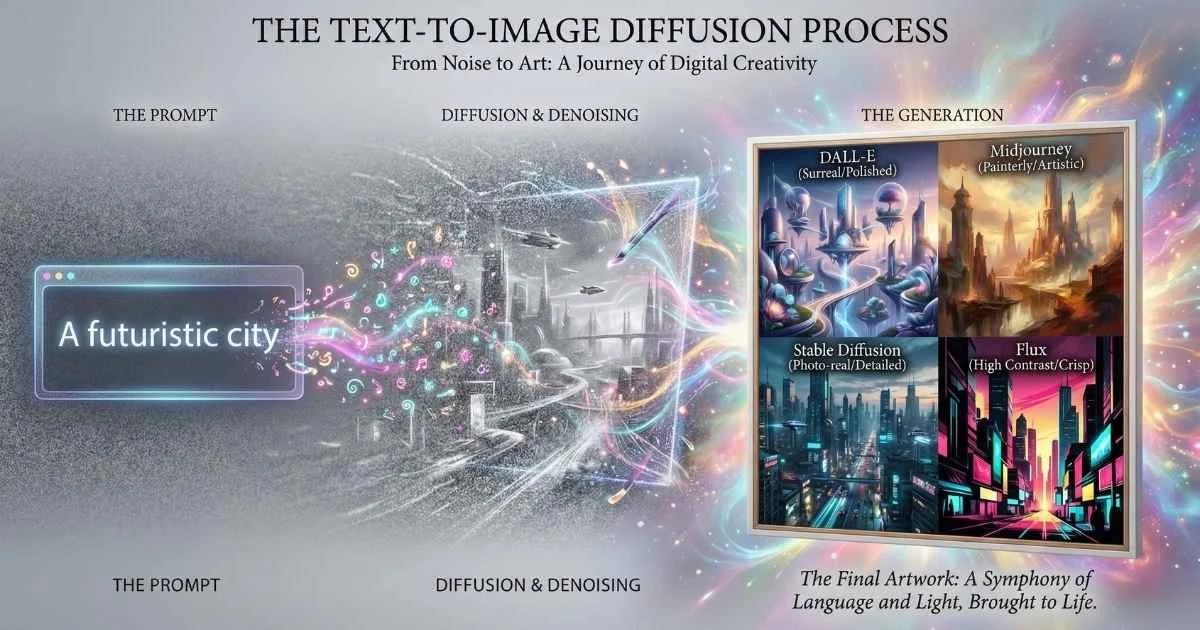
The Visual Revolution
We are witnessing a fundamental shift in visual creation. Tools like Midjourney, Flux, and DALL-E 3 have transformed the relationship between imagination and image. What once required years of technical training—understanding lighting, composition, texture, and rendering—can now be achieved through natural language.
Digital art has moved from manual construction to semantic generation.
In December 2025, the quality of AI-generated imagery has crossed the threshold of indistinguishability. For designers, marketers, and developers, this isn’t just a fun toy—it’s a production-ready asset pipeline that operates at the speed of thought.
All modern image generation models operate on the principle of diffusion: learning to deconstruct images into noise and then reverse the process to construct new images from pure noise, guided by text. If you’ve been curious about these tools—or overwhelmed by all the options—you’re in the right place. In this guide, I’ll break down exactly how AI image generation works, compare all the major platforms, and give you the practical knowledge to create stunning visuals for any purpose.
By the end, you’ll understand:
- How AI image generation actually works (without complex math)
- All major platforms compared: GPT-4o, Midjourney v7, Stable Diffusion 3.5, Flux.2
- Emerging tools: Ideogram 3.0, Leonardo AI, Adobe Firefly, Krea AI, Recraft V3
- Prompting techniques that get professional results
- When to use which tool for different creative needs
- Commercial licensing and ethical considerations
📊 The Numbers Are Staggering: The AI image generator market is valued at approximately $0.5 billion in 2025 and is projected to grow at an 18% CAGR through 2035, according to Market Research Future. Meanwhile, worldwide generative AI spending is expected to reach $644 billion in 2025—a 76% increase from 2024, per Gartner.
Let’s dive in.
$0.5B
2025 Market Size
18% CAGR to 2035
$644B
GenAI Spending
Gartner 2025 forecast
13+
Major Platforms
In December 2025
4MP
Max Resolution
Flux.2 Ultra
Sources: Market Research Future • Gartner
How AI Image Generation Works: The Technology Behind the Magic
Before we explore the platforms, let’s understand what’s actually happening when you type a prompt and an image appears. Don’t worry—no math degree required.
The Evolution of AI Art
AI image generation has come a long way:
Before Diffusion Models (2014-2021):
- GANs (Generative Adversarial Networks) were the standard—two neural networks competing with each other
- Results were impressive but often unstable
- Limited resolution and controllability
- You’ve probably seen those creepy “This Person Does Not Exist” faces—that was GAN technology
The Diffusion Revolution (2022-Present):
- Stable Diffusion released in August 2022 and changed everything
- More controllable, higher quality, and scalable
- Now the foundation for most AI image generators you’ll use
Source: IBM - What Are Diffusion Models?
Diffusion Models Explained Simply
Here’s the core concept that makes modern AI image generation possible:
Imagine a photograph slowly dissolving into TV static. Diffusion models learn to reverse this process. Starting from pure noise, they gradually reveal an image—guided by your text description.
The Diffusion Process: Noise to Image
How AI gradually reveals your image
Pure Noise
Early Shapes
Structure
Details
Final Image
Each step removes noise guided by your text prompt, gradually revealing the final image
How It Actually Works (The Simple Version)
Think of it like this: you’re teaching someone to restore old, faded photographs.
Step 1: Training — The AI studies millions of images with their descriptions. But instead of memorizing them, it learns patterns: “This is what fur looks like.” “Sunsets tend to have these colors.” “Faces are structured this way.”
Step 2: The Noise Trick — During training, we progressively add random “static” to images until they’re completely unrecognizable. The AI learns to reverse each tiny step of this process.
Step 3: Generation — When you type “a cat wearing a space helmet,” the AI:
- Starts with pure random noise (imagine TV static)
- Uses your text as a guide to decide: “What would this noise look like if it were slightly more like a cat in a space helmet?”
- Repeats this 20-50 times, each step making the image clearer
- The final result: your space cat
💡 Real-World Analogy: It’s like ink diffusing in water, but in reverse. Instead of ink spreading outward and becoming diluted, the AI “concentrates” random noise back into a coherent image. The text prompt acts like a magnet, pulling the noise toward a specific picture.
Source: GeeksforGeeks - Diffusion Models, IBM Research
Key Components of Modern Image Generators
Every AI image generator has these building blocks:
| Component | Purpose | Simple Explanation | Example |
|---|---|---|---|
| Text Encoder | Converts your prompt to numbers | Translates “fluffy cat” into math the AI understands | CLIP, T5 |
| Diffusion Model | The “denoising” engine | The brain that turns noise into images | U-Net, DiT |
| VAE (Decoder) | Converts numbers to pixels | Translates the math back into a picture you can see | Variational Autoencoder |
| Scheduler | Controls denoising steps | Decides how quickly to clear up the “static” | DDPM, Euler, DPM++ |
%%{init: {'theme': 'base', 'themeVariables': { 'primaryColor': '#f59e0b', 'primaryTextColor': '#ffffff', 'primaryBorderColor': '#d97706', 'lineColor': '#fbbf24', 'fontSize': '16px' }}}%%
flowchart LR
    A["Text Prompt"] --> B["Text Encoder"]
    B --> C["Latent Space"]
    D["Random Noise"] --> C
    C --> E["Diffusion Model<br/>(Iterative Denoising)"]
    E --> F["VAE Decoder"]
    F --> G["Final Image"]
Why Some Platforms Are Better at Certain Things
This is crucial to understand: different platforms make different tradeoffs.
- Text Rendering requires the model to understand letter shapes—difficult for diffusion models that think in patterns, not characters. This is why GPT-4o (trained specifically on text-image relationships) achieves 98% text accuracy while Midjourney (trained for aesthetics) struggles at ~20%.
- Photorealism needs massive training data of real photos—platforms with more photographic training data produce more realistic results.
- Artistic Styles benefit from curated artistic training data—Midjourney’s dreamy aesthetic comes from its carefully selected training set.
- Consistency requires models to understand object identity across images—newer features like Midjourney’s “Omni Reference” specifically address this.
Text Rendering Accuracy
Percentage of correctly rendered text in generated images
🎯 Why This Matters: If you need readable text in your images (logos, posters, memes), choose GPT-4o or Ideogram. Midjourney prioritizes artistic beauty over text accuracy.
Sources: Artificial Analysis • OpenAI Documentation
GPT-4o Image Generation: The Multimodal Powerhouse
If you’ve used ChatGPT recently and generated images, you’ve experienced GPT-4o’s native image generation. Let me explain what makes it special—and why it’s a game-changer for anyone who needs text in their images.
From DALL-E to GPT-4o: The Evolution
OpenAI’s image generation journey has been a fascinating evolution:
| Version | Release | Key Innovation |
|---|---|---|
| DALL-E 1 | January 2021 | First text-to-image from OpenAI |
| DALL-E 2 | April 2022 | Major quality improvement, inpainting |
| DALL-E 3 | October 2023 | ChatGPT integration, automatic prompt rewriting |
| GPT-4o | March 2025 | Native multimodal, replaced DALL-E 3 |
| GPT Image 1.5 | December 2025 | 4x faster generation, precise edits, face preservation |
Source: OpenAI Model Documentation, Wikipedia - GPT-4o
Important Distinction: GPT-4o isn’t technically “DALL-E 4”—it’s a completely different architecture. Instead of a separate image model called via API, image generation is now native to the multimodal GPT-4o model itself. The same neural network that processes your text also creates images. This unified approach is why GPT-4o understands context so much better.
🎓 Why This Matters: Previous systems like DALL-E 3 would receive your prompt, process it through a separate image model, and return results. GPT-4o’s native integration means it truly “understands” both text and images simultaneously—explaining why it can handle complex instructions and maintain consistency far better than its predecessors.
GPT-4o Image Generation Features (December 2025)
| Feature | Capability | Why It Matters |
|---|---|---|
| Text Rendering | ~98% accuracy | Best in class—finally, readable text in AI images |
| Resolution | Up to 1792×1024 or 1024×1792 | Suitable for most professional uses |
| Speed | 10-30 seconds typical | Fast enough for real-time iteration |
| Object Handling | 10-20 objects accurately | Complex scenes finally work |
| Conversational Editing | ”Make it more blue” | Natural language refinement |
| Character Consistency | Maintains identity across images | Great for brand mascots, series |
Source: InfoQ Analysis, GizmoChina GPT-4o Coverage, ZDNET GPT-4o Review
GPT Image 1.5: December 2025 Upgrade
In December 2025, OpenAI released GPT Image 1.5, the latest evolution of their image generation capabilities:
| Feature | GPT-4o | GPT Image 1.5 |
|---|---|---|
| Generation Speed | 10-30 seconds | 4x faster |
| Max Resolution | 1792×1024 | Up to 2048×2048 |
| Face Preservation | Good | Excellent (maintains identity during edits) |
| Brand Guidelines | Manual | Upload brand assets for on-brand generation |
| Editing Precision | Standard | Enhanced detail retention |
Key Improvements:
- 4x Faster Generation: Dramatically reduced wait times for image creation
- Face Preservation: Improved face generation that maintains identity during edits—critical for character consistency
- Higher Resolution: Up to 2048×2048 pixels without quality loss
- Brand Guideline Integration: Upload your brand design guidelines to generate on-brand assets automatically
- Transparent Backgrounds: Native support for images with alpha channels
Source: Microsoft Azure OpenAI Announcements, OpenAI December 2025 Updates
What GPT-4o Excels At
✅ Text in Images: Logos, posters, signs, memes, infographics—unmatched accuracy. This was historically the biggest weakness of AI image generators, and GPT-4o essentially solved it.
✅ Conversational Refinement: Say “make the sky more orange” and it updates the image naturally. No need to retype the entire prompt.
✅ Consistent Characters: Ask for “the same character from before, but now in a different pose” and it works. This enables comic-style storytelling and brand mascot creation.
✅ Marketing Materials: Branded content with accurate text—finally viable for social media graphics and ads.
✅ Multimodal Context: Upload an image and say “recreate this in a different style.” GPT-4o understands both the text and visual input together.
Limitations to Know
❌ Artistic stylization less refined than Midjourney—if you want that “dreamy” aesthetic, Midjourney still leads
❌ Limited parameter control—no aspect ratios like --ar 16:9 or style weights
❌ Content restrictions more aggressive—some creative requests get blocked
❌ Requires subscription—ChatGPT Plus ($20/month) or Pro ($200/month)
❌ Rate limited—Plus users get ~80 images per 3 hours
❌ Non-Latin text can still have minor accuracy issues
Source: OpenAI documentation notes on limitations
Best Use Cases
- Marketing with Text: Ads, social posts, banners with readable text
- Memes and Infographics: Text-heavy visual content that needs to be legible
- Iterative Design: When you need to refine through conversation—“more contrast, less busy”
- Concept Visualization: Explaining ideas quickly with images during meetings
- Brand Consistency: When you need the same character or style across multiple images
Getting Started with GPT-4o Images
Access: ChatGPT Plus/Pro at chat.openai.com
Try This:
- Say: “Generate an image of a cozy bookstore with warm lighting and a cat sleeping on a stack of books”
- When you get results, refine: “Now add ‘OPEN’ sign in the window with neon effect”
- Continue: “Make it nighttime with streetlights visible outside”
GPT-4o automatically rewrites your prompt for better results—a feature inherited from DALL-E 3. This means you don’t need to be a prompt engineering expert, but learning prompt engineering fundamentals will still give you more control.
💡 Pro Tip: GPT-4o is the only major platform where you can have a full conversation about an image, reference previous generations, and refine step-by-step. Use this for complex projects where iteration matters more than raw artistic quality.
Midjourney v7: The Artistic Powerhouse
Midjourney has become synonymous with “AI art that looks amazing.” There’s a reason professional artists, designers, and creative directors gravitate toward it—when you need images that evoke emotion and have that ineffable quality, Midjourney delivers.
Midjourney: From Discord Bot to Creative Standard
Founded: 2022 by David Holz (ex-Leap Motion)
Unique Model: Discord-first, community-driven
Philosophy: Art quality above all else
What started as a quirky Discord bot has become the industry standard for high-quality AI art. Midjourney has never released its models publicly or offered an API—everything runs on their infrastructure.
Version History:
| Version | Release | Key Advancement |
|---|---|---|
| v1-v4 | 2022-2023 | Early development, Discord-only |
| v5 | March 2023 | Major quality breakthrough, 1024×1024 |
| v6 | December 2023 | Improved text handling, photorealism |
| v7 | April 2025 | Current flagship, video support |
Source: Midjourney Documentation, Midjourney Changelog
v7 became the default model on June 17, 2025 and represents Midjourney’s current state-of-the-art.
🎯 December 2025 Update: A recent quality update in December 2025 enhanced v7’s photorealism to the point where “most people cannot differentiate between AI-generated renders and real photographs,” according to community testing. Source: Medium - Midjourney December Update
Midjourney v7 Key Features (December 2025)
| Feature | Description | Why It’s Useful |
|---|---|---|
Draft Mode (--draft) | 10x faster previews at half cost | Rapid iteration on concepts |
Omni Reference (--oref) | Consistent characters/objects across images | Brand mascots, comic series |
| Character Consistency 2.0 | Enhanced identity preservation across generations | Comics, storytelling |
| Style Creator | Custom SREF codes from user profiles | Personal aesthetic training |
| Voice Input | Speak your prompts instead of typing | Hands-free workflow |
| V1 Video Model | 5-second clips, extendable to 21 seconds | Animate your generated images |
| Style Personalization | Rate 200+ images to train your aesthetic | The AI learns YOUR style |
Tile Remix (--tile) | Seamless pattern creation | Wallpapers, textures, fabrics |
| 3D Modeling Tools | NeRF-like 3D generation | Immersive content creation |
Source: Midjourney Documentation v7, God of Prompt Analysis
Source: Midjourney Release Notes
The Midjourney Workflow
- Join Discord: discord.gg/midjourney
- Subscribe: Basic ($10/mo), Standard ($30/mo), Pro ($60/mo), Mega ($120/mo)
- Use /imagine: Type
/imagine prompt: [your description] - Variations (V): Generate variations of results you like
- Upscale (U): Create high-resolution versions
- Remix Mode: Edit prompts while keeping composition
Essential Midjourney Parameters
| Parameter | Effect | Example |
|---|---|---|
--ar | Aspect ratio | --ar 16:9 |
--v 7 | Model version | --v 7 (now default) |
--s | Stylization (0-1000) | --s 750 (more artistic) |
--c | Chaos (0-100) | --c 50 (more variety) |
--tile | Seamless patterns | --tile |
--draft | Fast preview | --draft |
--oref | Object reference | --oref URL |
--sref | Style reference | --sref URL |
--cref | Character reference | --cref URL |
What Midjourney v7 Excels At
✅ Artistic Quality: Rated 95% in ELO quality rankings—unmatched aesthetic
✅ Cinematic Imagery: Movie-quality lighting and composition
✅ Fantasy & Concept Art: Stunning imaginative scenes
✅ Consistent Characters: Omni Reference is game-changing
✅ Pattern Design: Seamless textures and patterns
✅ Video Generation: New V1 video model for motion
Midjourney Limitations
❌ Text rendering: Only ~20% accuracy (worst among major platforms)
❌ Discord-only interface (web beta limited)
❌ No free tier—all plans require subscription
❌ Images public unless “Stealth Mode” ($60/mo Pro plan)
❌ Learning curve with parameters
Midjourney Pricing (December 2025)
| Plan | Price | Fast Hours | Stealth Mode |
|---|---|---|---|
| Basic | $10/month | 3.3 hrs/mo | No |
| Standard | $30/month | 15 hrs/mo | No |
| Pro | $60/month | 30 hrs/mo | Yes |
| Mega | $120/month | 60 hrs/mo | Yes |
Source: midjourney.com/account
💡 Pro Tip: Use
--draftfor quick iterations at half cost, then generate full-quality versions of ideas you like. This can double your effective image budget.
Midjourney V8 Roadmap (Coming 2026)
Based on December 2025 announcements from David Holz, V8 is expected to include:
| Expected Feature | Details |
|---|---|
| Larger Training Dataset | Significantly broader and deeper knowledge base |
| Improved Text Rendering | Addressing the ~20% accuracy limitation |
| Enhanced Edit Model | Better inpainting and multiple reference capabilities |
| V2 Video Model | After V8 image model—better quality, controllable camera movement |
| Updated Retexturing | New tools for texture modification |
| New Upscalers | Enhanced resolution enhancement |
Source: Midjourney December 2025 Roadmap Discussions
Stable Diffusion 3.5: The Open Source Champion
Stable Diffusion is the Linux of AI image generation—free, open, customizable, and powering an enormous ecosystem.
For related content, see the guide to Running LLMs Locally.
Stable Diffusion: The Democratization of AI Art
Developer: Stability AI (founded 2020)
Philosophy: Open source, community-driven
Impact: Enabled thousands of custom models and local deployment
Version History:
| Version | Release | Significance |
|---|---|---|
| SD 1.4/1.5 | August 2022 | The breakthrough that started it all |
| SDXL | July 2023 | 1024x1024 flagship, higher quality |
| SD 3.0 | February 2024 | New architecture |
| SD 3.5 | October 2024 | Large, Large Turbo, Medium variants |
Source: Stability AI documentation
🎨 Stability AI 2025 Ecosystem Updates: Beyond image generation, Stability AI expanded their multimodal capabilities in 2025 with Stable Audio 2.5 (September 2025) for enterprise sound production, Stable Virtual Camera (March 2025) for 3D video from single images, and Stable Video 4D 2.0 (May 2025) for high-fidelity 4D asset generation.
Stable Diffusion 3.5 Variants (December 2025)
| Model | Parameters | Speed | Best For |
|---|---|---|---|
| SD 3.5 Large | 8.1B | Slower | Professional quality, 1MP output |
| SD 3.5 Large Turbo | 8.1B | 4 steps | Fast iteration |
| SD 3.5 Medium | 2.5B | Fastest | Consumer hardware |
| SDXL 1.0 | 6.6B | Medium | Mature ecosystem, ControlNet |
Why Stable Diffusion Matters
✅ Run Locally: No API costs, no usage limits
✅ Full Privacy: Data never leaves your machine
✅ Customization: Fine-tune on your own data
✅ Community Models: 500K+ models on Civitai, Hugging Face
✅ ControlNet: Precise control over composition
✅ Inpainting/Outpainting: Edit and extend images
Running Stable Diffusion Locally
Option 1: Automatic1111 Web UI (Most popular)
# Clone the repository
git clone https://github.com/AUTOMATIC1111/stable-diffusion-webui

# Run the installer
./webui.sh  # macOS/Linux
webui-user.bat  # Windows
Option 2: ComfyUI (Node-based, more flexible)
- Growing community preference for complex workflows
- Better for advanced users who want visual pipeline building
Hardware Requirements (SD 3.5 Medium):
- GPU: 8GB+ VRAM (12GB+ recommended)
- RAM: 16GB+
- Storage: 20GB+ for models
Key Stable Diffusion Concepts
| Concept | Description |
|---|---|
| Checkpoints | Base models (SDXL, SD3.5, custom) |
| LoRAs | Small add-ons for specific styles/characters |
| ControlNet | Guide composition with poses, edges, depth |
| Embeddings | Learned concepts (styles, objects) |
| VAE | Affects color/detail rendering |
| Samplers | Algorithms for denoising (Euler, DPM++) |
Stable Diffusion Limitations
❌ Technical setup required
❌ Hardware investment for local running
❌ Quality requires tuning expertise
❌ Text rendering still improving
❌ Steeper learning curve than hosted platforms
Cloud Options for Stable Diffusion
If you don’t have the hardware:
- Stability AI API: Official hosted service
- Replicate: Pay-per-generation
- RunPod/Vast.ai: Rent GPU by the hour
- Leonardo AI: SD-based with custom models
- Google Colab: Free tier available (limited)
Licensing for Commercial Use
SD 3.5 uses the Stability AI Community License:
- Free for non-commercial use
- Commercial use free for businesses under $1M annual revenue
- Enterprise license required for larger businesses
- SDXL has more permissive licensing
Source: Stability AI License Terms
%%{init: {'theme': 'base', 'themeVariables': { 'primaryColor': '#10b981', 'primaryTextColor': '#ffffff', 'primaryBorderColor': '#059669', 'lineColor': '#34d399', 'fontSize': '16px' }}}%%
flowchart TD
    A["Stable Diffusion Ecosystem"] --> B["Base Models"]
    A --> C["Extensions"]
    A --> D["User Interfaces"]
    B --> B1["SD 3.5 Large"]
    B --> B2["SDXL"]
    B --> B3["Community Checkpoints"]
    C --> C1["ControlNet"]
    C --> C2["LoRAs"]
    C --> C3["Embeddings"]
    D --> D1["Automatic1111"]
    D --> D2["ComfyUI"]
    D --> D3["Forge"]
Flux: The New Contender (Now Major Player)
Flux has emerged as a serious challenger—and as of December 2025, it’s no longer just a newcomer. Created by the original team behind Stable Diffusion, Flux.2 represents a new generation of image generation.
Black Forest Labs: The Stability AI Spinoff
Founded: 2024 by former Stability AI researchers
Key People: Robin Rombach (Stable Diffusion co-creator)
Philosophy: Push boundaries on quality and speed
💰 Major Funding: In December 2025, Black Forest Labs announced a $300 million Series B funding round, valuing the company at $3.25 billion. This investment is earmarked for accelerating research and infrastructure. Source: Forbes, Black Forest Labs Blog
Flux Model Family (December 2025)
| Model | Parameters | Purpose | Access |
|---|---|---|---|
| Flux.2 Max | 12B+ | Peak performance, Grounded Generation | API, premium |
| Flux.2 Pro | 12B+ | Maximum quality, new architecture | API, paid |
| Flux.2 Flex | 12B | Production-ready, fine-grained control | API, enterprise |
| Flux.2 Dev | 12B | Open weights for experimentation | Free, non-commercial |
| Flux.2 Klein | Smaller | Lightweight, Apache 2.0 license | Free, community |
| Flux.1 Pro Ultra | 12B | 4K resolution (4MP) | API, premium |
| Flux.1 Kontext Pro | 12B | Image editing, Photoshop integration | API/Photoshop |
Source: Black Forest Labs, BFL Blog, NVIDIA Partnership Announcement
What’s New in Flux.2 (November-December 2025)
Flux.2 isn’t just an incremental update—it’s built on an entirely new architectural paradigm for deeper semantic understanding:
✅ Multi-Reference Support: Combine up to 10 reference images into a single output. This means unprecedented consistency for characters, products, or artistic styles across a series of images.
✅ Enhanced Text Rendering: Significantly improved legible text generation—practical for infographics, logos, and UI mockups without additional editing.
✅ 4K Resolution (4MP): Output at up to 4 megapixels with photorealistic detail even at scale.
✅ 10x Faster Inference: Optimized for rapid generation. With FP8 quantization on NVIDIA RTX GPUs, Flux.2 offers a 40% performance increase.
✅ Hex-Color Precision: Specify exact colors using hex codes for accurate brand and color palette matching.
✅ Superior Scene Understanding: Remarkable precision in semantic relationships, spatial layouts, and environmental context.
Source: WaveSpeed AI Analysis, SkyWork AI Report, NVIDIA Blog
Flux.2 Max: Grounded Generation (December 2025)
The flagship Flux.2 Max introduces a revolutionary feature called “Grounded Generation”:
| Feature | Description |
|---|---|
| Web Context Queries | Model queries the web for real-time context before image generation |
| Minimal Drift | Superior consistency during iterative creative processes |
| Enhanced Editing | Better preservation of details during modifications |
| Peak Performance | Top-tier image quality with maximum prompt adherence |
This is particularly powerful for generating images that need to reflect current events, real products, or specific referenced content.
Source: BFL Blog, GetImg.ai Documentation
Hybrid Architecture: The Technical Edge
Flux.2 models are built on a groundbreaking hybrid architecture:
- Vision-Language Model: Powered by Mistral-3 24B for deep semantic understanding of both text and image inputs
- Rectified Flow Transformer: Improves logical layout, reduces “hallucinations,” and enhances prompt adherence
- FP8 Quantization: 40% performance boost on NVIDIA RTX GPUs with reduced VRAM requirements
- Open Weights: Flux.2 Dev and Klein available for local deployment and customization
This architecture enables Flux.2 to process complex, multi-part prompts with unprecedented accuracy.
Source: The Decoder, Craftium AI Analysis
Flux Kontext: Image Editing Revolution
Released May 2025 and enhanced through December 2025, Kontext lets you edit existing images using text prompts—and it’s now integrated into Adobe Photoshop Beta’s Generative Fill:
- Semantic Understanding: AI understands what’s in your image, not just pixels
- Character Consistency: Maintains identity across edits—crucial for commercial work
- Local Editing: Precise changes to specific regions with natural boundaries
- Style Transfer: Apply new styles while preserving essential content
- Photoshop Integration: Use Flux.1 Kontext Pro directly in Photoshop (September 2025)
Source: Flux.2 Documentation, Wikipedia - Black Forest Labs
How to Use Flux
API Access (Recommended for Production):
- replicate.com
- fal.ai
- together.ai
- bfl.ai (official API)
Free Platforms:
- FluxAI.dev
- 3D AI Studio
Local Installation:
- Download Flux.2 Dev or Klein models
- Run with ComfyUI (recommended) or Automatic1111
Hosted Services:
- Leonardo AI (integrates Flux models)
- RunPod (GPU rental)
Flux Limitations
❌ Smaller ecosystem than Stable Diffusion (but growing rapidly)
❌ Pro/enterprise models require API access and costs
❌ Higher hardware requirements for local running (12B parameters)
❌ ControlNet equivalent still maturing
❌ Negative prompts no longer recommended—the new literal language processing means you describe what you want, not what to avoid
Source: SkyWork AI Flux.2 Guide
Emerging Platforms: The Full Landscape
Beyond the big four, several platforms are carving out important niches.
Ideogram 3.0: The Text Rendering Specialist
Released: March 2025 (updated May 2025)
Focus: Best-in-class text integration in images
If you need text in your images and Midjourney isn’t cutting it, Ideogram is the answer:
- Superior typography and text placement with complex layouts
- Style Reference System: Upload up to 3 reference images for aesthetic guidance
- 4.3 billion style presets with “Random style” feature and savable Style Codes
- Stunning photorealism with intricate backgrounds and lighting
- Canvas Features: Magic Fill, Extend, and Replace Background
- Batch Generation: Scale design production for marketing workflows
- Prompt Magic: Automatically expands simple prompts into detailed instructions
Pricing: Free tier (100 images/day), Pro from $7/month
Source: Ideogram.ai
Leonardo AI: The Versatile Platform
Key Features (December 2025):
- Lucid Origin: New foundational model for vibrant, Full HD outputs
- Veo 3: Generate videos with sound from a single prompt
- Phoenix Model: AI image generation foundation model
- Blueprints (November 2025): One-click workflows for brand-consistent assets
- Instant Brand Kit, Product Lifestyle Photoshoot, Instant Animate
- Universal Upscaler: Enhanced image definition tool
- Multiple fine-tuned models (PhotoReal, Anime, 3D, Fantasy)
- Canvas Editor with inpainting/outpainting
- Realtime Canvas (sketch-to-image)
Pricing (December 2025):
| Plan | Price | Fast Tokens | Key Features |
|---|---|---|---|
| Free | $0 | 150 daily | Watermarked, public |
| Apprentice | $12/mo ($10 annual) | 8,500 monthly | Private generations, IP rights |
| Artisan Unlimited | $30/mo ($24 annual) | 25,000 + unlimited relaxed | Train 20 models |
| Maestro Unlimited | $60/mo ($48 annual) | 60,000 + unlimited relaxed | Train 50 models |
Best for: Versatile creative work, video generation, brand assets
Source: Leonardo.ai
Adobe Firefly Image Model 5: The Enterprise Choice
Key Features (December 2025):
- Firefly Image Model 5: Native 4MP resolution (2240×1792) without upscaling
- Layered Image Editing: AI auto-separates elements into independent layers
- Custom AI Models: Train on your own artwork for brand consistency
- “Prompt to Edit”: Natural language image editing
- Refined Human Rendering: Significantly reduced AI artifacts (hands, anatomy)
- Commercially safe (trained on licensed content)
Video & Audio Expansion:
- AI-powered video editor with timeline and layers
- Generate Soundtrack: Text-to-music for licensed audio
- Generate Speech: Text-to-speech via ElevenLabs partnership
- Generative Extend for video clips
Third-Party Integrations:
- Google Gemini 2.5 Flash
- OpenAI models
- Luma AI, Runway, Black Forest Labs (FLUX.1 Kontext)
- Topaz Labs
Best for: Professional workflows, commercial safety, enterprise teams
Adobe Firefly also powers video and design workflows. See our AI for Design guide for more.
Pricing: Included with Creative Cloud subscriptions
Source: Adobe Firefly
Recraft V3: The Designer’s Choice
Key Features (December 2025):
- Vector Graphics (SVG): Unique among AI generators—scalable output
- Chat Mode (September 2025): Conversational image creation and editing
- Agentic Mode (December 8, 2025): AI-driven creation through conversation
- MCP Support (July 2025): Integration with Claude, Cursor, and other AI agents
- AIUC-1 Certification (December 22, 2025): Enterprise AI trust certification
- Advanced text rendering with precise placement
- Mockup generation with 3D blending
- Vector and raster dual output from same conversation
New Model Integrations (December 2025):
- GPT Image 1.5, Flux 2 Max, Seedream v4.5
Performance: NVIDIA Blackwell GPU acceleration (2x faster generation, 3x faster upscaling)
Best for: Logos, brand assets, professional design, AI agent workflows
Pricing: Free tier with daily credits, Pro from $20/month
Source: Recraft.ai
Krea AI: The Real-Time Revolution
Key Features (December 2025):
- Real-Time Canvas: Generate images instantly from text, sketches, webcam
- Krea Realtime 14B (October 2025): 14-billion parameter model for long-form video
- Node App Builder (December 3, 2025): Transform AI workflows into shareable apps without coding
- Connect 50+ AI models for image, video, 3D, upscaling, and editing
- 22K Upscaling & 8K Video Upscaling: Industry-leading resolution enhancement
- FLUX Krea (July 2025): Open-source photorealistic image model
- LoRA Support (August 2025): Train custom AI models
- 3D Tools: Create 3D objects from images or text (Hunyuan3D-2.1 integration)
- Real-Time Video: 12+ fps video generation with Wan 2.2, Gen-4, Seedance, Kling, Runway, Luma
Best for: Rapid prototyping, interactive design, workflow automation
Pricing: Free version with limits, Pro plans available
Source: Krea.ai
Google Imagen 4: The Multimodal Native
Released: Generally available August 2025 (paid preview June 2025)
Integration: Gemini app, Whisk, Vertex AI, Google Workspace
Key Features (December 2025):
- 2K Resolution: High-quality image generation
- Imagen 4 Fast: Optimized for speed at lower cost
- Imagen 4 Ultra: Maximum detail and prompt alignment
- SynthID Watermark: Digital watermark on all generated images for transparency
- Improved text rendering and diverse artistic styles
Gemini Integration Updates (December 2025):
- Gemini 3 Flash Preview (December 17, 2025): Enhanced visual and spatial reasoning
- Gemini 3 Deep Think (December 4, 2025): Advanced reasoning mode for complex prompts
- “Nano Banana” (Gemini 2.5 Flash Image): AI image editing tool in Gemini app
Pricing Tiers: Free, Google AI Pro, Google AI Ultra
Best for: Google ecosystem users, Workspace integration, developers using Vertex AI
Source: Google AI Blog, DeepMind
Platform Capabilities Comparison
Scores based on community benchmarks (December 2025)
💡 Key Insight: GPT-4o leads in text accuracy (98%), while Midjourney v7 dominates artistic quality (95%). Flux.2 Pro offers the best balance across all metrics.
Sources: Artificial Analysis • Platform Documentation
Platform Comparison: Which Should You Use?
Let me make this simple. Here’s a comprehensive comparison and decision guide.
Platform Pricing Comparison
Pricing as of December 2025
| Platform | Free Tier | Basic | Pro |
|---|---|---|---|
| Midjourney | ✗ | $10/mo | $60/mo |
| ChatGPT (GPT-4o) | Limited | $20/mo | $200/mo |
| Stable Diffusion | Local | Free | API varies |
| Flux | Dev model | API pricing | API pricing |
| Leonardo AI | 150/day | $10/mo | $60/mo |
| Ideogram | 100/day | $7/mo | $20/mo |
| Adobe Firefly | Limited | CC sub | CC sub |
| Canva | Limited | $13/mo | $13/mo |
Sources: OpenAI • Midjourney • Leonardo AI
Decision Flowchart
%%{init: {'theme': 'base', 'themeVariables': { 'primaryColor': '#8b5cf6', 'primaryTextColor': '#ffffff', 'primaryBorderColor': '#7c3aed', 'lineColor': '#a78bfa', 'fontSize': '16px' }}}%%
flowchart TD
    A["Need AI Images?"] --> B{Main Priority?}
    B -->|Text in Images| C["GPT-4o, Ideogram, or Recraft"]
    B -->|Artistic Quality| D["Midjourney v7"]
    B -->|Full Control/Privacy| E["Stable Diffusion / Flux Dev"]
    B -->|Commercial Safety| F["Adobe Firefly"]
    B -->|Real-Time Iteration| G["Krea AI"]
    B -->|Vector Graphics| H["Recraft V3"]
    B -->|Beginner/Quick| I["Canva or Freepik"]
    C --> J{Budget?}
    D --> J
    J -->|Free needed| K["Ideogram Free / Leonardo Free"]
J -->|Paid OK| L["Choose based on style"]Marketing with Text
GPT-4o or Ideogram
Unmatched text accuracy
Artistic/Concept Art
Midjourney v7 or Leonardo AI
Highest aesthetic quality
Brand Assets/Logos
Recraft V3 or Ideogram
Vector output, brand consistency
Privacy/Local
Stable Diffusion or Flux Dev
Run entirely offline
Real-time Iteration
Krea AI or Leonardo Canvas
Instant visual feedback
Commercial Safety
Adobe Firefly or Canva
Licensed training data
Beginners
Canva or Leonardo AI
Easiest learning curve
AI Image Generation by Industry
Different industries have unique requirements for AI-generated images. Here’s how to optimize your workflow based on your field.
E-Commerce & Product Photography
Best Platforms: Leonardo AI (Product Lifestyle), Flux.2, Adobe Firefly
| Task | Recommended Approach |
|---|---|
| Product on white | GPT-4o or Flux.2 with “product photography, white background, studio lighting” |
| Lifestyle context | Leonardo AI Blueprints → Product Lifestyle Photoshoot |
| 360° style views | Generate multiple angles, maintain consistency with --cref |
| Variant generation | Batch generate color/style variations |
Example Workflow:
- Upload product photo to Leonardo AI
- Use Product Lifestyle Blueprint for context scenes
- Generate 10+ variations for A/B testing
- Upscale winners with Krea AI for high-resolution output
Key Prompting Tips:
- Include material descriptions: “matte finish,” “glossy surface,” “brushed metal”
- Specify lighting: “soft diffused lighting,” “dramatic shadows”
- Add context: “on marble countertop,” “in minimalist living room”
Gaming & Entertainment
Best Platforms: Midjourney v7, Stable Diffusion with LoRAs, Leonardo AI
| Task | Platform | Technique |
|---|---|---|
| Character concept art | Midjourney v7 | --s 750 for artistic style |
| Environment design | Midjourney + Flux.2 | Combine for detail + consistency |
| Consistent character sheets | Stable Diffusion | IP-Adapter + ControlNet |
| Pixel art/sprites | SD + LoRAs | Pixel art LoRA at 0.8 weight |
| UI mockups | GPT-4o or Ideogram | Best for readable text |
Popular LoRAs for Gaming:
- Concept Art: Hollie Mengert, Makoto Shinkai style
- Pixel Art: Pixel Art XL, 16-bit RPG
- 3D Stylized: Pixar/Disney style, Blender-render
Consistency Workflow:
- Design hero character with Midjourney
- Create character sheet (front, side, back, expressions)
- Use
--crefwith sheet for all future generations - Export to Stable Diffusion for LoRA fine-tuning if needed
Architecture & Real Estate
Best Platforms: Flux.2, Midjourney v7, Krea AI
| Task | Best Approach |
|---|---|
| Exterior visualization | Midjourney v7 with architectural style keywords |
| Interior staging | Leonardo AI or Flux.2 for photorealism |
| Before/after renovations | GPT-4o conversational editing |
| 3D to rendered | Flux.2 with reference images |
| Aerial views | Midjourney with --ar 16:9 |
Key Architecture Prompts:
"Modern minimalist home exterior, white stucco walls, large glass windows,
landscaped garden, golden hour lighting, architectural photography,
shot on Hasselblad, 8K resolution"
Virtual Staging Workflow:
- Photograph empty room
- Upload to Leonardo AI or GPT-4o
- “Add modern Scandinavian furniture, warm lighting, plants”
- Iterate: “Make it more spacious” / “Change sofa to sectional”
Marketing & Advertising
Best Platforms: GPT-4o (text), Ideogram, Adobe Firefly
| Task | Platform | Why |
|---|---|---|
| Social media graphics | GPT-4o or Ideogram | Accurate text rendering |
| Ad variants | Leonardo AI | Batch generation with Blueprints |
| Brand campaigns | Adobe Firefly | Commercial safety + brand guidelines |
| Localization | GPT-4o | Easily change text in conversation |
| Infographics | Ideogram or Recraft | Typography strength |
Brand Consistency Workflow:
- Create brand style guide (colors, fonts, imagery style)
- Generate 5+ reference images that match brand
- Use
--srefin Midjourney or style presets in Leonardo - Save prompt templates for team use
- Use Adobe Firefly for legally-safe final assets
A/B Testing Strategy:
- Generate 10+ headline variations
- Test different visual styles (photo vs illustration)
- Vary color schemes using hex codes in Flux.2
- Track performance, refine prompts for winners
Fashion & Apparel
Best Platforms: Leonardo AI, Flux.2, Midjourney v7
| Task | Approach |
|---|---|
| Clothing design ideation | Midjourney for artistic concepts |
| Technical flats | Recraft V3 for vector output |
| Virtual try-on concepts | Leonardo AI with consistent models |
| Pattern/textile design | Midjourney --tile for seamless patterns |
| Lookbook generation | Flux.2 for photorealistic models |
Pattern Design Workflow:
- Generate with
--tilein Midjourney: “seamless floral pattern, art nouveau style” - Download and test tiling in Photoshop
- Apply to 3D garment mockups
- Generate lifestyle images with pattern applied
Model-Free Product Shots:
- Use ghost mannequin prompts: “clothing on invisible mannequin”
- Flat lay photography style for accessories
- 360° turntable style for shoes/bags
Publishing & Editorial
Best Platforms: Midjourney v7, Adobe Firefly, GPT-4o
| Task | Best Platform |
|---|---|
| Book covers | Midjourney v7 (fantasy/fiction), Firefly (non-fiction) |
| Editorial illustrations | Midjourney with --s 500-750 |
| Infographics | Ideogram or GPT-4o |
| Article headers | Any platform based on style needed |
| Author portraits | Midjourney for stylized, Flux.2 for realistic |
Book Cover Workflow:
- Generate 20+ concept variations in Midjourney
- Select top 3-5 for refinement
- Add title/author with GPT-4o or Ideogram
- Final composite in Photoshop/Firefly
- Upscale to print resolution
Cost Optimization Guide
AI image generation can be free or expensive—here’s how to get maximum value.
True Cost Comparison (January 2026)
| Platform | Free Tier | Entry Paid | ~Cost per 100 Images | Best Value For |
|---|---|---|---|---|
| GPT-4o | None | $20/mo (Plus) | ~$2.50 (at limit) | Text accuracy |
| Midjourney | None | $10/mo (Basic) | ~$3.00 | Artistic quality |
| Leonardo AI | 150/day | $12/mo | ~$0.14 | Volume + variety |
| Ideogram | 100/day | $7/mo | ~$0.07 | Typography |
| Stable Diffusion | Unlimited | $0 (local) | Electricity only | Privacy/control |
| Flux.2 Dev | Unlimited | $0 (local) | Electricity only | Quality + local |
| Adobe Firefly | 25 credits/mo | CC subscription | Included | Enterprise |
| Krea AI | Limited | $24/mo | ~$0.24 | Real-time work |
| Recraft | Limited | $20/mo | ~$0.20 | Vector/design |
Budget Strategies
$0/month (Completely Free):
- Leonardo AI free tier: 150 tokens/day = ~4,500 images/month
- Ideogram free tier: 100 images/day = ~3,000/month
- Stable Diffusion locally (if you have GPU)
- Flux.2 Dev locally (non-commercial use)
$10-20/month (Starter):
- Midjourney Basic ($10) for hero images
- Supplement with Leonardo AI free tier for volume
- Use GPT-4o (within ChatGPT Plus) for text-heavy work
$30-50/month (Growth):
- Midjourney Standard ($30) for serious work
- GPT-4o Plus ($20) for text and iteration
- Free tiers for supplementary work
$50-100/month (Professional):
- Midjourney Pro ($60) for stealth + priority
- Leonardo Artisan ($30) for volume
- Adobe CC for commercial safety
- Specialized tools as needed (Krea, Recraft)
$100+/month (Enterprise):
- Multiple platforms for different use cases
- API access for automation
- Team accounts for collaboration
- Custom model training (LoRAs)
Hidden Costs to Consider
| Cost Type | Details | Estimate |
|---|---|---|
| Electricity (local) | GPU power consumption | $5-20/month |
| Cloud GPU rental | For heavy local workloads | $0.50-2/hour |
| Storage | Model files (20-50GB each) | One-time |
| Learning time | Mastering each platform | Significant |
| Failed generations | Iterations to get perfect result | 3-10x final |
Cost-Saving Tips
- Use Draft Mode: Midjourney
--draftis 50% cheaper - Batch Similar Work: Group similar prompts to reduce iteration
- Free for Ideation: Use free platforms for concepts, paid for finals
- Prompt Libraries: Save working prompts to avoid re-iteration
- Annual Subscriptions: 20-40% savings on most platforms
- Train LoRAs Once: Invest upfront, reuse indefinitely
- Off-Peak Usage: Some platforms are faster during low-traffic hours
- API vs UI: API often cheaper for volume work
ROI Calculation
Scenario: Marketing team replacing stock photos
| Without AI | With AI |
|---|---|
| Stock subscription: $300/mo | Leonardo Artisan: $30/mo |
| Custom photography: $500/shoot | Midjourney Pro: $60/mo |
| Designer time: $50/hour | Learning curve: 10 hours |
| Monthly: $800+ | Monthly: $90 |
Breakeven: Less than 1 month
Mastering Image Prompting
Regardless of which platform you use, better prompts = better images. Let me teach you the formula.
Anatomy of an Effective Image Prompt
Build prompts layer by layer
Complete Prompt Example:
"A majestic white wolf standing on a cliff edge, overlooking a misty valley at dawn, digital art style inspired by fantasy book covers, dramatic volumetric lighting with sun rays, wide angle establishing shot, highly detailed fur, 8K resolution"
The Prompt Formula
[Subject] + [Action] + [Environment] + [Style] + [Lighting] + [Camera] + [Quality]Example:
“A majestic white wolf standing on a cliff edge, overlooking a misty valley at dawn, digital art style inspired by fantasy book covers, dramatic volumetric lighting with sun rays, wide angle establishing shot, highly detailed fur, 8K resolution”
Platform-Specific Prompting Tips
GPT-4o (ChatGPT):
- Be conversational: “Create an image of…”
- Iterate naturally: “Now make it more dramatic”
- Leverage context: Reference previous images in conversation
- Include text directly: “Add the text ‘SALE’ in bold red letters”
Midjourney:
- Front-load important elements
- Use double colons for emphasis:
forest::2 cabin::1(forest is 2x important) - Add parameters:
--ar 16:9 --s 750 --c 25 - Reference styles:
in the style of Studio Ghibli - Use negative prompting:
--no text, watermark
Stable Diffusion:
- Use weighted syntax:
(beautiful:1.2)increases weight - Negative prompts are crucial:
(worst quality:1.4), blurry, text - Include trigger words for LoRAs
- Experiment with samplers and CFG scale
Flux:
- Precise descriptions work well
- Include text in quotes for rendering
- Detail placement explicitly: “text in the top-left corner”
Style Keywords Reference
| Category | Keywords |
|---|---|
| Photography | DSLR, 35mm film, bokeh, shallow depth of field, professional photography, mirrorless, full-frame sensor |
| Digital Art | digital painting, concept art, matte painting, CGI, 3D render, artstation trending |
| Traditional Art | oil painting, watercolor, charcoal sketch, pencil drawing, gouache, acrylic |
| Anime/Manga | anime style, Studio Ghibli, manga, cel-shaded, Makoto Shinkai, Kyoto Animation |
| Cinematic | movie still, cinematic lighting, anamorphic, film grain, 35mm Kodak, widescreen |
| Vintage | retro, 1980s, vintage photography, sepia, polaroid, Kodachrome, faded colors |
| Fantasy | epic fantasy, magical realism, ethereal, mystical, enchanted, otherworldly |
| Sci-Fi | cyberpunk, retrofuturism, hard sci-fi, biopunk, solarpunk, neon-noir |
| Horror | dark fantasy, eldritch, gothic, macabre, unsettling, atmospheric horror |
| Minimalist | clean, simple, negative space, geometric, modern, Scandinavian |
Negative Prompts: Platform-Specific Examples
Negative prompts tell the AI what to avoid. Here’s how to use them effectively:
Midjourney:
--no text, watermark, logo, signature, blurry, low quality, deformed, uglyStable Diffusion (Critical for quality):
Negative: (worst quality:1.4), (low quality:1.4), (normal quality:1.4),
lowres, bad anatomy, bad hands, text, error, missing fingers,
extra digit, fewer digits, cropped, jpeg artifacts, signature,
watermark, username, blurry, artist name, deformed, disfigured
Flux.2:
- Negative prompts NOT recommended—Flux.2’s literal interpretation means you describe what you want, not what to avoid
- If you mention “no watermark,” it may try to add one
- Instead: Focus entirely on positive descriptors
GPT-4o:
- No formal negative prompt system
- Use conversational refinement: “Remove the watermark” or “Make sure there’s no text visible”
Weight & Emphasis Syntax
| Platform | Increase Weight | Decrease Weight | Example |
|---|---|---|---|
| Midjourney | ::2 or ::1.5 | ::0.5 | forest::2 cabin::0.5 |
| Stable Diffusion | (word:1.2) or ((word)) | (word:0.8) or [word] | (beautiful:1.3) landscape |
| Flux.2 | Natural language | Natural language | ”mainly forest with small cabin” |
| GPT-4o | Natural language | Natural language | ”focus on the forest, cabin is subtle” |
Prompt Recipes: Ready-to-Use Templates
Professional Portrait:
Professional headshot of a [age] [gender] [ethnicity] person,
[expression], wearing [clothing], studio lighting,
neutral gray background, shot on Canon 5D, 85mm lens,
shallow depth of field, high-end corporate photography
Epic Landscape:
[Location type] landscape at [time of day], [weather condition],
[foreground element], dramatic lighting, volumetric fog,
[color palette] colors, landscape photography,
shot on Hasselblad, 16:9 aspect ratio, 8K resolution
E-Commerce Product:
[Product] on [surface], [background color] background,
product photography, studio lighting, soft shadows,
commercial quality, centered composition,
high detail, professional catalog style
Fantasy Character:
[Character type] [gender] warrior/mage/rogue, [age],
[distinctive feature], wearing [armor/clothing],
holding [weapon/item], dynamic pose,
fantasy illustration style, detailed,
dramatic lighting, intricate details, artstation quality
Architectural Visualization:
[Building type] exterior/interior, [architectural style],
[materials: glass, concrete, wood], [time of day],
[weather], landscaping, architectural photography,
ultra wide angle, professional lighting, 4K render
Food Photography:
[Dish name], gourmet plating, [dining context],
natural lighting from [direction], shallow depth of field,
food photography, appetizing, [garnish],
shot on medium format camera, high-end restaurant style
Abstract Art:
Abstract [style: geometric/fluid/organic] composition,
[primary color] and [secondary color] palette,
[texture: smooth/rough/glossy], [mood: calm/energetic/mysterious],
contemporary art, gallery quality, large canvas feeling
Vintage Poster:
[Subject] in [decade] [country] vintage poster style,
[art movement: art deco/art nouveau/propaganda],
bold colors, stylized illustration,
aged paper texture, retro typography space,
collectible poster art
Common Prompting Mistakes
| Mistake | Problem | Solution |
|---|---|---|
| Too vague | Generic results | Add specific details |
| Too complex | Conflicting elements | Focus on key elements |
| Wrong keywords | Style mismatch | Study platform examples |
| No composition | Random framing | Include camera/angle terms |
| Ignoring negatives | Unwanted elements | Use negative prompts |
| Conflicting styles | Incoherent output | Pick one dominant style |
| Wrong platform | Suboptimal results | Match task to platform strength |
| No lighting info | Flat images | Always specify lighting |
Advanced Techniques: Editing and Control
Once you’ve mastered basic generation, these techniques take your work to the next level.
Inpainting: Targeted Edits
Definition: Replace specific regions of an image
Use Cases:
- Fix artifacts (hands, faces)
- Remove unwanted elements
- Add new objects to scenes
- Change clothing, accessories
Available in: DALL-E, Stable Diffusion, Leonardo, Flux Kontext
Outpainting: Extending Images
Definition: Expand beyond original image boundaries
Use Cases:
- Create panoramas from single images
- Change aspect ratios
- Add context to compositions
- Create tiling patterns
Image-to-Image: Guided Generation
Definition: Use an existing image as a starting point
Key Parameter: Denoising strength (0-1)
- 0.3: Minor changes, keep structure
- 0.7: Major changes, loose structure
- 1.0: Complete reimagining
ControlNet: Precise Composition (Stable Diffusion)
| ControlNet Type | Input | Use Case |
|---|---|---|
| Canny | Edge detection | Preserve outlines |
| Depth | Depth map | Maintain spatial layout |
| OpenPose | Skeleton detection | Match body poses |
| Scribble | Rough sketch | Concept to finished |
| Segmentation | Region masks | Area-specific control |
Multi-Platform Workflow
%%{init: {'theme': 'base', 'themeVariables': { 'primaryColor': '#ec4899', 'primaryTextColor': '#ffffff', 'primaryBorderColor': '#db2777', 'lineColor': '#f472b6', 'fontSize': '16px' }}}%%
flowchart TD
    A["1. Rough Sketch/Idea"] --> B["2. Generate Base with Midjourney"]
    B --> C["3. Select Best Variation"]
    C --> D["4. Inpaint Problem Areas"]
    D --> E["5. Add Text with GPT-4o/Ideogram"]
    E --> F["6. Upscale to Final Resolution"]
    F --> G["7. Final Polish in Photoshop/Firefly"]
My recommendation: Use multiple platforms. Midjourney for artistic exploration, Stable Diffusion for precise control, GPT-4o or Ideogram for accurate text, Flux Kontext for editing, and Photoshop/Firefly for final polish.
Maintaining Character & Brand Consistency
One of the biggest challenges in AI image generation is maintaining consistent characters, styles, and branding across multiple images. Here’s how to solve it.
The Consistency Challenge
AI image generators create unique outputs each time by design. Maintaining consistent characters, styles, or branding across multiple images requires specific techniques.
Platform-Specific Consistency Tools
| Platform | Tool | How to Use |
|---|---|---|
| Midjourney | --cref (Character Reference) | Add reference image URL: --cref https://url.com/image.jpg |
| Midjourney | --sref (Style Reference) | Add style sample URL: --sref https://url.com/style.jpg |
| Midjourney | --oref (Omni Reference) | Object/item consistency across images |
| Midjourney | Style Personalization | Rate 200+ images to train your aesthetic |
| Flux.2 | Multi-Reference (10 images) | Combine up to 10 references for consistency |
| GPT-4o | Conversation context | Reference previous generations: “Same character as before” |
| Leonardo AI | Character Consistency mode | Enable in generation settings |
| SD/ComfyUI | IP-Adapter | Load reference image for style/face transfer |
| SD/ComfyUI | LoRA fine-tuning | Train on specific character/style |
Creating a Character Bible
For recurring characters, create a comprehensive reference document:
| Element | Description | Visual Reference |
|---|---|---|
| Face structure | Oval face, high cheekbones, strong jawline | Front-facing reference |
| Hair | Brown, shoulder-length, slight wave | Multiple angles |
| Eyes | Green, almond-shaped, expressive | Close-up reference |
| Build | Athletic, medium height | Full body reference |
| Clothing style | Modern casual, earth tones | Multiple outfit examples |
| Signature items | Silver pendant necklace, leather watch | Accessory details |
| Expressions | Confident smile, thoughtful, determined | Expression sheet |
Midjourney Character Workflow
Step 1: Create base character
/imagine [detailed character description] --ar 3:4 --s 50

Step 2: Generate reference sheet
/imagine character sheet, [character name], front view, side view,
back view, expressions, turnaround --ar 16:9 --cref [step1-image]

Step 3: All future generations
/imagine [new scene/pose] --cref [reference-sheet-url] --cw 100
--cw (Character Weight): Controls how strictly to follow reference
--cw 100: Maximum consistency (face, body, clothing)--cw 50: Moderate (mainly face)--cw 0: Only style, not character
Brand Consistency Checklist
- Define brand colors with hex codes (use in Flux.2)
- Create 5+ style reference images
- Document key visual elements
- Use consistent prompt structure
- Save successful prompts as templates
- Use
--srefcodes in Midjourney for instant style recall - Train custom LoRA for ultimate consistency
Saving & Sharing Style Codes (Midjourney)
After generating images you love, save the style:
- Copy the
--srefrandom style code from your generation - Store in a document with description
- Share with team members for consistent outputs
LoRAs & Custom Fine-Tuning
LoRAs (Low-Rank Adaptation) are small add-on files that modify how base models generate images. They’re essential for consistent, specialized outputs.
What Are LoRAs?
Think of LoRAs as “plugins” that add specific capabilities:
- Style LoRAs: Artistic styles (Pixar, anime, watercolor)
- Character LoRAs: Consistent characters or celebrities
- Concept LoRAs: Objects, clothing, poses
- Quality LoRAs: Detail enhancement, specific looks
File Size: Typically 10-200MB (vs 2-7GB for full models)
Finding LoRAs
| Source | Content | Quality Control | License Info |
|---|---|---|---|
| Civitai.com | 500K+ models | Community ratings, previews | Varies |
| Hugging Face | Research + community | Variable | Usually specified |
| Tensor.art | Curated selection | Higher quality curation | Varies |
Using LoRAs in Stable Diffusion
Setup (Automatic1111):
- Download
.safetensorsfile - Place in
models/Lorafolder - Restart WebUI
Prompting with LoRAs:
<lora:lora_name:0.8> rest of your prompt hereWeight Recommendations:
0.5-0.7: Subtle influence, blends with base model0.8-1.0: Strong influence, dominant effect>1.0: Overpowered (usually causes artifacts)
Combining Multiple LoRAs
<lora:style_lora:0.6> <lora:character_lora:0.8> [your prompt]Best Practices:
- Keep combined weight under 1.5 total
- Test each LoRA individually first
- Style + Character combinations work well
- Avoid conflicting LoRAs (two different styles)
Training Your Own LoRA
Requirements:
- 10-50 high-quality training images
- GPU with 8GB+ VRAM (12GB recommended)
- Training tool (Kohya, DreamBooth)
- 30-90 minutes training time
Step-by-Step:
- Collect Images: 10-50 consistent, diverse images
- Caption Each: Accurate descriptions (use BLIP or manual)
- Configure Training:
- Network dimension: 32-128 (higher = more detailed)
- Learning rate: 0.0001
- Steps: 1000-2000
- Train: Run for 30-90 minutes
- Test: Generate with various prompts
Common Training Mistakes:
- Too few images (need 15+ for quality)
- Inconsistent training data (conflicting images)
- Wrong learning rate (causes over/underfitting)
- Not enough steps (underbaked)
- Too many steps (overbaked, loses flexibility)
Popular LoRA Categories
| Category | Example Use Cases |
|---|---|
| Artistic Style | Pixar, Studio Ghibli, watercolor, oil painting |
| Character | Custom OCs, consistent mascots, celebrities |
| Clothing | Specific fashion, uniforms, historical dress |
| Pose/Action | Dynamic actions, specific positions |
| Quality | Detail enhancement, texture improvement |
| Concept | Products, vehicles, architecture styles |
Upscaling & Resolution Enhancement
AI generates at fixed resolutions (usually 1024×1024). For print, large displays, or detailed work, you need upscaling.
When to Upscale
| Use Case | Native Sufficient? | Upscale To |
|---|---|---|
| Instagram/social | Yes (1024px) | Not needed |
| Website hero | Maybe | 2048px |
| Print flyer (5×7”) | No | 1500×2100 (300 DPI) |
| Print poster (24×36”) | No | 7200×10800 (upscale 4-8x) |
| Billboard | No | Upscale + vector conversion |
Upscaling Tools Comparison
| Tool | Max Resolution | Quality | Speed | Cost |
|---|---|---|---|---|
| Krea AI Enhancer | 22K | Excellent | Fast | Free tier |
| Magnific AI | 16K | Excellent | Slow | $39/mo |
| Topaz Gigapixel | 6x | Excellent | Medium | $99 one-time |
| Real-ESRGAN | 4x | Good | Fast | Free (local) |
| SD Ultimate Upscale | Unlimited | Good | Slow | Free (local) |
| Upscayl | 4-16x | Good | Medium | Free (local) |
Best Upscaler by Content Type
| Content | Best Tool | Why |
|---|---|---|
| Faces/Portraits | Topaz, Magnific | Detail preservation, natural skin |
| Landscapes | Real-ESRGAN, Krea | Natural detail enhancement |
| Illustrations/Anime | Waifu2x, Real-ESRGAN | Line preservation |
| Text-heavy | Krea AI | Typography handling |
| Product photos | Magnific, Topaz | Texture fidelity |
| Mixed content | Krea AI | All-around quality |
Upscaling Workflow
- Generate at maximum native resolution (1024×1024 minimum, ideally higher)
- Fix any issues BEFORE upscaling (inpainting is harder at high res)
- Choose upscaler based on content type
- Upscale in stages if going beyond 4x (2x → 2x is often better than 4x directly)
- Apply selective sharpening if needed (especially for details)
- Compare to original to ensure no artifacts introduced
Local Upscaling with Real-ESRGAN
# Install
pip install realesrgan

# Basic usage
python inference_realesrgan.py -n RealESRGAN_x4plus -i input.jpg -o output.jpg

# For anime/illustrations
python inference_realesrgan.py -n RealESRGAN_x4plus_anime_6B -i input.jpg -o output.jpg
Troubleshooting Common Issues
Even experienced users encounter problems. Here’s how to diagnose and fix the most common issues.
Image Quality Problems
| Issue | Likely Cause | Solution |
|---|---|---|
| Blurry/soft images | Low steps, wrong sampler | Increase steps to 30+, try DPM++ 2M |
| Artifacts/glitches | GPU memory, bad seed | Restart, try different seed |
| Oversaturated colors | CFG too high | Lower CFG to 5-7 |
| Washed out colors | CFG too low or bad VAE | Increase CFG, check VAE |
| Grainy/noisy | Too few steps | Increase to 25-40 steps |
| Wrong aspect ratio | Platform default | Specify --ar or resolution |
Human Anatomy Issues
The classic “bad hands” problem and other anatomy issues:
| Problem | Midjourney Fix | SD Fix | GPT-4o Fix |
|---|---|---|---|
| Extra fingers | --no extra fingers | Negative prompt, ControlNet | ”Fix the hands” |
| Distorted face | --cref for reference | ADetailer extension | Iterate with feedback |
| Unnatural pose | Simplify pose description | ControlNet OpenPose | Describe pose simply |
| Merged limbs | Add “full body, separate limbs” | Negative prompts | Break down description |
| Wrong proportions | --ar for body type | ControlNet pose | Be specific about build |
ADetailer Extension (Stable Diffusion): Automatically detects and fixes faces and hands. Essential for SD users.
Text Rendering Issues
| Issue | Solution |
|---|---|
| Gibberish text | Use GPT-4o, Ideogram, or Recraft instead |
| Misspelled text | Double-check spelling in prompt, use quotes |
| Wrong font | Describe font: “bold sans-serif,” “elegant script” |
| Text cut off | Specify “complete text visible,” reduce text length |
| Text in wrong position | ”Text centered at top,” “caption at bottom” |
| Text too small | ”Large bold text,” “prominent headline” |
Platform-Specific Troubleshooting
Midjourney:
| Issue | Solution |
|---|---|
| Bot not responding | Check server status, try different channel |
| Variations broken | Exit Remix mode first |
| Upscale failed | Wait and retry, check queue |
| Unexpected style | Remove conflicting style keywords |
| Content blocked | Rephrase without flagged terms |
Stable Diffusion (Local):
| Issue | Solution |
|---|---|
| Out of memory | Reduce resolution, use --lowvram flag |
| Model won’t load | Check VRAM, use smaller model |
| Black output | Corrupted model, redownload |
| Extensions broken | Update WebUI, check compatibility |
| Slow generation | Enable xFormers, optimize settings |
GPT-4o:
| Issue | Solution |
|---|---|
| Rate limited | Wait 3 hours or upgrade plan |
| Request blocked | Rephrase prompt, avoid trigger words |
| Inconsistent character | Reference specific previous images |
| Won’t edit image | Upload image explicitly, be clear about changes |
Flux.2:
| Issue | Solution |
|---|---|
| Prompt ignored | Remove negative language, describe what you WANT |
| Color wrong | Use hex codes: “color #FF5733” |
| Too literal | Simplify prompt, less is more |
| API timeout | Retry, check service status |
Generation Failures
| Error | Cause | Solution |
|---|---|---|
| ”Content policy violation” | Blocked content | Rephrase, avoid flagged terms |
| Timeout | Server overload | Retry during off-peak hours |
| ”Out of memory” | Model too large | Use quantized model, reduce resolution |
| Empty/black output | Pipeline error | Restart application |
| ”Rate limit exceeded” | Too many requests | Wait, use API with backoff |
When to Start Over
Sometimes it’s faster to regenerate than fix:
- More than 3 major issues
- Fundamental composition problems
- Wrong style entirely
- Unrecoverable anatomy
- Time spent fixing > new generation
Commercial Use and Ethics
This is important—especially if you’re using AI images professionally.
Licensing Quick Reference (December 2025)
| Platform | Commercial Use | License Type | Notable Restrictions |
|---|---|---|---|
| GPT-4o/DALL-E | Yes | OpenAI ToS | Subject to content policy |
| Midjourney | Yes (paid plans) | Midjourney ToS | Public by default (non-Pro) |
| Stable Diffusion 3.5 | Conditional | Community License | Under $1M revenue free |
| Flux Pro | Yes | Commercial | API terms apply |
| Flux Dev | Non-commercial | Research license | Cannot monetize |
| Adobe Firefly | Yes | Commercial-safe | Trained on licensed content |
| Leonardo AI | Yes (paid plans) | Platform ToS | Check plan specifics |
| Ideogram | Yes (paid plans) | Platform ToS | Free tier has limited rights |
| Recraft | Yes (paid plans) | Platform ToS | Vector output fully owned |
| Google Imagen | Yes | Google ToS | Via Vertex AI only |
Understanding Copyright for AI Images
Can you copyright AI-generated images?
| Jurisdiction | Current Status (2025-2026) |
|---|---|
| United States | Generally no copyright for purely AI work; human creative input required |
| European Union | Similar to US; human authorship required |
| United Kingdom | Computer-generated works may have protection |
| China | Case-by-case; some AI works granted protection |
Key Considerations:
- Significant human input (prompt engineering, editing, curation) may qualify for protection
- The more you modify, the stronger your copyright claim
- Document your process to prove creative contribution
- When in doubt, consult an IP attorney
Legal Landscape (2025-2026 Updates)
| Case | Status | Implications |
|---|---|---|
| Getty v. Stability AI | Ongoing | Questions training data licensing |
| NYT v. OpenAI | Ongoing | Focus on text, but precedent matters |
| Various artist class actions | Ongoing | Opt-out and consent issues |
Best Practices for Legal Safety:
- Use commercially-licensed platforms (Adobe Firefly priority)
- Avoid generating in the style of living artists
- Don’t replicate copyrighted characters
- Keep records of your prompts and edits
- Consider commercial licenses for client work
Ethical Guidelines
❌ Don’t: Create non-consensual imagery of real people
❌ Don’t: Generate content to spread misinformation
❌ Don’t: Replicate copyrighted characters for commercial use
❌ Don’t: Use AI to replace artists without disclosure
❌ Don’t: Pass off AI work as traditional art without disclosure
❌ Don’t: Generate harmful, illegal, or exploitative content
✅ Do: Disclose AI generation when appropriate
✅ Do: Credit AI tools in creative contexts
✅ Do: Use AI as enhancement, not replacement
✅ Do: Respect platform content policies
✅ Do: Support artists by commissioning originals for key work
✅ Do: Stay updated on evolving regulations
Disclosure Requirements
| Context | Disclosure Needed? | Notes |
|---|---|---|
| Social Media | Recommended | Some platforms require it |
| Advertising | Often required | FTC guidelines apply (US) |
| Journalism | Required | Transparency essential |
| Art competitions | Usually required | Many ban or require disclosure |
| Client work | Discuss upfront | Set expectations early |
| Personal projects | Optional | But honesty is appreciated |
The Artist Impact Debate
This is a real conversation happening in the creative industry:
- Job Displacement: Real concerns for illustrators & stock photographers
- New Opportunities: AI art direction, prompt engineering, hybrid workflows
- Augmentation View: AI as tool, not replacement
- Industry Adaptation: Stock sites and freelance platforms adjusting
- New Roles Emerging: AI art directors, prompt engineers, fine-tuning specialists
My take: AI image generation is a tool—like Photoshop was in the 1990s. It will change jobs, create new ones, and the best creators will learn to use it effectively. The artists who thrive will be those who blend AI capabilities with human creativity and judgment.
AI Image Detection & Watermarking
As AI images become indistinguishable from photographs, transparency and detection become crucial.
Understanding AI Watermarks
| Platform | Watermark Type | Visibility | Persistence |
|---|---|---|---|
| Google Imagen | SynthID | Invisible | Resistant to edits |
| Adobe Firefly | Content Credentials (C2PA) | Metadata | Can be stripped |
| OpenAI GPT-4o | C2PA metadata | Metadata | Can be stripped |
| Midjourney | None by default | N/A | N/A |
| Stable Diffusion | None | N/A | N/A |
| Flux | None | N/A | N/A |
SynthID (Google)
Google’s SynthID embeds imperceptible watermarks directly into the image pixels:
- Survives cropping, compression, and color adjustments
- Can be detected by specialized tools
- Doesn’t affect image quality
- Applies to all Imagen-generated content
Content Credentials (C2PA)
The Coalition for Content Provenance and Authenticity standard:
- Embeds generation metadata in image files
- Tracks editing history
- Supported by Adobe, Microsoft, Google, OpenAI
- Can be verified with free tools
Checking Content Credentials: Visit contentcredentials.org/verify to verify any image.
AI Image Detection Tools
| Tool | Type | Accuracy | Cost | Use Case |
|---|---|---|---|---|
| Hive Moderation | Commercial API | ~95% | Paid | Production detection |
| Illuminarty | Research tool | ~90% | Free | Academic research |
| AI or Not | Browser tool | ~85% | Free | Quick checks |
| SynthID Detector | Google internal | ~98% | N/A | Imagen verification |
| Optic AI | Browser extension | ~80% | Free | Personal use |
Important Limitations:
- Detection accuracy varies with image quality and editing
- Heavily edited AI images may evade detection
- False positives occur with some photography styles
- Technology is in an arms race with generation improvements
When to Verify Images
- News and journalism contexts
- Social media claims
- Evidence or documentation
- Competition submissions
- Content moderation
For Developers: API Integration
If you’re building applications that need image generation, here’s how to integrate the major APIs.
API Comparison (January 2026)
| Provider | Endpoint | Cost (1024×1024) | Latency | SDK Support |
|---|---|---|---|---|
| OpenAI (DALL-E 3) | /images/generations | $0.040 (standard) | 5-15s | Python, Node |
| OpenAI (GPT-4o) | /chat/completions | ~$0.05 | 10-30s | Python, Node |
| Stability AI (SD3) | /v2beta/stable-image | $0.03 | 2-10s | Python, Node |
| Black Forest Labs | /v1/flux-pro | $0.05 | 3-8s | Python, REST |
| Replicate | Various models | $0.002-0.10 | 5-30s | Python, Node |
| fal.ai | Various models | $0.001-0.05 | 1-10s | Python, Node |
| Leonardo AI | REST API | Token-based | 3-15s | REST |
OpenAI Image Generation (Python)
from openai import OpenAI

client = OpenAI(api_key="your-api-key")

# DALL-E 3 generation
response = client.images.generate(
    model="dall-e-3",
    prompt="A futuristic city skyline at sunset, cyberpunk style",
    size="1024x1024",
    quality="hd",
    n=1,
)

image_url = response.data[0].url
print(f"Generated image: {image_url}")

# GPT-4o with image generation
response = client.chat.completions.create(
    model="gpt-4o",
    messages=[{
        "role": "user",
        "content": "Generate an image of a friendly robot serving coffee"
    }]
)
Stability AI (Python)
import requests

API_KEY = "your-stability-key"

response = requests.post(
    "https://api.stability.ai/v2beta/stable-image/generate/sd3",
    headers={
        "Authorization": f"Bearer {API_KEY}",
        "Accept": "image/*"
    },
    files={"none": ""},
    data={
        "prompt": "A serene mountain lake at dawn",
        "output_format": "webp",
        "aspect_ratio": "16:9"
    },
)

if response.status_code == 200:
    with open("output.webp", "wb") as f:
        f.write(response.content)
Black Forest Labs Flux (Python)
import requests

API_KEY = "your-bfl-key"

response = requests.post(
    "https://api.bfl.ai/v1/flux-pro",
    headers={
        "Authorization": f"Bearer {API_KEY}",
        "Content-Type": "application/json"
    },
    json={
        "prompt": "A photorealistic portrait of a futuristic astronaut",
        "width": 1024,
        "height": 1024,
        "guidance_scale": 7.5
    },
)

result = response.json()
image_url = result.get("image_url")
Best Practices for Production
- Implement rate limiting to avoid API quota issues
- Cache results for common or repeated prompts
- Use webhooks for async generation (Replicate, fal.ai support this)
- Handle failures gracefully with exponential backoff retries
- Monitor costs with usage dashboards and alerts
- Store prompts for reproducibility and debugging
- Use queues for batch processing at scale
- Validate outputs before serving to users
Error Handling Example
import time
from tenacity import retry, stop_after_attempt, wait_exponential

@retry(stop=stop_after_attempt(3), wait=wait_exponential(multiplier=1, min=2, max=10))
def generate_image_with_retry(prompt: str):
    try:
        response = client.images.generate(
            model="dall-e-3",
            prompt=prompt,
            size="1024x1024"
        )
        return response.data[0].url
    except Exception as e:
        if "rate_limit" in str(e).lower():
            time.sleep(60)  # Wait for rate limit reset
        raise

# Usage
try:
    url = generate_image_with_retry("A beautiful sunset")
except Exception as e:
    print(f"Failed after retries: {e}")
Mobile AI Image Generation
Generate images on the go with these mobile apps and workflows.
Best Mobile Apps (January 2026)
| App | Platform | Best For | Free Tier | Key Features |
|---|---|---|---|---|
| ChatGPT | iOS/Android | Text accuracy, iteration | Limited | GPT-4o integration |
| Midjourney Web | Mobile browser | Full MJ features | None | All v7 features |
| Leonardo AI | iOS/Android | Versatile, good free | 150/day | Multiple models |
| Picsart | iOS/Android | Quick edits + gen | Limited | Combined editing |
| Canva | iOS/Android | Design + AI | Limited | Template-based |
| Adobe Express | iOS/Android | Firefly integration | Limited | Commercial-safe |
| Dream by WOMBO | iOS/Android | Simple, fast | Yes | Beginner-friendly |
| NightCafe | iOS/Android | Community, credits | Yes | Multiple styles |
Mobile Workflow Tips
- Use voice input for faster prompting (Midjourney, ChatGPT)
- Save prompts to your notes app for quick reuse
- Draft on mobile, finalize on desktop for best quality
- Use cloud sync (Leonardo, Adobe) for cross-device work
- Take photos for references and upload directly
- Screenshot and iterate for quick ideation
Mobile vs Desktop: When to Use Each
| Scenario | Recommended | Why |
|---|---|---|
| Quick ideation | Mobile | Speed, convenience |
| Detailed prompting | Desktop | Better keyboard, precision |
| Final production | Desktop | Full control, upscaling |
| Client demos | Mobile | Portable, impressive |
| Batch processing | Desktop | Power, automation |
| On-location reference | Mobile | Camera, immediacy |
Mobile-Specific Features
ChatGPT (iOS/Android):
- Voice prompts for hands-free generation
- Photo upload + description for references
- Conversation history persists
Midjourney (Mobile Browser):
- Full parameter support (
--ar,--cref, etc.) - Discord app also works but less convenient
- Save favorite prompts to Discord for reuse
Leonardo AI App:
- Realtime Canvas on mobile
- Token sync across devices
- Offline history viewing
Batch Processing & Automation
For high-volume work, manual generation is too slow. Here’s how to automate.
Batch Generation by Platform
| Platform | Native Batch | Max Batch | Automation Method |
|---|---|---|---|
| Midjourney | Repeat jobs | Unlimited | Discord bots |
| GPT-4o | Sequential | 1 | API loops |
| Leonardo AI | Yes | 8 per job | API |
| Ideogram | Batch mode | 4 per job | API |
| SD/ComfyUI | Queue system | Unlimited | Workflow nodes |
| Flux (local) | ComfyUI | Unlimited | Workflow nodes |
ComfyUI Batch Workflow
ComfyUI’s node-based system excels at batch processing:
1. Load Prompt List Node → reads from CSV or text file
2. Loop Node → iterates through prompts
3. KSampler → generates each image
4. Save Image Node → auto-names based on prompt
5. Optional: Upscale Node → enhance each result
Benefits:
- Set up once, run overnight
- Automatic naming and organization
- Can chain multiple models
- Progress tracking
API Batch Processing (Python)
import asyncio
from openai import AsyncOpenAI

async def generate_batch(prompts: list[str]):
    """Generate multiple images concurrently"""
    client = AsyncOpenAI()

    async def generate_one(prompt: str, index: int):
        response = await client.images.generate(
            model="dall-e-3",
            prompt=prompt,
            size="1024x1024"
        )
        return {"index": index, "url": response.data[0].url}

    tasks = [generate_one(p, i) for i, p in enumerate(prompts)]
    return await asyncio.gather(*tasks)

# Example: Generate 10 product variations
prompts = [
    f"A {color} coffee mug on white background, product photography"
    for color in ["red", "blue", "green", "black", "white",
                  "yellow", "purple", "orange", "teal", "pink"]
]

results = asyncio.run(generate_batch(prompts))
for r in results:
    print(f"Image {r['index']}: {r['url']}")
Prompt Templates for Batch Generation
Variable Substitution:
Template: "Professional headshot of a {age} {gender} person,
{expression}, studio lighting, corporate style"

Variables:
- age: ["young", "middle-aged", "senior"]
- gender: ["man", "woman"]
- expression: ["smiling", "serious", "confident"]

Result: 3 × 2 × 3 = 18 unique images from one template
Color Variations:
Template: "{product} in #{hex_color} color, product photography"

Variables:
- hex_color: ["FF0000", "00FF00", "0000FF", "FFD700", "FF69B4"]

Result: 5 color variations of the same product
Automation Best Practices
- Start small: Test template with 3-5 images before full batch
- Monitor costs: Batch jobs can get expensive quickly
- Quality check: Spot-check results during long runs
- Error handling: Log failures, don’t stop the whole batch
- Rate limits: Add delays between requests (1-2 seconds)
- Output organization: Use clear naming conventions
- Keep prompts: Log all prompts for reproducibility
Getting Started: Your First Images
Ready to try this yourself? Here’s your roadmap.
Quick Start by User Type
| User Type | Recommended Start | Why |
|---|---|---|
| Complete Beginner | GPT-4o (ChatGPT) | Conversational, forgiving |
| Budget-Conscious | Leonardo AI Free | 150 tokens/day, good quality |
| Quality-Focused | Midjourney | Best artistic results |
| Privacy-Focused | Stable Diffusion local | Full control, offline |
| Commercial/Enterprise | Adobe Firefly | Legally safe, integrated |
| Text-Heavy Designs | Ideogram 3.0 | Best text rendering |
| Developers | Replicate or fal.ai | Easy API integration |
Your First Hour: Platform Guides
GPT-4o (ChatGPT) - 5 Minutes to Start:
- Go to chat.openai.com and sign in (Plus required)
- Type: “Generate an image of [your idea]”
- Wait 10-20 seconds for the result
- Refine: “Make it more colorful” or “Add a sunset”
- Download and share!
Midjourney - 15 Minutes to Start:
- Create a Discord account if needed
- Join discord.gg/midjourney
- Subscribe at midjourney.com
- In any bot channel, type:
/imagine prompt: a futuristic city at sunset - Wait for 4 variations, click V1-V4 for variations or U1-U4 to upscale
- Experiment with parameters:
--ar 16:9 --s 750
Leonardo AI - 10 Minutes to Start:
- Create free account at leonardo.ai
- Click “Image Generation”
- Select a model (Phoenix recommended for beginners)
- Enter your prompt and click Generate
- Use your 150 daily tokens wisely!
Your First Prompt Exercise
Try this prompt on each platform and compare results:
“A cozy coffee shop interior with large windows, warm lighting, plants on the windowsill, a steaming cup of coffee on a wooden table, autumn leaves falling outside, watercolor painting style”
Compare:
- Which captured the mood best?
- Where is text/detail most accurate?
- What’s the style difference?
- How long did generation take?
Common Beginner Mistakes
| Mistake | Why It Happens | How to Fix |
|---|---|---|
| Prompts too short | Thinking AI will fill gaps | Add details: style, lighting, composition |
| Expecting perfection | First gen rarely perfect | Iterate! Generate 10+, pick best |
| Wrong platform for task | Using MJ for text | Match platform to need |
| Ignoring parameters | Not knowing they exist | Learn --ar, --s, --cref |
| Giving up too fast | Frustration with results | AI is a skill—practice improves results |
| Not saving prompts | Recreating from scratch | Build a prompt library |
| Overspending | Not tracking usage | Use free tiers first, monitor budgets |
Learning Progression Path
Week 1-2: Foundations
- Generate 50+ images on one platform
- Learn 5 basic parameters
- Understand prompt structure
- Save 10 successful prompts
Week 3-4: Intermediate
- Try 3 different platforms
- Learn inpainting/editing
- Experiment with style references
- Generate first usable output for a project
Month 2: Advanced
- Master character/style consistency
- Learn ControlNet or IP-Adapter (SD)
- Create first custom LoRA
- Build workflow across multiple platforms
Month 3+: Expert
- Automate with APIs
- Train custom models
- Integrate AI into production workflows
- Stay current with monthly updates
Next Steps
- Experiment: Try different styles and subjects
- Learn Parameters: Platform-specific controls
- Build References: Save prompts that work
- Join Communities: r/midjourney, r/StableDiffusion, r/Leonardo_AI
- Follow Updates: AI image tools evolve rapidly
- Watch Tutorials: YouTube has excellent platform-specific guides
- Practice Daily: Even 15 minutes builds skills fast
The Market is Exploding
Just for context on how big this is becoming:
AI Image Generator Market Growth
Global market size in billions USD (18% CAGR projected)
$0.5B
2025 Market
$1.15B
2030 Est.
$2.5B
2035 Projected
Sources: Market Research Future • MetaTech Insights
The AI image generation market shows strong growth projections:
- Market Size 2025: Estimates range from $0.44 billion (conservative) to $3.16 billion (optimistic)
- Projected 2033: Over $30 billion at 32.5% CAGR
- Broader Generative AI: Expected to reach $32.2 billion in 2025 (53.7% YoY growth)
Key Statistics (December 2025):
- Over 15 billion AI-generated images created since 2022
- 34 million new AI images generated daily
- 62% of enterprises experimenting with AI image generation
- 45% of marketing teams incorporate AI images in creative workflows
- 220+ million monthly active users across major AI image platforms
- AI-generated images expected to account for 15% of all digital content online by end of 2025
This isn’t a fad; it’s a fundamental shift in how visual content is created.
Source: Market Research Future, SkyQuest Technology, Technavio
Key Takeaways
Let’s wrap up with the essential points:
- AI image generation uses diffusion models that reverse a noise-adding process to create images from text
- GPT-4o / GPT Image 1.5 (ChatGPT): Best for text in images (98% accuracy), 4x faster generation, conversational workflows
- Midjourney v7: Highest artistic quality (95%), Character Consistency 2.0, video support—V8 roadmap announced
- Stable Diffusion 3.5: Open source, maximum control and privacy, run locally
- Flux.2 / Flux.2 Max: Excellent prompt following, Grounded Generation, hybrid architecture with Mistral-3 24B
- Ideogram 3.0 & Recraft V3: Typography specialists—Recraft adds Agentic Mode and MCP support
- Krea AI: Real-time generation, 22K upscaling, Node App Builder for workflow automation
- Adobe Firefly 5: Commercially safe, 4MP native, layered editing, video/audio expansion
- Google Imagen 4: Gemini integration, 2K resolution, SynthID watermarking
- Leonardo AI: New pricing tiers, Lucid Origin model, Blueprints for brand consistency
- Different tools excel at different tasks—use multiple platforms for best results
The Practical Approach
- Start with one platform appropriate to your needs
- Master prompting fundamentals before advanced techniques
- Build a reference library of successful prompts
- Stay updated—this field evolves monthly
- Consider ethics and licensing in commercial use
What’s Next?
This is just the beginning of the AI creative tools series. Coming up:
- Article 17: AI Video Generation - Sora, Runway, Pika, and Beyond
- Article 18: AI Voice and Audio - TTS, Voice Cloning, Music Generation
- Article 19: AI for Design - Canva, Figma AI, and Design Automation
Now go create something. Open up ChatGPT, Midjourney, or Leonardo AI and generate your first image. The best way to understand AI image generation is to use it.
Related Articles: