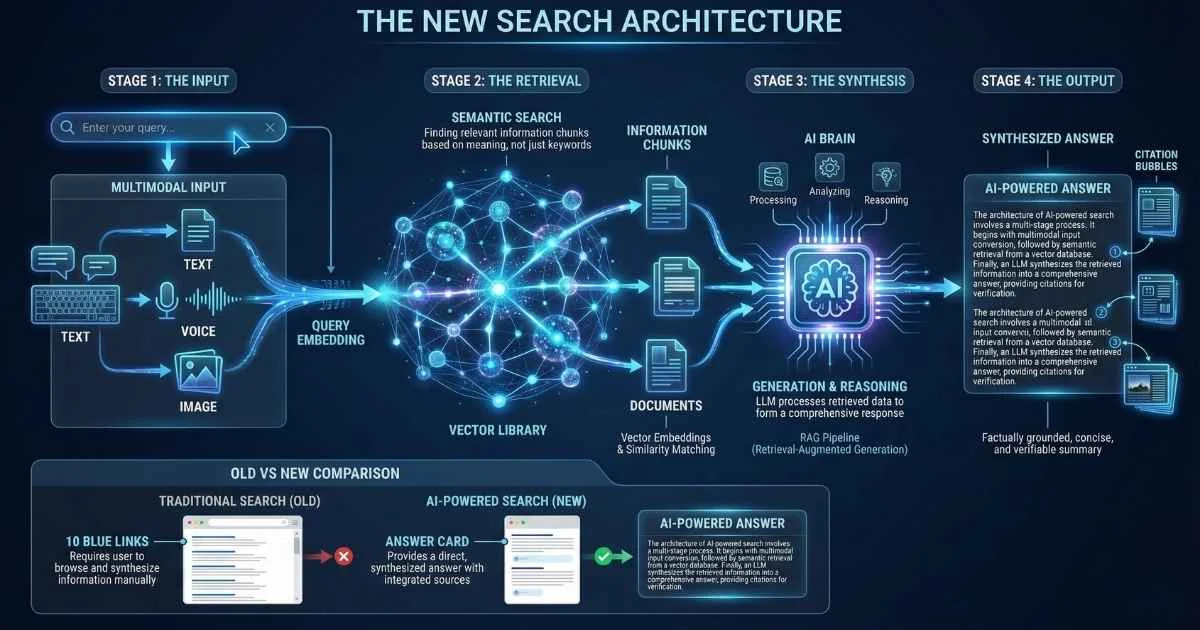
The End of “Ten Blue Links”
For twenty years, “searching the web” meant one thing: typing keywords, scanning a list of blue links, and clicking through tab after tab to assemble information manually. That era is ending.
We are shifting from search engines to answer engines.
AI-powered search tools like Perplexity, SearchGPT, and Google’s AI Overviews don’t just index the web—they read it. They synthesize information from multiple sources, understand complex intent, and deliver direct answers with citations. This change reduces research time from hours to minutes, fundamentally altering how we access human knowledge.
This guide analyzes the new landscape of AI search, comparing the major players:
- When to use AI search vs. traditional Google
- How to verify AI search results (critical skill)
- Advanced techniques for power users
- What’s coming next in the search revolution
Let’s dive into the future of finding information.
Sources: Google official blog, Statista Digital Market Outlook, Gartner research, Perplexity press releases
The Paradigm Shift: From Keywords to Conversations
Before we explore the tools, it’s worth understanding what’s fundamentally different about AI search. This isn’t just a better algorithm—it’s a completely different way of interacting with information.
How Traditional Search Works
Think about how you use Google today:
- You think of keywords: “EU AI Act compliance requirements”
- Google matches pages containing those terms
- You get a ranked list based on authority, relevance, and SEO
- You click through links, reading and synthesizing
- You repeat with refined queries until you find what you need
This model has dominated for 25 years. And it works—but it puts the synthesis burden on you. You’re the one connecting dots across sources, filtering out irrelevant information, and hoping you’ve found reliable sources.
How AI Search Engines Work
AI search flips this model:
- You ask a question in natural language: “What do I need to do to comply with the EU AI Act if I’m using AI in my business?”
- The system understands your intent: not just keywords, but what you actually want to know
- It retrieves relevant content from the web in real-time
- An LLM synthesizes information from multiple sources
- You get a direct answer with citations to verify
The key technology enabling this is called RAG (Retrieval Augmented Generation). Don’t let the technical name intimidate you—it’s actually a simple concept. For a deeper explanation, see the RAG, Embeddings, and Vector Databases guide.
Understanding RAG: The Library Wizard Analogy
Imagine you walk into the world’s largest library and ask a question: “What are the health benefits of intermittent fasting?”
Without RAG (traditional LLM chatbots like early ChatGPT): A librarian who memorized millions of books years ago tries to answer from memory. They might give you outdated information, make up facts, or confidently state things that are no longer true.
With RAG (AI search engines like Perplexity): A brilliant research assistant runs through the library in real-time, pulls the most relevant recent books and papers off the shelves, reads the key passages, and synthesizes an answer while showing you exactly which sources they used.
That’s the magic of RAG. It grounds the AI’s response in actual, current, retrievable information.
%%{init: {'theme': 'base', 'themeVariables': { 'primaryColor': '#4f46e5', 'primaryTextColor': '#ffffff', 'primaryBorderColor': '#3730a3', 'lineColor': '#6366f1', 'fontSize': '16px' }}}%%
flowchart LR
    A["Your Question"] --> B["Query Understanding"]
    B --> C["Web Retrieval"]
    C --> D["Content Ranking"]
    D --> E["LLM Synthesis"]
    E --> F["Answer + Citations"]
The RAG Pipeline Explained
Here’s what happens when you ask an AI search engine a question:
| Step | What Happens | Why It Matters |
|---|---|---|
| Query Understanding | NLP extracts intent, entities, and context | ”compliance requirements” → understands you want actionable steps |
| Multi-Source Retrieval | Searches web, databases, news in real-time | Doesn’t rely on cached index; gets current information |
| Relevance Ranking | Filters and prioritizes authoritative sources | Government sites rank higher than random blogs |
| LLM Synthesis | Combines information into coherent response | You get a summary, not raw data |
| Citation Generation | Links each claim to its source | You can verify everything |
The magic is in how these components work together. The retrieval ensures accuracy and currency. The LLM ensures clarity and usefulness.
💡 Key insight: AI search engines combine the reach of traditional search with the comprehension of LLMs. They’re not replacing Google’s index—they’re adding an intelligence layer on top.
Why This Matters Right Now
This shift is happening faster than most people realize:
- According to Gartner’s October 2024 research, search engine volume will drop 25% by 2026 as users shift to AI chatbots and agents
- Perplexity AI has grown to over 30 million active users as of late 2025, processing 780 million monthly queries with a goal of reaching 1 billion weekly queries
- Google’s market share has dropped below 90% for the first time in over a decade, now estimated at 85.7-89.2% as AI alternatives gain traction
- Google AI Overviews now reach over 1.5 billion users across 200+ countries, appearing in 13-47% of search queries
- The global AI search engine market is valued at $43.63 billion in 2025, with generative AI dominating 54.2% of the technology segment
The Key Differences at a Glance
| Aspect | Traditional Search | AI Search |
|---|---|---|
| Input | Keywords, short phrases | Natural language questions |
| Output | List of links | Synthesized answer + sources |
| Follow-ups | New search from scratch | Conversational continuation |
| Ambiguity | Shows varied results | Can ask for clarification |
| Synthesis | You combine sources | AI combines for you |
| Speed to answer | Minutes (multiple clicks) | Seconds (direct answer) |
| Verification | Manual cross-referencing | Built-in citations |
The Rise of AI-Enhanced Search
Percentage of searches with AI involvement (estimated)
Source: Gartner research (2024), industry analyst estimates
Meet the Major AI Search Platforms
Now let’s explore the tools you can actually use. Each has its own personality and strengths—choosing the right one depends on what you’re trying to accomplish.
Perplexity AI: The Research Champion
If I could only recommend one AI search tool, it would be Perplexity. It was purpose-built for research-quality answers with citations.
The Origin Story: Founded in August 2022 by Aravind Srinivas (ex-Google), Denis Yarats (ex-Meta), Johnny Ho (ex-Quora), and Andy Konwinski (ex-Databricks), Perplexity set out to build “the answer engine”—not just links, but actual answers you can trust. As of September 2025, they raised $200 million at a $20 billion valuation, with total funding exceeding $1.5 billion. Key investors include Jeff Bezos, NVIDIA, NEA, IVP, Accel, and SoftBank Vision Fund 2. For a detailed comparison with other AI assistants, see the AI Assistants Comparison guide.
How It Actually Works:
When you ask Perplexity a question, here’s what happens behind the scenes:
- Query Analysis: The system breaks down your question into search intents
- Parallel Retrieval: Multiple search queries run simultaneously across the web
- Source Ranking: Results are scored for authority, recency, and relevance
- Citation Mapping: Each piece of information is tied to its source
- Synthesis: An LLM (Claude 4, GPT-5, Grok 4, or their own Sonar model) generates a cohesive response
What Makes It Special:
- Pro Search: Multi-step research that searches over 300 sources, asks clarifying questions, and digs deeper—like having a research assistant who asks “What specifically are you trying to understand?”
- Deep Research Mode (February 2025): Automates extensive research, conducting multi-step analysis and synthesizing detailed reports—now available to free users via Sonar integration
- Comet Browser (July 2025): AI-powered Chromium browser with integrated search, instant article summaries, image descriptions, AI sidebar assistant, and email drafting capabilities—free to download since October 2025
- Perplexity Assistant (January 2025): Multimodal AI that can execute tasks, interpret visuals, and maintain contextual awareness across different applications
- Focus Modes: Switch between Academic (scholarly papers), Writing (content creation), Wolfram (computation), YouTube (video content), or Reddit (community discussions)
- Collections & Spaces: Save and organize research threads, with shared workspaces for team collaboration
- Multi-model Access: Choose between GPT-5, GPT-4.1, o4-mini, Claude 4.0, Grok 4, Gemini Pro 3, plus Perplexity’s own Sonar and R1-1776 models
Sonar AI Model (February 2025): Perplexity’s in-house model built on Meta Llama 3.3 70B, optimized for web-grounded, real-time answers. Features include:
- 128K token context window
- Web-grounded search with dynamic depth
- Latency optimizations for faster responses
- Powers all free-tier queries
Strategic Partnerships (2025):
- 📱 Motorola: Pre-installed app and voice assistant (April 2025)
- 📺 Samsung: Powering revamped Bixby for Galaxy S26, Smart TV app (September 2025)
- 📸 Snapchat: $400 million deal for conversational search (early 2026)
- 🌍 NVIDIA DGX Cloud: Sovereign AI models for Europe supporting 24 EU languages (July 2025)
Where It Excels:
- 📚 Academic research with proper citations
- 🔍 Deep dives into complex topics with Deep Research mode
- 📊 Fact-finding with source verification
- 🎓 Learning new subjects quickly
- 💼 Professional research and due diligence
- 🌐 Integrated browsing with Comet
Where It Falls Short:
- ⚠️ Free tier limits Pro queries to ~5/day
- ⚠️ Not ideal for local, shopping, or navigational searches
- ⚠️ Facing legal scrutiny over copyright and content use from major publishers
- ⚠️ Occasional citation mismatches (always verify critical info)
Pricing (as of December 2025):
| Tier | Cost | What You Get |
|---|---|---|
| Free | $0 | Basic search, ~5 Pro queries/day, Deep Research via Sonar, limited file uploads |
| Pro | $20/month | 600+ Pro searches/day, all premium models, Comet browser features, unlimited file upload, API credits |
| Enterprise | Custom | Team Spaces, SSO, API access, custom data sources, priority support |
My Verdict: For anyone doing serious research—students, writers, analysts, professionals—Perplexity Pro is worth every penny. The 2025 additions of Deep Research, Comet browser, and multi-model access make it the most complete AI search solution available.
Google AI Overviews: The Integrated Giant
Google isn’t sitting still. They’ve integrated AI directly into the search experience you already know—and 2025 brought major upgrades.
How It Works: When you search on Google, certain queries now trigger an “AI Overview” at the top—a synthesized answer generated by Gemini 3 Flash that appears above the traditional results. AI Overviews now reach over 1.5 billion users across 200+ countries.
Key Features (December 2025):
- Gemini 3 Flash: The new default model with “PhD-level reasoning,” faster performance, and improved multimodal understanding (text, images, audio)
- Gemini 3 Deep Think: Advanced reasoning mode for complex math, science, and logic problems (Google AI Ultra subscribers)
- AI Mode Enhanced: Deeper research capabilities with interactive graphs for sports and finance, “Thinking (3 Pro)” for free US users
- Deep Research Agent: Multi-step research that can research for hours and compile comprehensive reports
- Search Live: Gemini-powered conversational search with dynamic interactions
- NotebookLM Integration: Incorporate NotebookLM notebooks as sources within Gemini responses
- Visual Deep Research Reports: Reports now include animations and images for complex information (AI Ultra)
- Nano Architecture: Improved on-device processing for faster mobile responses
- Lens Integration: Point your camera and get AI-powered answers with enhanced multimodal capabilities
Where It Excels:
- 🌍 Massive index—trillions of pages, 1.5B+ users with AI Overviews
- 🔗 Google ecosystem integration (Maps, Shopping, Flights, NotebookLM)
- 🆓 Powerful features available for free
- 📱 Works everywhere with optimized mobile experience
- 🧠 Best-in-class reasoning with Gemini 3 Deep Think
Where It Falls Short:
- ⚠️ AI Overviews appear in only 13-47% of queries
- ⚠️ Less control over search methodology compared to Perplexity
- ⚠️ Privacy concerns for logged-in users
- ⚠️ AI Overviews reducing direct website clicks by 30%+
Pricing:
| Tier | Cost | What You Get |
|---|---|---|
| Free | $0 | AI Overviews, Gemini 3 Flash, AI Mode basics, “Thinking (3 Pro)“ |
| Google AI Ultra | $24.99/month | Gemini 3 Deep Think, Visual Deep Research, advanced features |
My Verdict: Google’s December 2025 Gemini 3 rollout made AI Overviews significantly more capable. If you’re already in the Google ecosystem, this is now a serious research tool—not just a supplement.
Microsoft Copilot: The Windows Companion
Microsoft has deeply integrated AI search into Windows, Edge, and Office—and December 2025 brought significant upgrades to make it smarter and more capable.
The Integration Advantage: Copilot isn’t just a search engine—it’s an assistant that lives in your browser sidebar, in Windows, and across Microsoft 365. The December 2025 updates make it remember your preferences and work across applications.
Key Features (December 2025):
- GPT-5 Default: GPT-5 is now the default model in Copilot Chat, offering faster and more accurate responses
- Enhanced Work IQ & Memory: Remembers past conversations, project names, and specific instructions for personalized responses
- Teams Mode: Extend individual Copilot conversations into collaborative group chats within Microsoft Teams
- Agent Mode (Word): Intent-aware rewriting that better handles structured content
- Formula Completion (Excel): Proactively suggests and autocompletes formulas for data analysis
- Explain This (PowerPoint): Contextual explanations for complex slide elements
- Inbox Intelligence (Outlook): Email prioritization with intelligent follow-up suggestions
- Agentic Actions: Handle multi-step workflows by maintaining context across applications
- Edge Multi-Tab: Summarize and ground responses across multiple browser tabs, documents, and YouTube videos
- Notebook Mode: Extended context with suggested references that surface relevant files, emails, and notes
Where It Excels:
- 🪟 Seamless Windows integration with dedicated M365 Copilot app
- 📄 Works across your Office documents with cross-app context
- 🧠 Memory feature enables truly personalized assistance
- 🎨 Built-in image generation with OpenAI’s latest models
- 🤝 Team collaboration with Teams Mode
Where It Falls Short:
- ⚠️ Bing index smaller than Google
- ⚠️ Requires Microsoft 365 for full functionality
- ⚠️ Some features still rolling out globally
Pricing (December 2025):
| Tier | Cost | What You Get |
|---|---|---|
| Free | $0 | Basic Copilot in Edge/Windows, Copilot Chat with GPT-5 |
| Copilot Pro | $20/month | Priority access, M365 integration, all premium features |
| M365 Copilot Business | $21/user/month | Full enterprise features (reduced from $30 for SMBs ≤300 employees) |
| M365 Copilot Enterprise | $30/user/month | Advanced security, compliance, and governance |
💰 Promotional Discounts (through March 2026): 15% off standalone Copilot Business, 35% off Business Standard + Copilot bundle, 25% off Business Premium + Copilot bundle.
My Verdict: The December 2025 updates—especially Work IQ memory and agentic actions—make Copilot a genuine productivity multiplier for Microsoft users. The price reduction for SMBs makes it more accessible than ever.
You.com: The Privacy-Conscious Alternative
You.com takes a different approach: multiple specialized “modes” and a focus on user privacy.
The Philosophy: Founded by ex-Salesforce AI researchers, You.com has evolved from a consumer search engine to an enterprise-focused AI platform. In 2025, they pivoted to providing AI search APIs for businesses, now processing nearly 1 billion queries monthly for customers including DuckDuckGo and Databricks.
Key Features (2025):
- ARI (Deep Research Agent): Named to TIME’s Best Inventions of 2025—scans 400+ sources to produce research reports with verified citations, interactive graphs, and visualizations
- Enterprise APIs: Search APIs that power conversational search for other platforms
- Smart Mode: AI-powered answer synthesis with grounding
- Genius Mode: Multi-step research with citations
- YouChat: Conversational AI assistant
- YouWrite: Advanced writing assistance
- YouImagine: AI-powered image generation
Where It Excels:
- 🔒 Privacy-focused (minimized tracking)
- 🏢 Enterprise-grade APIs powering major platforms
- 🔬 ARI agent for regulated industries requiring verified research
- 🎛️ Highly customizable experience
Where It Falls Short:
- ⚠️ Consumer product less prioritized with enterprise pivot
- ⚠️ Less polished consumer experience compared to Perplexity
- ⚠️ Some advanced features require API/subscription
My Verdict: You.com has found its niche in the enterprise API space, powering search for other platforms. If you need privacy-focused search or are building an AI-powered product, their APIs are worth exploring. For individual research, Perplexity remains more polished.
ChatGPT with Web Search: OpenAI’s Answer Engine
OpenAI’s ChatGPT has evolved beyond a chatbot into a capable search and research tool, especially with the December 2025 GPT-5.2 release.
How It Works: ChatGPT now includes web browsing capabilities that search the internet in real-time, synthesize information, and provide answers with citations—competing directly with AI search engines.
Key Features (December 2025):
- GPT-5.2 Model: Major upgrade with “Instant,” “Thinking,” and “Pro” modes—achieves 70.9% on knowledge work tasks (vs 38.8% for GPT-5.1)
- GPT-5.2-Codex: Specialized version for coding with enhanced long-horizon task handling
- Shopping Research: New product discovery features to help users find and compare products
- App Directory: Third-party app integration bringing external data and workflows into conversations
- Enhanced Memory: Filters and automatically manages stored memories for personalized, contextually relevant responses
- Detailed Characteristic Controls: Granular control over response style—warmth, enthusiasm, formatting, emoji frequency
Where It Excels:
- 🧠 Best-in-class reasoning with GPT-5.2
- 🔄 Seamless conversation continuity with memory
- 🛒 Shopping research and product comparison
- 🔌 Third-party app integrations
- 🎨 Most versatile—handles search, creation, code, and analysis
Where It Falls Short:
- ⚠️ Citation quality not as robust as Perplexity
- ⚠️ Not purpose-built for search (chatbot first)
- ⚠️ Free tier has rate limits on web browsing
Pricing:
| Tier | Cost | What You Get |
|---|---|---|
| Free | $0 | GPT-4o with limited web browsing |
| ChatGPT Plus | $20/month | GPT-5.2, enhanced browsing, app integrations |
| ChatGPT Pro | $200/month | Unlimited reasoning, GPT-5.2 Pro mode, priority access |
| ChatGPT Team | $25/user/month | Team workspaces, admin controls |
| Enterprise | Custom | SSO, advanced security, custom solutions |
My Verdict: If you’re already a ChatGPT user, the web browsing features make it a capable search tool for general research. However, for dedicated research with robust citations, Perplexity still has the edge.
Other Notable Platforms
Beyond the major players, several specialized AI search engines excel in specific niches:
Kagi: The Premium Privacy Choice
What It Is: A paid, ad-free search engine that prioritizes quality results and user privacy. No tracking, no ads, no selling your data.
Key Features:
- Lenses: Custom search filters (e.g., only academic sites, only forums)
- Personalization: Boost or block specific domains permanently
- LLM Assistant Integration: Built-in AI summarization with multiple LLM options
- Universal Summarizer: Summarize any webpage, PDF, or YouTube video
- Orion Browser: Their own privacy-focused browser (macOS)
Pricing: Starter $5/month (300 searches), Professional $10/month (unlimited), Ultimate $25/month (all features + family plan)
Best For: Users who value quality over quantity and are willing to pay for an ad-free, privacy-respecting experience.
Phind: The Developer’s Best Friend
What It Is: An AI search engine built specifically for programmers and technical queries. Understands code context and programming concepts natively.
Key Features:
- Code-Aware Search: Understands programming languages, frameworks, and technical documentation
- Pair Programming Mode: Chat interface for debugging and development help
- VS Code Extension: Search directly from your IDE
- Context Window: Remembers your codebase context for relevant answers
- Multiple Models: GPT-4, Claude, and their own Phind model
Pricing: Free tier with limits, Pro at $17/month for unlimited queries
Best For: Software developers, data scientists, and anyone doing technical research. Especially useful for debugging, learning new frameworks, and understanding complex documentation.
Consensus: The Scientific Paper Specialist
What It Is: An AI search engine that exclusively searches peer-reviewed scientific papers, synthesizing research findings with proper academic citations.
Key Features:
- Academic-Only Index: Only searches published scientific literature
- Consensus Meter: Shows what percentage of papers agree/disagree on a topic
- Study Snapshots: Key findings extracted from each paper
- Citation Export: Direct export to reference managers (Zotero, Mendeley)
- Methodology Filters: Filter by study type (RCT, meta-analysis, etc.)
Pricing: Free tier with basic features, Pro at $8.99/month for advanced filters and unlimited queries
Best For: Researchers, academics, medical professionals, and anyone who needs evidence-based answers with proper scientific backing.
Brave Search: Privacy Without Compromise
What It Is: The search engine from Brave browser, built on its own independent index (not using Google or Bing). Offers AI-powered summaries while maintaining strict privacy.
Key Features:
- Independent Index: Truly separate from Google/Bing (rare in the industry)
- Brave AI Answer: AI-powered summaries with citations
- No Tracking: Zero data collection on queries
- Goggles: Community-created search filters and rankings
- API Access: For developers building privacy-focused applications
December 2025 Stats: 101 million monthly browser users, 1.6 billion monthly search queries, nearly 20 billion annual queries
Pricing: Completely free (ad-supported with non-tracking ads)
Best For: Privacy-conscious users who don’t want to pay for Kagi but want to avoid Google’s data collection.
Arc Search: Mobile Innovation
What It Is: A mobile-first AI search app from The Browser Company (makers of Arc browser). Designed to provide quick answers on the go.
Key Features:
- “Browse for Me”: AI visits multiple sites and synthesizes a custom page just for your query
- Reader Mode: Clean, distraction-free reading
- Quick Actions: Voice search, image search, instant actions
- Beautiful UI: One of the best-designed mobile search experiences
Pricing: Free
Best For: Mobile users who want fast, synthesized answers without opening multiple browser tabs.
DeepSeek: The Chinese Contender
What It Is: A rapidly emerging AI search platform from China, known for competitive performance at lower costs. Important to understand as the AI search market globalizes.
Key Features:
- DeepSeek-V3: Latest model with strong reasoning capabilities
- Cost Efficiency: Significantly lower API costs than Western competitors
- Multilingual: Strong performance in Chinese and English
- Open Source Options: Some models available open-source
Considerations: Data sovereignty concerns for Western users; primarily serves Asian markets but increasingly global
Best For: Understanding the competitive landscape; cost-sensitive API users; Chinese-language queries.
Quick Comparison Table
| Platform | Best For | Key Differentiator | Monthly Cost |
|---|---|---|---|
| Kagi | Quality + Privacy | Ad-free, customizable | $10-25 |
| Phind | Developers | Code-native understanding | Free-$17 |
| Consensus | Academics | Scientific papers only | Free-$9 |
| Brave Search | Privacy (free) | Independent index | Free |
| Arc Search | Mobile | ”Browse for Me” synthesis | Free |
| DeepSeek | Cost-efficiency | Competitive Chinese AI | Varies |
| Exa | API developers | Semantic search API | API pricing |
📊 2025 Market Note: Brave browser reached 101 million monthly active users by September 2025, with Brave Search processing nearly 20 billion queries annually on its independent index. The AI search market continues to fragment into specialized verticals.
AI Search Platform Comparison
AI Search for Specific Use Cases
Different professionals and students have unique research needs. Here’s how to optimize AI search for your specific context.
For Students & Academics
Best Tools: Perplexity (Academic focus), Consensus, Google Scholar + Gemini
Research Paper Workflow:
- Start with Consensus for peer-reviewed literature overview
- Use Perplexity Academic mode for broader context
- Cross-reference with Google Scholar for completeness
- Verify all citations before including in papers
Citation Best Practices:
- ⚠️ Never cite the AI search engine itself—cite the original sources it references
- ✅ Click through to original papers and verify the AI’s interpretation
- ✅ Use Consensus’s citation export for proper formatting (Zotero, Mendeley)
- ✅ Check your institution’s AI usage policy—disclosure may be required
Avoiding Academic Integrity Issues:
| Do | Don’t |
|---|---|
| Use AI search to find sources | Copy AI-generated summaries as your own writing |
| Verify each citation manually | Assume AI citations are accurate |
| Disclose AI tool usage per policy | Use AI search for take-home exams (unless permitted) |
| Use as a starting point | Submit AI-synthesized content as original work |
🎓 Pro Tip: Perplexity’s Collections feature helps organize research by project. Create separate collections for different papers or chapters.
For Developers & Engineers
Best Tools: Phind, ChatGPT (GPT-5.2-Codex), Perplexity, GitHub Copilot Chat
Code Research Workflow:
- Start with Phind for code-specific questions (better understands programming context)
- Use ChatGPT-Codex for complex generation and debugging
- Reference official docs via Perplexity for framework-specific questions
- Cross-check Stack Overflow for community-validated solutions
AI Search vs Stack Overflow:
| Scenario | Use AI Search | Use Stack Overflow |
|---|---|---|
| Understanding concepts | ✅ Better synthesized explanations | 🔶 Scattered across multiple answers |
| Debugging errors | ✅ Context-aware suggestions | ✅ Community-validated solutions |
| Latest framework features | ✅ Real-time documentation access | ❌ May be outdated |
| Code opinions/best practices | 🔶 Can be generic | ✅ Experienced community input |
| Complex multi-step solutions | ✅ Can break down steps | 🔶 Need to piece together |
Power Tips for Developers:
- Use Phind’s VS Code extension to search without leaving your IDE
- Include your tech stack in queries: “Using Next.js 15 with TypeScript, how do I…”
- Ask for code reviews: “Review this function for performance issues: [paste code]”
- Request explanations: “Explain this regex step by step: [pattern]“
For Business Professionals
Best Tools: Perplexity Pro (Deep Research), Microsoft Copilot, ChatGPT
Market Research Workflow:
- Use Perplexity Deep Research for comprehensive industry analysis
- Cross-reference with financial sources (SEC filings, analyst reports)
- Use Copilot in Excel for data analysis of findings
- Create reports with Copilot in Word from research threads
Due Diligence Checklist:
- Run Deep Research on company/industry
- Verify financials with SEC.gov/official sources
- Check news sources for recent developments
- Review competitor analysis
- Validate key statistics against primary sources
- Document your research trail
Competitive Intelligence Tips:
- Ask for “Competitor comparison: [Company A] vs [Company B] in [market]”
- Request SWOT analyses with source verification
- Use time-bounded queries: “Developments in [industry] in Q4 2025”
- Save research to Collections for ongoing tracking
For Writers & Content Creators
Best Tools: Perplexity (Writing focus), ChatGPT, Claude
Research-to-Writing Workflow:
- Start with Perplexity for factual research and source gathering
- Use Writing focus mode for content structure ideas
- Verify stats and quotes via original sources
- Draft with ChatGPT/Claude if desired (clearly separate research from writing)
Fact-Checking Best Practices:
| Claim Type | Verification Method |
|---|---|
| Statistics | Trace to original study/survey |
| Quotes | Find primary source or recording |
| Historical facts | Cross-reference multiple sources |
| Scientific claims | Check peer-reviewed literature |
| News events | Verify with multiple outlets |
Avoiding AI Content Pitfalls:
- ⚠️ AI search can surface AI-generated content—verify sources are legitimate
- ⚠️ Don’t over-rely on AI summaries; read original sources for nuance
- ✅ Use AI search for discovery, then do deep reading
- ✅ Keep a verification log for important claims
For Healthcare & Legal Professionals
Best Tools: Consensus (medical), Perplexity (with extreme caution), specialized legal databases
⚠️ Critical Warning: AI search should NEVER replace professional medical or legal judgment. These tools are for research augmentation only.
When AI Search Can Help:
- Background research on unfamiliar topics
- Finding recent literature and case law
- Generating lists of considerations to explore
- Initial orientation to new areas
When to Avoid AI Search:
- Making clinical or legal decisions
- Providing advice to patients/clients
- Situations requiring guaranteed accuracy
- Anything with malpractice implications
Best Practices for High-Stakes Professionals:
| Always Do | Never Do |
|---|---|
| Use domain-specific databases (PubMed, Westlaw) | Rely solely on AI search for patient/client matters |
| Consult with colleagues | Assume AI legal/medical citations are current |
| Verify against authoritative sources | Skip the verification step “to save time” |
| Document your research methodology | Present AI-generated content as your own analysis |
🏥 For Medical Research: Use Consensus (peer-reviewed only) plus PubMed. AI search can help synthesize findings, but always verify clinical recommendations against current guidelines.
⚖️ For Legal Research: Start with Westlaw/LexisNexis for case law. AI search like Perplexity can help understand concepts, but never substitute for proper legal research.
AI Search on Mobile
AI search isn’t just for desktop research—mobile experiences have matured significantly in 2025.
Mobile App Comparison
| App | Platform | Key Feature | Voice Support | Offline |
|---|---|---|---|---|
| Perplexity | iOS, Android | Full feature parity with web | ✅ Yes | ❌ No |
| ChatGPT | iOS, Android | Voice mode with GPT-5.2 | ✅ Advanced | ❌ No |
| Google App | iOS, Android | AI Overviews + Lens | ✅ Yes | Partial |
| Arc Search | iOS | ”Browse for Me” | ✅ Yes | ❌ No |
| Copilot | iOS, Android | M365 integration | ✅ Yes | ❌ No |
| Brave Search | iOS, Android | Privacy-focused | ✅ Yes | ❌ No |
Voice-First Search
Voice has become a first-class interface for AI search in 2025:
iOS 18+ with Siri + ChatGPT:
- “Hey Siri, ask ChatGPT about [topic]” routes complex queries to ChatGPT
- Native integration for hands-free research
- Follows up conversationally
Google Assistant + Gemini:
- “Hey Google” triggers Gemini for AI-powered responses
- Multimodal: Can analyze what your camera sees
- Deep integration with Google services
Perplexity Voice Mode:
- Tap microphone for voice queries
- Read responses aloud
- Follow-up by voice
Best Practices for Voice Search:
- Speak in complete questions: “What are the symptoms of vitamin D deficiency?” not “vitamin D symptoms”
- Ask for clarification: “Explain that in simpler terms”
- Request specifics: “Give me three examples”
Quick Mobile Workflows
Screenshot + AI Search (Multimodal):
- Screenshot any content (social post, product, document)
- Open ChatGPT or Perplexity
- Upload screenshot
- Ask: “What is this? Is this accurate? Where can I find more?”
On-the-Go Research:
- Use Perplexity’s share extension to analyze any article
- Arc Search’s “Browse for Me” creates instant summaries
- ChatGPT can read and analyze PDFs from your files
Quick Actions by Platform:
| Need | Best Mobile Tool | How |
|---|---|---|
| Quick fact-check | Perplexity | Voice or text query |
| Summarize article | Arc Search | Share → Browse for Me |
| Product research | ChatGPT | Photo + “Compare prices” |
| Local info | Google App | Maps + AI Overview |
| Document analysis | ChatGPT/Perplexity | Upload from Files |
📱 Mobile Tip: Enable widgets for your favorite AI search apps. Perplexity and ChatGPT both offer home screen widgets for instant access.
When to Use AI Search vs. Traditional Search
Here’s the question I get asked most often: “Should I just switch to AI search for everything?”
The honest answer: No. Different query types have different ideal tools. Let me give you a framework.
The Decision Framework
Use AI Search When:
✅ You need a synthesized answer, not just raw sources
✅ Your question is complex or multi-faceted
✅ You want to follow up with related questions
✅ You’re learning about an unfamiliar topic
✅ You need citations for credibility
✅ Time is critical (quick answers needed)
✅ You’re comparing options or summarizing viewpoints
Use Traditional Search When:
✅ You’re looking for a specific website or page
✅ You want to browse and discover serendipitously
✅ You need real-time breaking news
✅ Local search with maps is essential
✅ Shopping with direct purchase intent
✅ Image search for visual browsing
✅ You don’t trust AI summarization for your query
The Hybrid Strategy
For most research tasks, I use a hybrid approach:
%%{init: {'theme': 'base', 'themeVariables': { 'primaryColor': '#4f46e5', 'primaryTextColor': '#ffffff', 'primaryBorderColor': '#3730a3', 'lineColor': '#6366f1', 'fontSize': '16px' }}}%%
flowchart TD
    A["Research Question"] --> B{"What Type?"}

    B -->|"Quick Facts"| C["AI Search"]
    C --> D{"Good Answer?"}
    D -->|Yes| E["Done ✓"]
    D -->|No| F["Traditional Search"]

    B -->|"Exploration"| G["Traditional First"]
    G --> H["Find Sources"]
    H --> I["AI Summarize"]

    B -->|"Deep Research"| J["AI: Get Overview"]
    J --> K["Traditional: Primary Sources"]
    K --> L["AI: Synthesize"]
    L --> M["Verify Key Facts"]
Query Type Quick Reference
When to Use AI Search vs Traditional Search
Comparing effectiveness scores for different query types
💡 My Rule of Thumb: Start with AI search for informational queries. Fall back to traditional search when you need to navigate somewhere specific, shop, or find local services. Use both for important research.
🧪 Try This Now: Compare Search Results
Here’s a hands-on exercise to experience the difference:
Step 1: Pick a topic you’re genuinely curious about. Example: “What are the health effects of cold exposure therapy?”
Step 2: Search in three places:
- Traditional Google - Note how many links you need to click
- Perplexity (free at perplexity.ai) - Note the synthesized answer
- Google with AI Overview - Compare the integrated response
Step 3: Answer these questions:
- Which gave you a useful answer fastest?
- Which required the most work from you?
- Did the AI search include citations you could verify?
Step 4: Click through at least 2 citations from the AI search. Do they actually support what the AI claimed?
This exercise typically takes 5-10 minutes and will give you an intuitive feel for when each approach works best.
The Art of Verification: Avoiding AI Misinformation
I’ve saved the most important section for here. AI search engines can be wrong. They can confidently cite sources that don’t say what the AI claims. They can hallucinate facts. And they can make you look foolish if you share unverified information.
Here’s how to protect yourself.
A Real-World Hallucination Example
Let me share a case that really drove this home for me. In early 2024, an AI search engine was asked about a celebrity’s biography. It confidently stated:
“According to Wikipedia, [Celebrity Name] was born on March 15, 1985, and graduated from Stanford University with a degree in Economics.”
The problem? When I clicked the Wikipedia citation, the article clearly stated the celebrity was born in 1987, attended a completely different university, and majored in Theater. The AI had:
- ✅ Found a relevant source (correct)
- ❌ Hallucinated details that seemed plausible but weren’t in the source
- ❌ Presented fabricated information with confidence
This wasn’t a one-off. Studies have shown AI systems can confidently cite sources while misrepresenting their content. According to research from Stanford, even advanced AI systems struggle with accurate attribution.
Why Verification Matters More Than Ever
Traditional search had its own problems—low-quality content, SEO manipulation, misinformation. But at least you were reading the actual sources and making your own judgments.
With AI search, you’re trusting a system to:
- Find the right sources
- Interpret them correctly
- Synthesize them accurately
- Present them clearly
That’s a lot of trust. And while AI search engines have improved dramatically, they’re not perfect.
The SIFT Framework
I use the SIFT method, developed by digital literacy expert Mike Caulfield. It’s simple, effective, and designed for the fast-paced information environment we live in:
The SIFT Framework for AI Search Verification
A simple process to verify AI search results before acting on them
Red Flags to Watch For
When reviewing AI search results, these warning signs should trigger extra verification:
| Red Flag | Why It’s Concerning | What to Do |
|---|---|---|
| ⚠️ No citations | Can’t verify claims | Ask for sources or search manually |
| ⚠️ Vague citations | ”Studies show…” without specifics | Find the actual study |
| ⚠️ Statistics without sources | Numbers can be fabricated | Trace to original data |
| ⚠️ Very specific details | Page numbers, exact quotes | Often hallucinated—verify |
| ⚠️ Medical/legal/financial advice | High stakes for errors | Always consult professionals |
| ⚠️ Confidence without nuance | ”Always” or “never” claims | Reality is usually more complex |
| ⚠️ AI citing AI | Circular citation problem | Find primary sources |
My Verification Workflow
For important information, here’s what I do:
%%{init: {'theme': 'base', 'themeVariables': { 'primaryColor': '#4f46e5', 'primaryTextColor': '#ffffff', 'primaryBorderColor': '#3730a3', 'lineColor': '#6366f1', 'fontSize': '16px' }}}%%
flowchart TD
    A["AI Search Result"] --> B{"Has Citations?"}
    B -->|No| C["⚠️ Verify Independently"]
    B -->|Yes| D["Click 2-3 Citations"]
    D --> E{"Claims Match Sources?"}
    E -->|No| C
    E -->|Yes| F{"Important Decision?"}
    F -->|Yes| G["Cross-Reference"]
    F -->|No| H["Proceed Carefully"]
    G --> I{"Sources Agree?"}
    I -->|Yes| J["✅ High Confidence"]
    I -->|No| K["🔍 Deeper Research"]
Domain-Specific Verification
Different topics need different verification approaches:
| Domain | Extra Caution For | Best Verification Sources |
|---|---|---|
| Medical | Symptoms, treatments, medications | Mayo Clinic, NHS, PubMed, your doctor |
| Legal | Laws, regulations, rights | Official government sites, licensed attorneys |
| Financial | Investment advice, tax info | SEC, IRS, licensed advisors |
| News | Breaking events, politics | Multiple news outlets, Reuters, AP |
| Scientific | Research claims, statistics | PubMed, Google Scholar, Consensus |
| Historical | Dates, events, quotes | Academic sources, primary documents |
🎯 My Rule: Treat AI search like a brilliant research assistant who occasionally makes things up with complete confidence. Trust but verify—especially for anything that matters.
Case Studies: When AI Search Got It Wrong
Case 1: The Legal Citation Disaster (2023)
In a now-infamous case, a New York lawyer submitted a legal brief containing citations to cases that didn’t exist. The lawyer had used ChatGPT (with web browsing) to research case law, and the AI had fabricated several judicial decisions with convincing but completely fictional names, citations, and holdings.
The Lesson: AI can create plausible-sounding legal citations that never existed. Always verify case citations through official legal databases (Westlaw, LexisNexis, court websites).
Case 2: The Medical Misinformation Incident (2024)
An AI search engine confidently stated that a particular supplement was “FDA-approved for treating anxiety” with a citation to the FDA website. When fact-checked, the FDA page actually stated the opposite—supplements are NOT FDA-approved for treating medical conditions.
The Lesson: AI can misinterpret source material, especially for medical claims. The citation existed, but the AI’s interpretation was dangerously wrong.
Case 3: The Financial Fabrication (2024)
A user asked about a company’s stock performance. The AI search provided specific percentage changes and dates—but when verified, several key numbers were off by significant margins. The AI had combined data from different time periods and presented them as if from a single source.
The Lesson: Financial statistics require verification against primary sources (SEC filings, Bloomberg, official company reports). AI can confidently mix and misrepresent numerical data.
Case Studies: When AI Search Got It Right
Case 1: Breakthrough Research Discovery
A medical researcher used Perplexity’s Academic focus to explore potential connections between two conditions. The AI synthesized findings across 15 papers they hadn’t encountered, leading to a novel research hypothesis that was later validated.
The Value: AI search excels at connecting dots across large bodies of literature that would take humans weeks to manually review.
Case 2: Due Diligence Time Savings
A consultant used Perplexity Deep Research for competitive analysis. What would typically take 2-3 days of manual research was completed in 2 hours, with clear citations for every claim that the team could verify.
The Value: For research tasks requiring breadth over depth, AI search can dramatically compress timelines while maintaining verifiability.
Privacy & Data Considerations
Understanding what happens to your queries and data is essential when choosing an AI search platform.
What AI Search Engines Collect
| Data Type | Why Collected | Privacy Concern |
|---|---|---|
| Query history | Improve results, personalization | Reveals interests, research topics |
| Uploaded files | Document analysis | Potentially sensitive content |
| Conversation context | Better follow-ups | Extended profile over time |
| Location data | Local search, personalization | Movement patterns |
| Device info | Security, optimization | Cross-device tracking potential |
Platform Privacy Comparison
| Platform | Data Retention | Delete History | GDPR Compliant | Enterprise Options |
|---|---|---|---|---|
| Perplexity | Retained by default | ✅ Yes | ✅ Yes | ✅ SOC 2, SSO |
| ChatGPT | 30 days (can opt-out) | ✅ Yes | ✅ Yes | ✅ Enterprise |
| Google AI | Per Google account settings | ✅ Yes | ✅ Yes | ✅ Workspace |
| Copilot | Per Microsoft settings | ✅ Yes | ✅ Yes | ✅ M365 Enterprise |
| Kagi | Minimal | ✅ Yes | ✅ Yes | N/A (paid = private) |
| Brave Search | None | N/A | ✅ Yes | N/A |
| You.com | Minimal by design | ✅ Yes | ✅ Yes | ✅ Enterprise API |
Privacy-First Alternatives
If privacy is your primary concern:
- Brave Search (Free): Truly private, no tracking, independent index
- Kagi ($10-25/month): Paid model means no ads, no selling data
- DuckDuckGo AI Chat: Privacy-focused, powered by multiple LLMs
- Self-hosted options: For enterprise, consider private RAG deployments
Best Practices for Privacy-Conscious Users
For Sensitive Searches:
- Use incognito/private browsing mode
- Consider Brave Search or Kagi for non-logged searches
- Don’t upload sensitive documents to free tiers
- Review and delete history regularly
For Enterprise Use:
- Use enterprise plans with data protection agreements
- Enable audit logging for compliance
- Consider data residency requirements (EU, etc.)
- Implement SSO for access control
Document Handling:
| Document Type | Recommendation |
|---|---|
| Public info | Fine for AI search analysis |
| Internal docs | Use enterprise plans only |
| Client data | Avoid or use private deployments |
| Regulated data (HIPAA, etc.) | Compliance-approved tools only |
🔒 Privacy Tip: If you wouldn’t be comfortable with your query appearing in a data breach, consider whether AI search is the right tool for that particular search.
Troubleshooting Common AI Search Issues
”The AI gave me outdated information”
Why It Happens: AI models have training cutoffs; real-time web search may still index cached content.
Solutions:
- Add time constraints: “latest” or “as of December 2025”
- Use News focus in Perplexity for recent events
- Check citation dates—older sources may not reflect current state
- For very recent events, traditional news search may be faster
”Citations don’t match the claims”
Why It Happens: Hallucination, misinterpretation, or AI paraphrasing changing meaning.
Solutions:
- Always click through to verify critical claims
- Report mismatched citations (Perplexity has feedback options)
- Rephrase your query for different source coverage
- Cross-reference with a second AI search platform
”I’m not getting the depth I need”
Why It Happens: Basic queries get basic answers; AI doesn’t know you need more.
Solutions:
- Use Pro Search or Deep Research modes explicitly
- Break complex questions into multi-step research
- Provide more context: “I’m writing a graduate thesis on…”
- Specify the level of detail: “Provide a comprehensive analysis with…”
- Use follow-up questions to go deeper
”Results feel biased or one-sided”
Why It Happens: Sources may be skewed; AI may default to majority viewpoints.
Solutions:
- Explicitly ask for multiple perspectives: “What are arguments for AND against…”
- Use perspective requests: “What do critics say about…”
- Search for contrarian viewpoints separately
- Cross-reference with traditional search for source diversity
”The AI says it can’t find information on this”
Why It Happens: Topic may be too niche, recent, or behind paywalls.
Solutions:
- Try different phrasing or related terms
- Use specialized platforms (Consensus for science, Phind for code)
- Switch to traditional search for discovery, then return to AI for synthesis
- Check if information exists in academic databases AI can’t access
”I keep hitting rate limits”
Why It Happens: Free tiers have usage caps to manage costs.
Solutions:
- Upgrade to paid tier if you’re a power user ($20/month typical)
- Batch your research—plan queries rather than ad-hoc searching
- Use free alternatives (Google AI Overviews, Brave Search) for simple queries
- Enterprise plans have higher or unlimited caps
”File upload isn’t working properly”
Why It Happens: File too large, format unsupported, or processing issues.
Solutions:
- Check file size limits (varies by platform)
- Convert to supported formats (PDF usually best)
- For large documents, consider breaking into sections
- Upgrade to paid tier for larger file limits
Advanced AI Search Techniques
Ready to level up? These techniques will dramatically improve your AI search results.
Prompt Engineering for Search
Just like with chatbots, how you ask matters enormously:
Basic Query (mediocre results):
“best programming language”
Optimized Query (much better):
“Compare Python, JavaScript, and Go for backend development in 2025. Consider learning curve, job market, performance, and ecosystem maturity. Focus on practical recommendations for someone with 2 years of coding experience.”
See the difference? The optimized query gives the AI:
- Context: Backend development, 2025 timeframe
- Specific items to compare: Three languages
- Criteria to evaluate: Learning curve, jobs, performance, ecosystem
- Audience: Someone with 2 years of experience
Power User Techniques
Technique 1: Scope Setting
Add brackets or explicit context to narrow your search:
- “Explain quantum computing
[for a high school student]” - “Latest developments in renewable energy
[from the past 6 months]” - “Compare electric cars
[in the $40,000-60,000 range for US buyers]”
Technique 2: Multi-Step Decomposition
Break complex research into steps:
- Start broad: “Overview of AI regulation globally”
- Go deep: “EU AI Act specific compliance requirements”
- Get specific: “What high-risk AI categories require conformity assessments?”
- Apply it: “If I use AI for hiring, what documentation do I need?”
Technique 3: Perspective Requests
Ask for multiple viewpoints to avoid bias:
- “What are the arguments for and against remote work?”
- “How do economists vs environmentalists view carbon taxes?”
- “What do critics say about [topic]? What do supporters say?”
Technique 4: Source Control
Guide the types of sources you want:
- “Using only peer-reviewed sources, explain…”
- “Based on official government data, what is…”
- “According to industry analyst reports, how is…”
Platform-Specific Power Features
Perplexity Power Tips:
| Feature | What It Does | When to Use |
|---|---|---|
| Deep Research | Automated multi-step analysis with comprehensive reports | Complex topics requiring thorough investigation |
| Focus: Academic | Prioritizes scholarly sources | Scientific research, citations needed |
| Focus: Writing | Better for content creation | Blog posts, essays, drafts |
| Focus: Wolfram | Math and computation | Data analysis, calculations |
| Focus: YouTube | Searches video content | Tutorials, explanations |
| Focus: Reddit | Community perspectives | Product reviews, opinions |
| Pro Search | Multi-step deep research across 300+ sources | Complex questions |
| Comet Browser | AI sidebar while browsing any site | Research while reading articles |
| File Upload | Analyze your documents | PDF analysis, comparison |
Google AI Overviews Tips (December 2025):
- Use AI Mode for deeper research with interactive graphs
- “Thinking (3 Pro)” mode for complex reasoning (free in US)
- Gemini 3 Deep Think for advanced math/science problems (AI Ultra)
- Add NotebookLM sources to Gemini for grounded research
- Use Gemini directly (gemini.google.com) for Gemini 3 Flash capabilities
Microsoft Copilot Tips (December 2025):
- Work IQ memory remembers your preferences—train it with consistent context
- Teams Mode extends individual chats to group collaboration
- Edge Multi-Tab summarizes across multiple browser tabs at once
- Notebook Mode with suggested references surfaces relevant files automatically
- Connect to Microsoft 365 for cross-app context and document search
ChatGPT Power Tips (December 2025):
- GPT-5.2 “Thinking” mode for complex reasoning tasks
- Use enhanced memory to build personalized context over time
- Shopping research features for product comparison
- App Directory integrations bring external tools into conversations
- Characteristic controls let you fine-tune response style
Building Your Research Workflow
Here’s my complete research workflow for complex topics:
%%{init: {'theme': 'base', 'themeVariables': { 'primaryColor': '#4f46e5', 'primaryTextColor': '#ffffff', 'primaryBorderColor': '#3730a3', 'lineColor': '#6366f1', 'fontSize': '16px' }}}%%
flowchart TD
    A["Research Question"] --> B["AI Search: Overview"]
    B --> C["Identify Subtopics"]
    C --> D["Deep Dive Each"]
    D --> E["Collect Primary Sources"]
    E --> F["AI: Synthesize Findings"]
    F --> G["Verify Key Claims"]
    G --> H["Draft Answer"]
    H --> I["Final Fact-Check"]
The key insight: AI search is excellent for the first and middle stages (overview, synthesis), but human judgment is essential for verification and final quality control.
AI Search for Teams & Organizations
As AI search matures, teams and enterprises are deploying these tools organization-wide. Here’s how to approach it strategically.
Enterprise AI Search Options
| Platform | Enterprise Plan | Key Enterprise Features | Compliance |
|---|---|---|---|
| Perplexity | Enterprise (Custom) | Spaces, SSO, API, custom data | SOC 2, GDPR |
| ChatGPT | Enterprise ($60/user) | Unlimited GPT-4, no training on data | SOC 2, GDPR, HIPAA |
| Copilot | M365 Enterprise ($30/user) | Full M365 integration, Purview | SOC 2, GDPR, HIPAA |
| Workspace + Gemini | NotebookLM, custom integrations | SOC 2, GDPR, HIPAA | |
| You.com | Enterprise API | Custom deployments, white-label | SOC 2, GDPR |
Building Team Research Workflows
Preventing Duplicate Research:
- Use Perplexity Spaces or shared Collections
- Tag research threads by project
- Assign research leads for major initiatives
- Create a shared “Sources Verified” tag for fact-checked content
Knowledge Management Integration:
Research Workflow:
1. AI Search (Discovery) → 2. Verify Sources → 3. Save to Knowledge Base → 4. Share Team Summary
Example: Cross-Functional Research Team:
| Role | Primary Tool | Responsibility |
|---|---|---|
| Lead Researcher | Perplexity Pro | Deep Research, synthesis |
| Fact-Checker | Multiple platforms | Verification, source validation |
| Documentation | Copilot + SharePoint | Report generation, sharing |
| Analysis | ChatGPT + Excel | Data interpretation, modeling |
Security & Compliance Considerations
Data Protection Checklist:
- Enterprise plan with data processing agreement (DPA)
- SSO/SAML integration enabled
- Audit logging activated
- Data residency requirements met (EU, etc.)
- Employee training on appropriate use
- Clear policy on uploading sensitive documents
By Compliance Standard:
| Standard | Key Requirements | Recommended Platforms |
|---|---|---|
| SOC 2 | Data security controls | All enterprise plans |
| GDPR | EU data residency, deletion rights | All enterprise plans |
| HIPAA | Healthcare data protection | ChatGPT Enterprise, M365 Copilot |
| FedRAMP | US government | Azure/GovCloud deployments |
| Financial | SOX, PCI-DSS compliance | Enterprise with custom DPAs |
Cost-Benefit Analysis
ROI Calculation Framework:
| Cost Factor | Monthly per User | Annual per User |
|---|---|---|
| Perplexity Pro | $20 | $240 |
| ChatGPT Plus | $20 | $240 |
| ChatGPT Enterprise | ~$60 | ~$720 |
| M365 Copilot Business | $21 | $252 |
| M365 Copilot Enterprise | $30 | $360 |
Estimated Time Savings:
- Research tasks: 50-70% faster
- Competitive analysis: 60-80% faster
- Report writing: 30-50% faster
Break-Even Calculation: If a knowledge worker earns $50/hour, saving 1 hour/week = $2,600/year Most enterprise AI search tools cost $250-720/year → ROI positive if saving >15-30 minutes per week
💼 Enterprise Tip: Start with a pilot team (10-20 users) for 3 months. Measure time savings on specific research tasks before rolling out organization-wide.
For Developers: AI Search APIs
Building AI search into your applications? Here’s what you need to know about the available APIs.
Available APIs
| Provider | API | Best For | Pricing Model |
|---|---|---|---|
| Perplexity | Sonar API | Web-grounded answers | Per query (~$0.005/query) |
| You.com | Search API | Enterprise search integration | Per query (volume pricing) |
| Exa | Neural Search API | Semantic document search | Per query |
| Brave | Search API | Privacy-focused applications | Free tier + paid |
| Tavily | Search API | Agent/RAG applications | Per query |
| SerpAPI | Scraping API | Traditional search results | Per query |
Perplexity Sonar API Details
// Example: Perplexity Sonar API call
const response = await fetch('https://api.perplexity.ai/chat/completions', {
  method: 'POST',
  headers: {
    'Authorization': `Bearer ${PERPLEXITY_API_KEY}`,
    'Content-Type': 'application/json'
  },
  body: JSON.stringify({
    model: 'sonar',
    messages: [{ role: 'user', content: 'What is quantum computing?' }],
    search_domain_filter: ['wikipedia.org', 'arxiv.org'],
    return_citations: true
  })
});
Sonar Models Available:
| Model | Context | Best For |
|---|---|---|
sonar | 128K | General queries, fast |
sonar-pro | 128K | Complex queries, better reasoning |
sonar-deep-research | 128K | Multi-step research tasks |
Building a RAG Pipeline
Basic Architecture:
User Query → Query Enhancement → Web Search API → Rank Results → LLM Synthesis → ResponseWhen to Use AI Search APIs vs Build Your Own:
| Scenario | Use AI Search API | Build Custom RAG |
|---|---|---|
| General web knowledge | ✅ Yes | ❌ Overkill |
| Your proprietary docs | ❌ Limited | ✅ Yes |
| Real-time info needed | ✅ Yes | 🔶 Complex |
| High query volume | 🔶 Cost consideration | ✅ May be cheaper |
| Custom domain | ❌ Generic | ✅ Yes |
API Pricing Comparison
| Provider | Free Tier | Paid Pricing | Rate Limits |
|---|---|---|---|
| Perplexity | No | ~$0.005-0.02/query | 5,000/min |
| You.com | 100/month | Custom enterprise | Varies |
| Exa | 1,000/month | $0.002-0.01/query | 100/min |
| Brave | 2,000/month | $0.003/query | 1/sec |
| Tavily | 1,000/month | $0.005/query | Varies |
Integration Considerations
Authentication: Most APIs use Bearer tokens or API keys Rate Limiting: Plan for backoff/retry logic Caching: Cache responses for repeated queries (with TTL) Monitoring: Track cost per query format Fallbacks: Have backup providers for reliability
🔧 Developer Tip: Start with Perplexity Sonar for most use cases—it’s the best balance of quality, speed, and cost. Use specialized APIs (Consensus for academic, Phind for code) when you need domain expertise.
AI Search Across Languages
AI search isn’t just for English speakers. Here’s how multi-language support varies across platforms.
Language Support by Platform
| Platform | Languages | Translation Quality | Best Language |
|---|---|---|---|
| Google AI | 100+ | Excellent (Gemini) | All major |
| Perplexity | 46 | Very Good | English, major EU |
| ChatGPT | 50+ | Excellent | All major |
| Copilot | 40+ | Very Good | English, major EU |
| DeepSeek | 20+ | Excellent Chinese | Chinese, English |
| Kagi | 30+ | Good | English |
Regional Considerations
European Union:
- GDPR compliance requirements
- Data residency options available on enterprise plans
- Perplexity + NVIDIA building Sovereign AI for 24 EU languages
- Consider EU-based alternatives for data privacy
Asia-Pacific:
- DeepSeek strong for Chinese queries
- Baidu AI Search for China-mainland users
- Line (Japan), Naver (Korea) have regional AI search
- Consider latency with US-based services
Emerging Markets:
- Google AI Overviews most widely available
- ChatGPT mobile app has good global coverage
- Translation quality varies for low-resource languages
- Consider local telco partnerships (like Perplexity + Telkomsel)
Multi-Language Research Tips
Best Practices:
- Query in the native language for best results in that language
- Use English for comparison across sources in different languages
- Verify translated content against original-language sources
- For legal/medical, use language-specific expert sources
Translation Workflow:
- Search in English for broad coverage
- Note key terms in target language
- Search in target language for local sources
- Use AI to help translate/summarize findings
- Verify with native speaker or professional translator
🌍 Multilingual Tip: Google’s December 2025 Gemini translation (70+ languages with voice-preserved translation) is a game-changer for international research.
The Future of AI Search
Many of the trends we predicted just a year ago have now become reality. Here’s what’s already here and what’s coming next.
What’s Now Reality (2025)
These capabilities were “emerging trends” in 2024—they’re now mainstream features:
Multimodal Search ✅ Now Live: Pointing your phone camera at something and getting AI-powered answers is now standard. Gemini 3 Flash processes images, audio, and text seamlessly. Perplexity Assistant handles visual interpretation across applications. Google Lens integration is more powerful than ever.
Agentic Search ✅ Now Live: AI doesn’t just answer—it takes actions. Microsoft Copilot’s “Agentic Actions” maintain context across applications. Google’s Deep Research agent researches for hours and compiles comprehensive reports. Perplexity’s Deep Research automates multi-step analysis.
Personalized Intelligence ✅ Now Live: ChatGPT’s enhanced memory learns your preferences and conversation history. Microsoft Copilot’s Work IQ remembers project names and past instructions. Google AI Ultra personalizes responses based on your interaction patterns.
Collaborative Research ✅ Now Live: Perplexity Spaces enables team research workspaces. Microsoft Copilot’s Teams Mode extends individual conversations to group collaboration. Real-time research synthesis is now a standard enterprise feature.
What’s Coming Next (2026 and Beyond)
Autonomous Purchasing Agents: Perplexity’s Comet browser is already testing autonomous shopping actions—purchasing products on your behalf with approval. Expect more platforms to add “buy for me” capabilities, though legal challenges (like Amazon’s lawsuit against Perplexity) will shape how this evolves.
Sovereign AI Search: AI search customized for specific regions and languages. Perplexity’s partnership with NVIDIA DGX Cloud is building Sovereign AI models for Europe supporting 24 EU languages, complying with local data residency and privacy requirements. Expect more regional AI search solutions.
AI-Generated Content Verification: As AI content floods the web, search engines will need to identify and flag AI-generated sources. Google’s SynthID watermarks and video verification tools are early steps. Expect “source authenticity” to become a key ranking factor.
Cross-Platform Knowledge Graphs: AI search that understands your context across all your tools—calendar, email, documents, code—and provides answers that reflect your complete digital life. NotebookLM integration in Gemini is an early example.
Voice-First Search Experiences: Google Translate’s new Gemini-powered live speech translation (70+ languages) hints at a future where voice becomes the primary search interface, with real-time translation and synthesis.
The Future of AI Search
- ChatGPT browsing
- Bing Chat launches
- Perplexity gains traction
- Google AI Overviews
- Enterprise AI search
- Citation standards
- Deep Research agents
- Multi-step research
- Tool integration
- Image/video queries
- Voice-first search
- AR search overlay
- Days-long research
- Source synthesis
- Auto-fact-checking
The Industry Reshaping
| What’s Changing | From | To |
|---|---|---|
| Traffic model | Clicks to publishers | Answers in search (fewer clicks) |
| SEO | Optimize for rankings | Optimize for AI inclusion |
| Revenue model | Pure advertising | Subscriptions + ads hybrid |
| Search focus | General-purpose | Specialized AI search (code, academic, shopping) |
| Interaction | One-way queries | Conversational research |
The Challenges Ahead
It’s not all positive. We need to grapple with:
- Publisher revenue: If AI answers queries directly, how do content creators survive? Google’s AI Overviews are already reducing direct website clicks by 30%+
- Legal and copyright issues: Perplexity and other AI search engines face lawsuits over content use—how this resolves will shape the industry
- Misinformation scale: What happens when AI-generated content floods the web and AI search indexes it? Verification becomes critical
- Filter bubbles: Personalization could limit information diversity; memory features could reinforce biases
- Quality decline: Less incentive to create original content if AI just summarizes it
- Consolidation: Risk of a few companies controlling information access (Google still holds 85%+ market share)
These are hard problems without easy solutions. As users, we can help by verifying information, citing sources, and supporting quality content creation.
Getting Started: Your AI Search Toolkit
Ready to try this yourself? Here’s my recommended setup based on your needs:
Which AI Search Tool Should You Use?
The 30-Day AI Search Challenge
Want to build new habits? Try this:
| Week | Challenge | Goal |
|---|---|---|
| Week 1 | Replace 50% of your searches with AI | Build habit |
| Week 2 | Use AI search for a real work project | Apply practically |
| Week 3 | Try 3 different AI search platforms | Find your fit |
| Week 4 | Teach someone else how to use AI search | Solidify learning |
Quick Reference
Best for Quick Facts: Google AI Overviews, Perplexity
Best for Deep Research: Perplexity Pro (Deep Research), Google Deep Research Agent
Best for Code: Phind, Perplexity with Code focus, ChatGPT with GPT-5.2-Codex
Best for Privacy: Kagi, Brave Search
Best Free Option: Perplexity Free, Google AI, ChatGPT Free
Best for Teams: Perplexity Spaces, Microsoft Copilot Teams Mode
Best for Multimodal: Google Gemini 3 Flash, Perplexity Assistant
Best for Enterprise API: You.com, Perplexity Sonar
Best for Browsing + Search: Perplexity Comet, Microsoft Edge Copilot
Best for Shopping Research: ChatGPT, Google
Best for Microsoft Users: Microsoft Copilot with Work IQ
Complete Pricing Comparison
Monthly Costs by Platform (December 2025):
| Platform | Free Tier | Basic Paid | Pro/Premium | Enterprise |
|---|---|---|---|---|
| Perplexity | ✅ 5 Pro queries/day | N/A | $20/mo (600+ queries) | Custom |
| ChatGPT | ✅ GPT-4o limited | $20/mo Plus | $200/mo Pro | $60/user |
| Google AI | ✅ Full AI Overviews | N/A | $24.99/mo Ultra | Workspace pricing |
| Microsoft Copilot | ✅ Basic Copilot | $20/mo Pro | $21/user M365 Business | $30/user Enterprise |
| Kagi | ❌ | $5/mo (300 searches) | $10/mo Professional | $25/mo Ultimate |
| Phind | ✅ Limited | N/A | $17/mo Pro | N/A |
| Consensus | ✅ Limited | N/A | $8.99/mo Pro | N/A |
| Brave Search | ✅ Full | N/A | N/A | N/A |
| You.com | ✅ Limited | N/A | Custom | Enterprise API |
| Arc Search | ✅ Full | N/A | N/A | N/A |
Is Paid Worth It? Value Analysis
| If You… | Recommendation | Why |
|---|---|---|
| Search occasionally for facts | Free tier | Google AI + Perplexity Free covers basics |
| Research for work weekly | Perplexity Pro ($20) | Deep Research + unlimited models |
| Heavy ChatGPT user | ChatGPT Plus ($20) | GPT-5.2 + browsing + memory |
| Need reasoning power | ChatGPT Pro ($200) | Unlimited GPT-5.2 Pro mode |
| Privacy-focused | Kagi ($10) or Brave (free) | No tracking, quality results |
| Developer | Phind Pro ($17) | Code-native understanding |
| Academic researcher | Consensus ($9) + Perplexity ($20) | Peer-reviewed + broad research |
| Microsoft workspace | M365 Copilot ($21-30) | Integration value |
| Team/enterprise | Enterprise plans | Compliance + collaboration |
When Free Tier Is Enough
Keep using free if:
- You search less than 5x daily for complex topics
- Simple fact-checking is your main need
- You’re comfortable with Google AI Overviews
- Privacy isn’t a primary concern
- You can verify sources manually without Pro features
Time to upgrade when:
- You regularly hit Pro query limits
- You need Deep Research for complex topics
- Citation quality is critical for your work
- You’re using multiple platforms inefficiently
- Time savings justify the cost ($20/mo = $0.66/day)
Key Takeaways
Let’s wrap up with what matters most:
-
AI search is a paradigm shift—from finding links to getting answers. It’s not just faster; it’s a fundamentally different way to research.
-
RAG technology (Retrieval Augmented Generation) combines real-time web search with LLM synthesis. That’s why AI search feels so different from chatbots.
-
Different tools for different queries. Use AI search for complex, informational questions. Use traditional search for navigation, local, and shopping.
-
Verification is non-negotiable. AI search can confidently present wrong information. Use the SIFT framework: Stop, Investigate, Find better coverage, Trace claims.
-
Power user techniques matter. How you phrase queries, use focus modes, and structure research dramatically affects quality.
-
The revolution is here—not coming. Multimodal, agentic, and personalized search are now live features. Google’s market share has dropped below 90% for the first time in a decade. The platforms that master these capabilities will define how we access information.
The shift from “10 blue links” to synthesized answers with citations is the biggest change in how we access information since Google launched. With Perplexity at $20 billion valuation, Google AI Overviews reaching 1.5 billion users, and Microsoft Copilot integrating memory across applications, 2025 has proven this is no longer experimental—it’s the new standard.
What’s Next?
Ready to continue your AI learning journey? Here’s where to go from here:
- ✅ You are here: AI Search Engines - The Future of Finding Information
- 📖 Next up: AI-Powered IDEs - Cursor, Windsurf, VS Code + Copilot
- 📖 Then: CLI Tools for AI - Terminal-Based AI Assistants
Or go back to review:
- AI for Everyday Productivity - Email, Writing, and Research
- What Are Large Language Models? A Beginner’s Guide
Now go try it. Pick one AI search engine—I recommend starting with Perplexity or trying their new Comet browser—and use it for your next research task. Ask a question you’ve been meaning to explore. Try the Deep Research mode for a complex topic. Click through to verify the sources. Experience the difference for yourself.
The future of finding information isn’t coming—it’s already here, and it’s evolving faster than ever.
Related Articles: