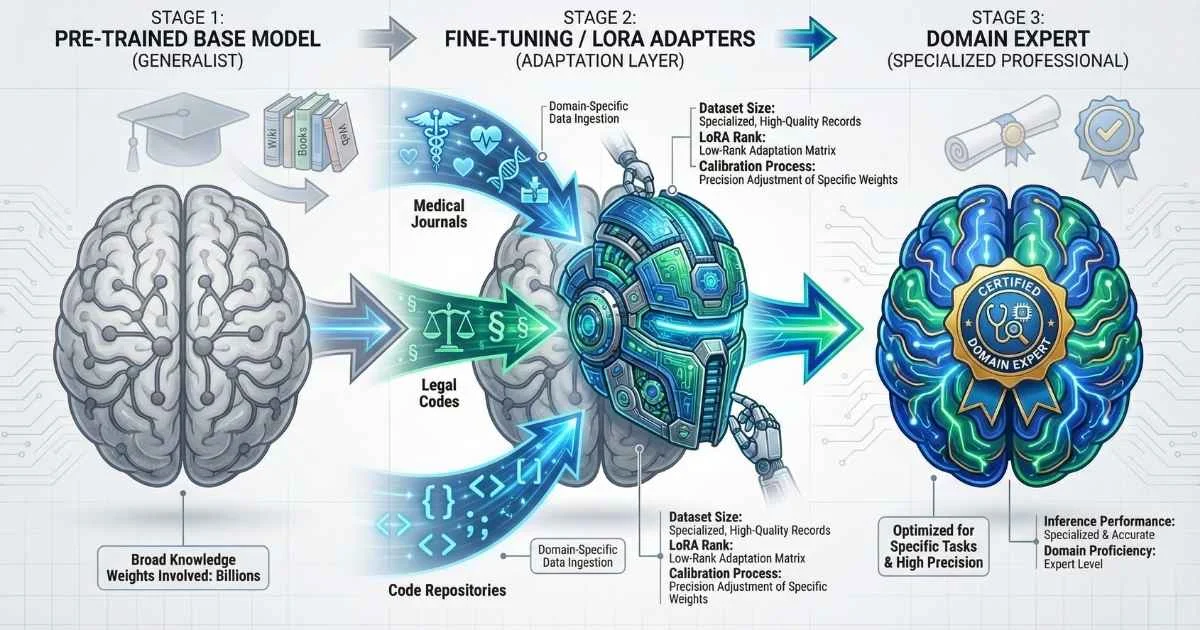
Beyond the Generalist Model
Foundation models like GPT-4 and Claude 3.5 are impressive generalists—they know a little bit about everything. However, for specialized business applications, “a little bit” is often insufficient.
The difference between a generic demo and a production application often lies in customization.
When an AI needs to understand proprietary medical terminology, adhere to strict brand voice guidelines, or generate code in a proprietary internal language, standard prompting often fails. This is where customization techniques—from Retrieval-Augmented Generation (RAG) to full fine-tuning—become essential.
This guide provides a technical decision framework for customizing LLMs, exploring:
That’s when I realized: no matter how sophisticated your prompts, general-purpose LLMs will always give general-purpose answers. If you need an AI that truly understands your domain, speaks with your voice, and handles your specific use cases—you need to fine-tune.
In this guide, I’m going to demystify the complete fine-tuning landscape as of December 2025. Whether you’re a developer wanting to customize open-source models or an enterprise evaluating platforms, you’ll walk away knowing exactly when, how, and where to fine-tune.
67%
Enterprises fine-tune LLMs (2025)
2-5×
Faster training with Unsloth
80%
Less VRAM with QLoRA
0.1-2%
Parameters trained (LoRA)
Sources: Gartner 2025 • Unsloth • QLoRA Paper
First, Let’s Clear Up the Customization Options
One of the biggest mistakes I see is jumping straight to fine-tuning when a simpler solution would work. There are actually three main ways to customize LLM behavior, and choosing the right one can save you weeks of work and thousands of dollars.
The Three Pillars of LLM Customization
%%{init: {'theme': 'base', 'themeVariables': { 'primaryColor': '#4f46e5', 'primaryTextColor': '#ffffff', 'primaryBorderColor': '#3730a3', 'lineColor': '#6366f1', 'fontSize': '16px' }}}%%
flowchart LR
    A["Customization Need"] --> B{"What type?"}
    B -->|"Format/Style"| C["Prompt Engineering"]
    B -->|"Knowledge"| D["RAG"]
    B -->|"Behavior"| E["Fine-Tuning"]
    C --> F["Minutes, Free"]
    D --> G["Days, Low Cost"]
    E --> H["Weeks, Higher Cost"]
Prompt Engineering is crafting better instructions to get the output you want. It’s free, immediate, and should always be your first attempt. You’d be surprised how much you can achieve with well-structured prompts, role-playing, and few-shot examples. See our Prompt Engineering Fundamentals guide for detailed techniques.
RAG (Retrieval-Augmented Generation) gives the model access to external documents. When the user asks a question, relevant passages are retrieved and included in the prompt. The model doesn’t learn anything new—it just references the information you provide. For a complete guide, see the RAG, Embeddings, and Vector Databases guide.
Fine-Tuning actually changes the model’s weights. You’re training it on your specific data so it develops new patterns, terminology, and behaviors that become part of the model itself.
When to Use What?
Click each approach to see details
Prompt Engineering
Best For:
Format changes, simple style tweaks
When to Use:
Task can be described in instructions, few-shot examples work
Limitations:
Limited behavior change, no new knowledge
Cost
Free
Difficulty
Easy
Time
Minutes
Sources: OpenAI Fine-tuning Guide • Hugging Face PEFT
The Decision Framework I Use
Here’s my mental checklist when a client asks about customizing an LLM:
Try Prompt Engineering First When:
- ✅ The task can be described in clear instructions
- ✅ A few examples demonstrate what you want
- ✅ You need to deploy immediately
- ✅ The model already “knows” the domain, just needs formatting
Use RAG When:
- ✅ Information changes frequently (daily/weekly)
- ✅ You need source attribution (citations matter)
- ✅ Domain knowledge lives in documents
- ✅ You want to avoid hallucinations about facts
Fine-Tune When:
- ✅ You need consistent style, tone, or format
- ✅ Domain-specific terminology and reasoning is essential
- ✅ Task requires specialized structured outputs
- ✅ You want a smaller, faster, cheaper model for production
- ✅ Privacy/compliance requires custom deployment
💡 Pro Tip: The best enterprise deployments often combine all three. Fine-tune for behavior and style, use RAG for current knowledge, and craft prompts for specific interactions.
What Fine-Tuning Actually Does (Under the Hood)
Let me demystify what happens when you “fine-tune” a model. It’s surprisingly intuitive once you understand the concept.
The Training Hierarchy
When companies like OpenAI or Meta create models, they go through multiple training stages:
| Stage | What It Does | Who Does It | Your Role |
|---|---|---|---|
| Pre-training | Learn language fundamentals | Model creators | Already done |
| Supervised Fine-Tuning (SFT) | Learn to follow instructions | Model creators | You can customize |
| Alignment (RLHF/DPO) | Learn human preferences | Model creators | You can customize |
| Your Fine-Tuning | Specialize for your task | You | This is where you take over |
Fine-tuning doesn’t start from scratch—it takes a model that already understands language and tweaks it in specific ways based on your examples. For a deep dive into how models are initially trained, see the How LLMs Are Trained guide.
Analogy: It’s like an experienced chef learning a new cuisine. They don’t need to learn what “cooking” is—they already know knife skills, heat control, and flavor balancing. You’re just teaching them Thai techniques, not cooking fundamentals.
Base Models vs. Instruction-Tuned Models
When fine-tuning, you can start from two types of models:
Base Models (like LLaMA 4 Scout base, Mistral Large 3 base) are pure text completion engines. They predict the next word but have no concept of “user” and “assistant.” Fine-tune these when you want maximum control over behavior.
Instruction-Tuned Models (like LLaMA 4 Scout Instruct, LLaMA 4 Maverick, GPT-4o-mini) already know how to follow instructions and have a conversation. Fine-tune these when you want to add specialized capabilities while keeping the helpful assistant behavior.
For most production use cases, start with instruction-tuned models—they give you a head start on being useful.
What Fine-Tuning Can and Cannot Do
This is crucial to understand before investing time and money:
| ✅ Fine-Tuning CAN | ❌ Fine-Tuning CANNOT |
|---|---|
| Teach consistent output formats | Add knowledge after training cutoff |
| Instill domain-specific terminology | Make the model learn in real-time |
| Adjust tone, style, and voice | Guarantee factual accuracy |
| Improve task-specific performance | Fix fundamental architecture limits |
| Reduce hallucinations in trained domains | Replace the need for good prompts |
| Enable reliable structured outputs | Create a smaller model (see distillation) |
Choosing the Right Base Model
Selecting the right model to fine-tune is one of the most important decisions you’ll make. Here’s my guide for December 2025:
Model Selection Matrix by Use Case:
| Use Case | Recommended Models | Why |
|---|---|---|
| General chat/assistant | LLaMA 4 Scout, Mistral 3, Qwen3 | Strong instruction following |
| Code generation | DeepSeek Coder V2, CodeLLaMA, Qwen3-Coder | Pre-trained on code |
| Reasoning/math | DeepSeek R1, Qwen3-Next, LLaMA 4 Maverick | Built-in chain-of-thought |
| Multilingual | Qwen3, mT5, BLOOM, Aya | Diverse language training |
| Long documents | LLaMA 4 Maverick (400B MoE), Mistral Large 3 | 128K+ context |
| Vision + text | Qwen3-VL, LLaVA-NeXT, GLM-4.6V | Multimodal architecture |
| Low resource/edge | Phi-3-mini, Gemma 3 4B, Qwen3-1.5B | Efficient small models |
| Function calling | FunctionGemma, Mistral 3, GPT-4o-mini | Tool use optimized |
Model Size Trade-offs:
| Size | VRAM (QLoRA) | Training Time | Quality | Best For |
|---|---|---|---|---|
| 1-3B | 2-4 GB | Minutes-Hours | Decent | Edge, mobile, prototyping |
| 7-8B | 6-10 GB | Hours | Very Good | Most production use cases |
| 13-20B | 12-20 GB | Hours-Days | Excellent | Quality-critical apps |
| 30-70B | 24-48 GB | Days | Outstanding | Enterprise, complex tasks |
| 100B+ | 80+ GB | Days-Weeks | Best | Research, frontier apps |
License Considerations:
| License | Commercial Use | Modify & Distribute | Examples |
|---|---|---|---|
| Apache 2.0 | ✅ Unrestricted | ✅ Yes | Mistral, Qwen, Phi |
| MIT | ✅ Unrestricted | ✅ Yes | Some research models |
| LLaMA License | ✅ With conditions | ✅ Yes | LLaMA 4, LLaMA 3 |
| CC-BY-NC | ❌ Non-commercial | ✅ Yes | Some academic models |
My Decision Flowchart:
-
What’s your GPU budget?
- Consumer GPU (8-24GB) → 7B-13B models with QLoRA
- Cloud/enterprise (48GB+) → 30B-70B models
- Multiple GPUs → Consider 100B+
-
What’s your latency requirement?
- Real-time (< 100ms) → 1-4B quantized
- Interactive (< 500ms) → 7-13B
- Batch processing → Any size
-
What’s your accuracy requirement?
- Prototyping → Smallest that works
- Production → Test 7B, 13B, find sweet spot
- Critical applications → Start with largest feasible
💡 Pro Tip: Always benchmark multiple model sizes on YOUR task. A well-tuned 7B model often beats a poorly-tuned 70B model.
The PEFT Revolution: LoRA and QLoRA Explained
If you’d asked me about fine-tuning in 2022, I would have said you need a cluster of A100 GPUs and a budget of at least $50,000. Today? You can fine-tune a 7B model on a MacBook with 16GB RAM. For guidance on running models locally, see the Running LLMs Locally guide.
This revolution is thanks to Parameter-Efficient Fine-Tuning (PEFT), and specifically LoRA and QLoRA.
The Problem with Full Fine-Tuning
Traditional fine-tuning updates every single parameter in the model. For a 7B model, that’s 7 billion numbers to adjust. The problems:
- Memory: You need to store the model, gradients, and optimizer states—often 16-24 bytes per parameter
- Storage: Each fine-tuned version is a full model copy
- Cost: Multiple high-end GPUs for days or weeks
- Risk: “Catastrophic forgetting”—the model might lose capabilities it had before
Enter LoRA: Low-Rank Adaptation
LoRA takes a brilliantly simple approach: instead of updating the massive weight matrices directly, it adds small “adapter” matrices that modify the behavior.
%%{init: {'theme': 'base', 'themeVariables': { 'primaryColor': '#4f46e5', 'primaryTextColor': '#ffffff', 'primaryBorderColor': '#3730a3', 'lineColor': '#6366f1', 'fontSize': '16px' }}}%%
flowchart LR
    A["Input"] --> B["Original Weights<br/>(Frozen)"]
    A --> C["LoRA Adapter<br/>(Trainable)"]
    B --> D["Combined Output"]
    C --> D
Here’s the key insight: the adapter is much smaller than the full weight matrix. Instead of training millions of parameters, you train maybe 1-2% of them. The original weights stay frozen (unchanged), and the small adapter learns your specific customizations.
Benefits of LoRA:
- Train 0.1-2% of parameters instead of 100%
- Adapter files are tiny (50-200MB vs 14GB for a 7B model)
- Multiple adapters can share one base model
- Nearly identical quality to full fine-tuning
- No catastrophic forgetting
QLoRA: Taking It Further with Quantization
QLoRA (Quantized LoRA) combines LoRA with 4-bit quantization. The base model is loaded in 4-bit precision (huge memory savings), while the LoRA adapters are trained in full precision.
The result? You can fine-tune a 70B model on a single RTX 4090 (24GB VRAM). Previously that would have required 800GB+ of GPU memory.
GPU Memory Requirements (VRAM in GB)
QLoRA makes 70B models trainable on consumer GPUs
| Model Size | Full Fine-Tune | LoRA | QLoRA |
|---|---|---|---|
| 7Bparameters | 80+GB | 16-24GB | 6-8GB |
| 13Bparameters | 160+GB | 32-40GB | 12-16GB |
| 70Bparameters | 800+GB | 160+GB | 24-48GB |
Full Fine-Tune
Multiple A100 80GB
LoRA
Single A100 40GB
QLoRA
RTX 4090 / M2 Max
Sources: QLoRA Paper • Hugging Face PEFT
LoRA Configuration Basics
When setting up LoRA, you’ll encounter a few key parameters:
| Parameter | What It Means | Typical Values |
|---|---|---|
| Rank (r) | Size of adapter matrices | 8-64 (higher = more capacity) |
| Alpha | Scaling factor | Usually 2× rank |
| Target modules | Which layers to adapt | q_proj, v_proj (attention) or all linear |
| Dropout | Regularization | 0.05-0.1 |
My recommendation for starting out:
- Rank: 16 (good balance)
- Alpha: 32
- Target: All linear layers for instruct models
- Dropout: 0.05
DoRA: Even Closer to Full Fine-Tuning
DoRA (Weight-Decomposed Low-Rank Adaptation, introduced February 2024, mainstream by late 2025) takes LoRA further by decomposing weight matrices into magnitude and direction components. The directional component uses LoRA adapters while magnitude is trained separately.
%%{init: {'theme': 'base', 'themeVariables': { 'primaryColor': '#4f46e5', 'primaryTextColor': '#ffffff', 'primaryBorderColor': '#3730a3', 'lineColor': '#6366f1', 'fontSize': '16px' }}}%%
flowchart LR
    A["Pre-trained Weights"] --> B["Decompose"]
    B --> C["Magnitude<br/>(Trainable)"]
    B --> D["Direction<br/>(LoRA Adapters)"]
    C --> E["Combined Output"]
    D --> E
Why DoRA Matters:
- Achieves results closer to full fine-tuning than LoRA (~97% vs ~95% quality)
- Same inference overhead as LoRA (adapters merge at deploy time)
- Particularly effective for complex reasoning tasks
- Fully supported in Hugging Face PEFT library (
use_dora=True) - Exhibits learning patterns that mimic full fine-tuning behavior
December 2025 Development: QDoRA combines DoRA with 4-bit quantization. Early benchmarks show it sometimes outperforms even full fine-tuning while using less memory than standard QLoRA—a remarkable achievement.
| Technique | Memory Savings | Quality vs Full FT | Best For |
|---|---|---|---|
| LoRA | 90%+ | ~95% | General use, fast iteration |
| QLoRA | 95%+ | ~93% | Consumer GPUs, budget-conscious |
| DoRA | 90%+ | ~97% | Complex reasoning, quality-focused |
| QDoRA | 95%+ | ~96-98% | Best of both worlds |
When to Choose DoRA Over LoRA:
- Complex reasoning tasks (math, code, logic)
- When quality is critical and memory isn’t the primary constraint
- Research applications requiring near-full-fine-tuning quality
- Vision-language model fine-tuning
Modern Alignment: DPO, ORPO, and Moving Beyond RLHF
If you’ve followed AI news, you’ve heard about RLHF (Reinforcement Learning from Human Feedback). It’s how ChatGPT learned to be helpful instead of just completing text. But RLHF is complex, expensive, and often unstable.
Enter DPO and ORPO—simpler alternatives that are becoming the standard in December 2025.
Alignment Techniques Evolution
From complex RLHF to simpler DPO and ORPO
Train reward model → Use RL to optimize
✓ Pros
- • Maximum control
- • Well-researched
✗ Cons
- • Complex pipeline
- • Expensive
- • Unstable training
Directly optimize on preference pairs
✓ Pros
- • Simpler pipeline
- • More stable
- • Lower cost
✗ Cons
- • Less fine-grained control
Combined SFT + alignment in one step
✓ Pros
- • Single-stage
- • Efficient
- • Good results
✗ Cons
- • Newer, less proven
📊 December 2025 Trend: DPO is now the default choice for most fine-tuning projects. Start with SFT, add DPO if needed.
Sources: DPO Paper • ORPO Paper • InstructGPT (RLHF)
The RLHF Pipeline (What It Replaced)
RLHF requires three stages:
- Supervised Fine-Tuning on ideal examples
- Train a Reward Model to predict which responses humans prefer
- Reinforcement Learning (PPO) to optimize the LLM against the reward model
This works, but it’s complex (three different models!), unstable (RL is finicky), and expensive.
DPO: Direct Preference Optimization
DPO (introduced 2023, mainstream by 2025) has a brilliant insight: you can skip the reward model entirely. Instead, you train directly on preference pairs.
Prompt: "How do I improve my code quality?"

Preferred Response: "Here are five evidence-based practices..."
Rejected Response: "Just write better code. It's not hard if you try."
The model learns: “For this prompt, produce outputs more like the preferred and less like the rejected.” No reward model needed, just supervised learning on pairs.
Why DPO Won:
- Single training stage (not three)
- More stable training
- Similar results to RLHF
- Much simpler to implement
ORPO: The New Kid on the Block
ORPO (Odds Ratio Preference Optimization, 2024) goes even further: it combines SFT and preference alignment into a single stage. Instead of SFT → DPO, you do everything at once.
It’s fully established by late 2025, offering similar quality with even simpler pipelines. ORPO is reference model-free and computationally efficient.
GRPO: The Reasoning Revolution
GRPO (Group Relative Policy Optimization) gained massive attention in 2025 after its use in training DeepSeek R1. It’s particularly effective for reasoning models.
How GRPO Differs from DPO:
| Aspect | DPO | GRPO |
|---|---|---|
| Comparison type | Pairwise (chosen vs rejected) | Group-wise (multiple ranked responses) |
| Reward model | Not needed | Not needed |
| Best for | General preference alignment | Reasoning, math, code |
| Data format | Pairs | Ranked groups per prompt |
Key GRPO Improvements (Late 2025):
- Zero Gradient Signal Filtering: Removes uninformative gradients that slow training
- Active Sampling: Focuses training on challenging examples
- Token-Level Loss: Finer-grained optimization for better convergence
- Off-policy GRPO: Improved sampling efficiency
When to Use GRPO:
- Training reasoning models (math, code, logic)
- When you have multiple ranked responses per prompt
- Building chain-of-thought capabilities
- Creating models that “think” before answering
💡 December 2025 Note: DAPO (an open-sourced RL algorithm) demonstrated superior performance over DeepSeek’s GRPO on certain benchmarks, signaling continued innovation in this space. The TRL library now supports both.
My Recommendation for December 2025
| Your Situation | Approach |
|---|---|
| Format/style changes only | SFT (supervised fine-tuning) |
| Need preference alignment | SFT + DPO |
| Want single-stage efficiency | ORPO |
| Training reasoning models | GRPO |
| Research/maximum control | RLHF (rarely needed) |
Most production deployments: SFT first, add DPO if needed. Use GRPO for reasoning capabilities.
Fine-Tuning Platforms Compared: December 2025
The platform landscape has exploded. You have managed cloud services, specialized fine-tuning platforms, and open-source frameworks. Let me break down your options.
Fine-Tuning Platforms (December 2025)
Choose based on your needs and expertise
OpenAI
Simplicity
Key Feature: One-click deployment
Amazon Bedrock
Enterprise AWS
Key Feature: RFT, 66% accuracy gains
Google Vertex AI
GCP/Gemini
Key Feature: Native Gemini tuning
Together AI
Open-source
Key Feature: 100+ models, 131K context
Sources: Together AI • Unsloth • LLaMA-Factory
Managed Cloud Platforms
OpenAI Fine-Tuning API now supports GPT-4o, GPT-4o-mini, and the new GPT-4.1 family (including gpt-4.1-nano). December 2025 additions include Reinforcement Fine-Tuning (RFT) with programmable graders, vision fine-tuning support, and webhooks for completion notifications. The focus is now on an “eval → improve → re-eval” loop using the Evals API. Pricing: $25/M tokens training, $3.75/$15 inference for GPT-4o.
Amazon Bedrock received its largest expansion at re:Invent 2025—18 new open-weight models including Mistral Large 3, Gemma 3, Qwen3-Next, and NVIDIA Nemotron. Their Reinforcement Fine-Tuning (RFT) reports up to 66% accuracy improvements. The new Amazon Nova 2 family (Lite, Pro, Sonic, Omni) offers specialized models for different workloads, with Nova Forge enabling custom frontier model creation from your proprietary data.
Google Vertex AI now supports fine-tuning for Gemini 2.5 Pro/Flash, Gemini 2.0 Flash, and the new Gemini 3 Flash (December 2025 preview). Multimodal fine-tuning covers text, image, audio, video, and documents. The tuning service is generally available with supervised fine-tuning for domain-specific applications.
Together AI supports 150+ models with extended context up to 256K tokens. New serverless fine-tuning options reduce infrastructure management. Competitive pricing and excellent developer experience make it the go-to for open-source model fine-tuning.
Specialized Platforms
Fireworks AI takes an “inference-first” approach—they optimize for fast serving of fine-tuned models. Their Reinforcement Fine-Tuning uses Python evaluator functions for an “evaluation-first” philosophy.
Predibase offers a low-code/no-code experience that’s surprisingly powerful. Their Fine-Tuning Index shows specialized models outperforming GPT-4 on domain tasks.
OpenPipe (acquired by CoreWeave in September 2025) is fascinating—it automatically collects data from your production logs and continuously fine-tunes models. Perfect for replacing expensive API calls with cheaper specialized models.
Modal is serverless GPU compute. You pay only when training, with easy Python APIs. Great for sporadic fine-tuning needs.
Open-Source Frameworks (Developer Favorites)
Unsloth ⭐ remains the community darling with major December 2025 updates:
- 3× faster training with 30% less VRAM through new Triton kernels and padding-free training
- Extended context: Up to 500,000 tokens (750K+ on high-VRAM GPUs)
- FP8 GRPO: Reinforcement learning on consumer GPUs (RTX 40/50 series)—1.4× faster than FP16
- New model support: Mistral 3, Devstral 2, NVIDIA Nemotron 3, GLM-4.6V, Qwen3-VL, Qwen3-Next
- Mobile deployment: Fine-tune for direct phone execution (PyTorch collaboration)
- QAT support: Quantization-Aware Training recovering up to 70% accuracy
- Transformers v5 compatibility (preliminary support)
If you’re doing local fine-tuning on NVIDIA hardware, Unsloth is the definitive choice.
LLaMA-Factory expanded significantly in 2025:
- Model support: LLaMA 4, Qwen3, InternVL3, Gemma 3, and 100+ other models
- Training methods: Now supports GRPO, ORPO, and DPO alongside traditional RLHF
- New optimizers: APOLLO, Adam-mini, Muon, OFT for better training efficiency
- Built-in acceleration: FlashAttention-2 and Unsloth integration
- Visual WebUI makes parameter tuning accessible for beginners
Axolotl is for power users who want configuration-driven flexibility. Define everything in YAML files, support for advanced techniques, production-ready outputs.
Apple MLX is the answer for Mac users. Native Apple Silicon support means you can fine-tune 7B models on a MacBook with 16GB RAM. Privacy-first, no cloud costs.
Making Your Choice
| Your Situation | Recommended Platform |
|---|---|
| Fastest path to production | OpenAI Fine-Tuning API |
| Enterprise in AWS | Amazon Bedrock |
| Enterprise in GCP | Vertex AI |
| Need open-source flexibility | Together AI |
| Want automatic data collection | OpenPipe |
| Low-code preference | Predibase or LLaMA-Factory |
| Maximum speed on NVIDIA | Unsloth + Hugging Face |
| Mac developer | Apple MLX |
| Budget-conscious | Local with QLoRA |
Data Preparation: Where Most Projects Fail
I’ve seen more fine-tuning projects fail due to bad data than bad hyperparameters. The old saying “garbage in, garbage out” applies tenfold to LLMs. Let me share what actually works.
Quality Over Quantity
Here’s a counterintuitive truth: 1,000 excellent examples will outperform 10,000 mediocre ones. LLMs learn patterns, and noisy data creates noisy patterns.
What “quality” means:
- Consistent format across examples
- Diverse coverage of the skill you’re teaching
- Accurate responses (no errors in your “ground truth”)
- Representative of real production use cases
- Edge cases included (not just happy paths)
Data Size Guidelines (December 2025)
| Use Case | Minimum | Recommended | Notes |
|---|---|---|---|
| Style transfer | 100-500 | 500-1,000 | Consistent examples crucial |
| Domain adaptation | 500-2,000 | 2,000-5,000 | Cover vocabulary |
| Task specialization | 1,000-5,000 | 5,000-10,000 | Diverse examples |
| Major capability change | 10,000+ | 50,000+ | Consider starting from base |
Data Formats
OpenAI JSONL Format (conversations):
{"messages": [
  {"role": "system", "content": "You are a helpful medical assistant..."},
  {"role": "user", "content": "What are the symptoms of..."},
  {"role": "assistant", "content": "The key symptoms include..."}
]}
Generic Instruction Format (for open-source):
{"instruction": "Summarize this clinical note", "input": "Patient presented with...", "output": "Summary: 42-year-old male..."}DPO Preference Format:
{"prompt": "Explain quantum computing", "chosen": "Imagine...", "rejected": "Quantum computing uses qubits..."}Synthetic Data: The Secret Weapon
Here’s a technique that’s become standard in 2025: use a powerful model (GPT-4, Claude) to generate training data, then fine-tune a smaller model on those outputs. This is called synthetic data generation or distillation.
The process:
- Define the skill you want to teach
- Use GPT-4/Claude to generate diverse examples
- Have humans review and filter for quality
- Train your smaller model on the curated synthetic data
Why it works:
- Scale: Generate thousands of examples quickly
- Consistency: The teacher model has consistent style
- Coverage: Can systematically cover edge cases
Risks to watch:
- Model collapse: If the student is only fed synthetic data repeatedly, quality can degrade
- Bias amplification: The teacher’s biases get passed down
- Reduced diversity: Synthetic text can be more homogeneous
Best practice: Mix synthetic data (60-80%) with real human-generated data (20-40%) and always have humans verify quality.
My Data Quality Checklist
Before training, I verify:
| ✅ Do | ❌ Don’t |
|---|---|
| Diverse examples covering the task | Repeat similar examples |
| Consistent formatting | Mix incompatible formats |
| Include edge cases | Train only on “happy path” |
| Verify factual accuracy | Include known errors |
| Balance categories/topics | Heavily skew distributions |
| Remove PII | Leave personal information |
| Hold out 10-20% for validation | Train on 100% of data |
For more on privacy and safety considerations, see the Understanding AI Safety, Ethics, and Limitations guide.
Data Cleaning Scripts
Here are practical scripts for cleaning your training data:
import json
import re
from collections import Counter

def clean_training_data(input_file, output_file):
    """Clean and validate training data for fine-tuning."""

    cleaned = []
    issues = Counter()

    with open(input_file, 'r') as f:
        for line_num, line in enumerate(f, 1):
            try:
                example = json.loads(line)
            except json.JSONDecodeError:
                issues['invalid_json'] += 1
                continue

            # Check required fields
            if 'messages' not in example:
                issues['missing_messages'] += 1
                continue

            # Remove empty messages
            example['messages'] = [
                m for m in example['messages']
                if m.get('content', '').strip()
            ]

            # Check minimum conversation length
            if len(example['messages']) < 2:
                issues['too_short'] += 1
                continue

            # Remove PII patterns
            for msg in example['messages']:
                msg['content'] = remove_pii(msg['content'])

            cleaned.append(example)

    # Write cleaned data
    with open(output_file, 'w') as f:
        for example in cleaned:
            f.write(json.dumps(example) + '\n')

    print(f"Cleaned: {len(cleaned)} examples")
    print(f"Issues found: {dict(issues)}")
    return cleaned

def remove_pii(text):
    """Remove common PII patterns."""
    patterns = [
        (r'\b\d{3}-\d{2}-\d{4}\b', '[SSN]'),        # SSN
        (r'\b\d{16}\b', '[CARD]'),                   # Credit card
        (r'\b[A-Za-z0-9._%+-]+@[A-Za-z0-9.-]+\.[A-Z|a-z]{2,}\b', '[EMAIL]'),
        (r'\b\d{3}[-.]?\d{3}[-.]?\d{4}\b', '[PHONE]'),
    ]
    for pattern, replacement in patterns:
        text = re.sub(pattern, replacement, text)
    return text
Annotation Tools for Creating Training Data
| Tool | Best For | Cost | Notes |
|---|---|---|---|
| Label Studio | General annotation | Free (open-source) | Self-hosted, flexible |
| Argilla | LLM feedback | Free (open-source) | Built for LLM workflows |
| Scale AI | Enterprise volume | $$$$ | High quality, expensive |
| Surge AI | Preference data | $$$ | Good for RLHF/DPO pairs |
| Prodigy | Fast annotation | $$ | Active learning built-in |
GRPO Data Format
For GRPO (Group Relative Policy Optimization), you need ranked groups:
{
  "prompt": "Solve: What is 15% of 80?",
  "responses": [
    {"text": "15% of 80 = 0.15 × 80 = 12", "rank": 1},
    {"text": "80 × 15/100 = 12", "rank": 2},
    {"text": "About 12", "rank": 3},
    {"text": "15", "rank": 4}
  ]
}
Data Versioning Best Practices
Always version your training data alongside code:
# Using DVC (Data Version Control)
pip install dvc
dvc init
dvc add training_data.jsonl
git add training_data.jsonl.dvc
git commit -m "Training data v1.0: 5000 examples"
git tag data-v1.0
Hands-On: Fine-Tuning with QLoRA
Let me walk you through an actual fine-tuning run. We’ll use QLoRA to fine-tune a 7B model for customer service—doable on a 24GB GPU or Google Colab Pro.
Prerequisites
- Python 3.10+
- GPU with 16-24GB VRAM (or Google Colab Pro)
- Hugging Face account (for model access)
- Your training data in JSONL format
Setup
# Install required packages
pip install transformers peft trl datasets accelerate bitsandbytes

# Key versions (December 2025)
# transformers >= 4.48 (v5 preview available)
# peft >= 0.18 (required for Transformers v5 compatibility)
# trl >= 0.26
# Optional: unsloth for 3x speedup
Loading the Model with QLoRA
import torch
from transformers import AutoModelForCausalLM, AutoTokenizer, BitsAndBytesConfig
from peft import LoraConfig, prepare_model_for_kbit_training, get_peft_model

# Quantization config (4-bit for QLoRA)
bnb_config = BitsAndBytesConfig(
    load_in_4bit=True,
    bnb_4bit_use_double_quant=True,
    bnb_4bit_quant_type="nf4",
    bnb_4bit_compute_dtype=torch.bfloat16
)

# Load base model in 4-bit
model = AutoModelForCausalLM.from_pretrained(
    "meta-llama/Llama-3.3-8B-Instruct",  # or LLaMA 4 Scout, Mistral, Qwen3
    quantization_config=bnb_config,
    device_map="auto"
)
tokenizer = AutoTokenizer.from_pretrained("meta-llama/Llama-3.3-8B-Instruct")

# LoRA configuration (use use_dora=True for DoRA)
lora_config = LoraConfig(
    r=16,                          # Rank
    lora_alpha=32,                 # Scaling factor
    target_modules=["q_proj", "v_proj", "k_proj", "o_proj", "gate_proj", "up_proj", "down_proj"],
    lora_dropout=0.05,
    bias="none",
    task_type="CAUSAL_LM",
    use_dora=False  # Set to True for DoRA (better quality, same overhead)
)

# Prepare model for training
model = prepare_model_for_kbit_training(model)
model = get_peft_model(model, lora_config)
Training
from trl import SFTTrainer
from transformers import TrainingArguments
from datasets import load_dataset

# Load your data
dataset = load_dataset("json", data_files="training_data.jsonl")

training_args = TrainingArguments(
    output_dir="./results",
    num_train_epochs=3,
    per_device_train_batch_size=4,
    gradient_accumulation_steps=4,
    learning_rate=2e-4,
    warmup_ratio=0.03,
    logging_steps=10,
    save_strategy="epoch",
    evaluation_strategy="epoch",
    fp16=True,
)

trainer = SFTTrainer(
    model=model,
    train_dataset=dataset["train"],
    eval_dataset=dataset["validation"],
    tokenizer=tokenizer,
    args=training_args,
    max_seq_length=2048,
)

# Train!
trainer.train()
Saving and Using Your Adapter
# Save adapter (small file ~50-100MB)
model.save_pretrained("./customer-service-adapter")

# Later: Load base + adapter for inference
from peft import PeftModel

base = AutoModelForCausalLM.from_pretrained("meta-llama/Llama-3.3-8B-Instruct")
model = PeftModel.from_pretrained(base, "./customer-service-adapter")
Debugging Tips
| Problem | Likely Cause | Fix |
|---|---|---|
| Validation loss increasing | Overfitting | Reduce epochs, add more data, increase dropout |
| Repetitive outputs | Mode collapse | Lower learning rate, add diversity to data |
| Forgot how to chat | Catastrophic forgetting | Mix in general chat data, reduce epochs |
| CUDA out of memory | Batch too large | Reduce batch size, increase gradient accumulation |
Troubleshooting Common Fine-Tuning Problems
Fine-tuning can fail in subtle ways. Here’s my comprehensive troubleshooting guide based on hundreds of debugging sessions.
Training Issues
Loss Not Decreasing
Symptoms: Training loss stays flat, oscillates wildly, or increases.
Diagnostic Checklist:
- ❓ Is the learning rate appropriate? Try:
1e-5,5e-5,1e-4,2e-4 - ❓ Is the data format correct for the model’s chat template?
- ❓ Are the right layers being trained?
# Check if gradients are flowing
for name, param in model.named_parameters():
    if param.requires_grad:
        if param.grad is not None:
            print(f"{name}: grad_norm = {param.grad.norm():.6f}")
        else:
            print(f"{name}: NO GRADIENT (check target_modules)")
Solutions Matrix:
| Symptom | Cause | Solution |
|---|---|---|
| Loss flat from start | Wrong data format | Check chat template matches model |
| Loss stuck after initial drop | Learning rate too low | Increase by 2-5x |
| Loss oscillating | Learning rate too high | Decrease by 2-5x |
| Loss increases | Major data issues | Validate data format, check for corruption |
CUDA Out of Memory
Quick fixes in order of impact:
- Reduce batch_size (try 1, then 2, then 4)
- Increase gradient_accumulation_steps proportionally
- Enable gradient checkpointing:
model.gradient_checkpointing_enable() - Reduce max_seq_length (512 → 256 for testing)
- Use 4-bit quantization (QLoRA)
- Lower LoRA rank (r=16 → r=8)
Memory estimation formula:
VRAM ≈ Model_Size × (4 for FP32, 2 for FP16, 0.5 for 4-bit) × Batch_Size × OverheadModel Outputs Garbage After Training
Common causes and fixes:
| Issue | Solution |
|---|---|
| Wrong tokenizer config | Ensure tokenizer.pad_token = tokenizer.eos_token |
| Chat template corrupted | Reload original tokenizer, re-apply template |
| Wrong generation config | Use model.eval() and check do_sample, temperature |
| Adapter not loaded correctly | Verify PeftModel loading order |
# Debug generation issues
model.eval()
with torch.no_grad():
    outputs = model.generate(
        input_ids,
        max_new_tokens=100,
        do_sample=False,  # Deterministic for debugging
        pad_token_id=tokenizer.eos_token_id
    )
print(tokenizer.decode(outputs[0]))
Quality Issues
Model Forgot How to Chat (Catastrophic Forgetting)
Prevention strategies:
- Mix 10-20% general chat data into training
- Use fewer epochs (1-3 is often enough for LoRA)
- Lower learning rate (5e-6 instead of 2e-4)
- Freeze more layers (only train q_proj, v_proj)
Recovery: If already happened, restart from base model with mixed data.
Repetitive/Looping Outputs
Causes and solutions:
| Cause | Solution |
|---|---|
| Training data too similar | Increase diversity, deduplicate |
| Overfitting | Reduce epochs, increase dropout |
| Generation settings | Add repetition_penalty=1.1 at inference |
Model Ignores System Prompt
- Include system prompt in ALL training examples
- Verify chat template is correct for the model
- Check if base model supports system prompts
Inference Issues
LoRA Adapter Won’t Load
# CORRECT loading order
from transformers import AutoModelForCausalLM
from peft import PeftModel

# Step 1: Load base model first
base_model = AutoModelForCausalLM.from_pretrained(
    "meta-llama/Llama-3.3-8B-Instruct",
    device_map="auto"
)

# Step 2: Load adapter on top
model = PeftModel.from_pretrained(base_model, "./my-adapter")

# WRONG: Don't try to load merged model as PeftModel
Performance Worse Than Expected
Validation checklist:
- Testing on held-out data (not training data)?
- Comparing against pre-fine-tune baseline?
- No data leakage between train/validation?
- Same tokenizer settings as training?
- Same quantization settings as training?
Domain-Specific Success Stories
Fine-tuning isn’t theoretical—organizations are seeing massive improvements in production. Let me share what’s working across industries.
Domain-Specific Fine-Tuning Success
Average accuracy improvement on domain tasks
Medical/Healthcare
Med-PaLM 2, BioMistral, ClinicalGPT
Clinical documentation, diagnostic assistance, patient communication
Challenge: HIPAA compliance, accuracy critical
Legal
ChatLAW, Harvey AI
Contract review, legal research, document drafting
Challenge: Jurisdiction-specific, liability concerns
Finance
BloombergGPT, FinGPT
Risk modeling, compliance, fraud detection
Challenge: Regulatory requirements, audit trails
Code/Development
CodeLlama, DeepSeek-Coder, StarCoder
Code generation, review, documentation
Challenge: Security, license compliance
📈 Enterprise Data (2025): 67% of enterprises now fine-tune LLMs. Average domain task accuracy improvement: 25-45% (McKinsey).
Sources: McKinsey AI Report 2025 • Gartner AI Survey
Medical/Healthcare
The Challenge: Healthcare needs extreme accuracy, regulatory compliance (HIPAA), and specialized terminology (ICD codes, drug names, clinical procedures).
What’s Working in December 2025:
- Med-Gemini (successor to Med-PaLM 2) achieves 91.1% on MedQA, surpassing expert doctors
- Med42 (fine-tuned LLaMA) serves as foundation for custom medical AI
- RAG + Fine-tuning hybrid approaches outperform either method alone
- Training models to abstain (“I don’t know”) rather than hallucinate
- 35-50% accuracy improvement on clinical tasks with domain fine-tuning
December 2025 Trends:
- Multimodal medical LLMs (imaging + text integration)
- Strict HIPAA compliance built into training pipelines
- Focus shifting from exam scores to clinical integration and real-world safety
- Emphasis on explainability for clinical decision support
Critical Consideration: These models must be assistants, not replacements for clinicians. Human oversight is non-negotiable.
Legal
The Challenge: Jurisdiction-specific rules, precedent awareness, liability concerns, and need for citation accuracy.
What’s Working:
- Fine-tuning on case law, statutes, and legal documents
- Harvey AI, ChatLAW as commercial examples
- Training for specific jurisdictions (US, UK, etc.)
- 40-60% improvement on legal research tasks
Critical Consideration: Always include disclaimers and human review for any legal advice.
Financial Services
The Challenge: Regulatory requirements, numerical precision, audit trails, and market sensitivity.
What’s Working:
- BloombergGPT (trained on 50B+ financial documents)
- Fine-tuning on financial reports, regulations, transaction patterns
- Fraud detection, compliance monitoring, risk assessment
- 30-45% improvement on finance-specific tasks
Critical Consideration: Explainability and audit trails are essential for regulatory compliance.
Code & Software Engineering
The Challenge: Understanding proprietary codebases, internal APIs, coding standards, and company-specific patterns.
What’s Working in December 2025:
- Codestral (Mistral’s code model) as base for enterprise code assistants
- Fine-tuning on internal repositories, documentation, and code reviews
- Teaching company-specific patterns, naming conventions, and architecture
- 50-70% improvement on internal code completion tasks
- Specialized models for security scanning and code review
Example Dataset Sources:
- Git commit history with good commit messages
- Code review comments and approved changes
- Internal documentation and API specs
- Bug reports paired with fix commits
Critical Consideration: Be careful not to leak proprietary code patterns. Use private deployments.
Customer Service & Support
The Challenge: Consistent brand voice, accurate product knowledge, handling edge cases, and knowing when to escalate.
What’s Working:
- Fine-tuning on resolved support tickets and chat logs
- Creating persona-specific models (friendly, professional, technical)
- Training on product FAQs, troubleshooting guides, and policies
- 40-55% reduction in escalation rates with well-tuned models
Example Training Data Structure:
{
  "messages": [
    {"role": "system", "content": "You are a helpful support agent for TechCorp. Be friendly, solve problems, and escalate billing issues to humans."},
    {"role": "user", "content": "My widget isn't working after the update"},
    {"role": "assistant", "content": "I'm sorry to hear that! Let me help you troubleshoot..."}
  ]
}
Critical Consideration: Include escalation training—models must know when to hand off to humans.
Education & Training
The Challenge: Adapting to different learning levels, providing accurate explanations, and maintaining pedagogical best practices.
What’s Working:
- Fine-tuning on curriculum materials and textbooks
- Creating level-specific tutors (elementary, high school, university)
- Training on worked examples with step-by-step explanations
- Incorporating Socratic questioning techniques
- 30-40% improvement in student comprehension metrics
Best Practices:
- Include examples of breaking down complex concepts
- Train on diverse explanation styles (visual, analogy-based, formal)
- Add examples of encouraging student attempts
Critical Consideration: Accuracy is paramount—errors in educational content can propagate misconceptions.
Enterprise Adoption Stats (December 2025)
From Gartner and McKinsey reports:
- 67% of enterprises now fine-tune or plan to fine-tune LLMs
- Average accuracy improvement: 25-45% on domain tasks
- Cost reduction: 40% lower inference costs with smaller tuned models
- Deployment time: Reduced from months to weeks with PEFT methods
Hallucination Reduction Through Fine-Tuning
December 2025 Benchmarks show significant progress in reducing hallucinations through domain fine-tuning:
| Domain | Average Hallucination Rate (Top Models) |
|---|---|
| General Knowledge | ~9% |
| Financial Data | ~2% |
| Scientific Research | ~4% |
| Medical/Healthcare | ~4% |
| Legal Information | ~6% |
Fine-tuning Impact: Studies show 30% reduction in hallucinations when using preference datasets that explicitly contrast accurate outputs with hallucinated ones.
Key Strategies for Hallucination Reduction:
- Domain-specific training data: Narrow the model’s focus to precise knowledge
- Abstention training: Teach models to say “I don’t know” when uncertain
- Temperature tuning: Lower values (0.2-0.5) reduce creative hallucinations
- RAG + Fine-tuning hybrid: Ground responses in retrieved facts
💡 Pro Tip: Leading models now train to use external tools rather than relying solely on parametric memory, which dramatically reduces hallucinations in factual domains.
Evaluating Your Fine-Tuned Model
How do you know if your fine-tuning actually worked? Here’s a comprehensive evaluation framework.
The Evaluation Stack
| Level | What It Measures | When to Use |
|---|---|---|
| Loss metrics | Training convergence | During training |
| Automated benchmarks | Task-specific accuracy | Post-training |
| LLM-as-judge | Quality, style, helpfulness | Pre-deployment |
| Human evaluation | Real-world usefulness | Before production |
| Production metrics | Business impact | After deployment |
Setting Up Automated Evaluation
from datasets import load_dataset
import json

def evaluate_model(model, tokenizer, test_file, max_samples=100):
    """Evaluate fine-tuned model on held-out test set."""

    results = []

    with open(test_file, 'r') as f:
        test_data = [json.loads(line) for line in f][:max_samples]

    for example in test_data:
        # Extract prompt (exclude assistant response)
        messages = example['messages'][:-1]  # All but last
        expected = example['messages'][-1]['content']

        # Generate response
        inputs = tokenizer.apply_chat_template(messages, return_tensors="pt")
        outputs = model.generate(inputs, max_new_tokens=256)
        generated = tokenizer.decode(outputs[0][inputs.shape[1]:])

        results.append({
            'expected': expected,
            'generated': generated,
            'prompt': messages[-1]['content']
        })

    return results

def calculate_metrics(results):
    """Calculate basic quality metrics."""
    from difflib import SequenceMatcher

    similarities = []
    for r in results:
        ratio = SequenceMatcher(None, r['expected'], r['generated']).ratio()
        similarities.append(ratio)

    return {
        'avg_similarity': sum(similarities) / len(similarities),
        'min_similarity': min(similarities),
        'max_similarity': max(similarities)
    }
LLM-as-Judge Evaluation
Use a stronger model (GPT-4, Claude) to evaluate your fine-tuned model’s outputs:
JUDGE_PROMPT = """
Rate this response on a scale of 1-10 for each criterion:

**Question:** {question}
**Response:** {response}
**Expected Style:** {style_guide}

Criteria:
1. **Accuracy** (factual correctness):
2. **Relevance** (addresses the question):
3. **Style** (matches expected tone):
4. **Completeness** (covers all aspects):

Provide scores and brief justification for each.
"""

def llm_judge_evaluation(results, style_guide, judge_model="gpt-4o"):
    """Use LLM to evaluate output quality."""
    from openai import OpenAI
    client = OpenAI()

    scores = []
    for r in results:
        response = client.chat.completions.create(
            model=judge_model,
            messages=[{
                "role": "user",
                "content": JUDGE_PROMPT.format(
                    question=r['prompt'],
                    response=r['generated'],
                    style_guide=style_guide
                )
            }]
        )
        # Parse scores from response...
        scores.append(response.choices[0].message.content)

    return scores
Creating a Validation Dataset
Golden rules for validation data:
- Hold out 10-20% of data for validation
- Ensure validation covers edge cases
- Include examples from each category/topic
- Create adversarial examples (intentionally tricky)
import random

def split_dataset(data, val_ratio=0.15, test_ratio=0.10, seed=42):
    """Split data into train/val/test sets."""
    random.seed(seed)
    random.shuffle(data)

    n = len(data)
    test_end = int(n * test_ratio)
    val_end = test_end + int(n * val_ratio)

    return {
        'test': data[:test_end],
        'validation': data[test_end:val_end],
        'train': data[val_end:]
    }
Benchmarking Against Baselines
Always compare your fine-tuned model against:
- Pre-fine-tune base model - Did we actually improve?
- Prompt-only approach - Is fine-tuning worth the effort?
- Larger un-tuned model - Cost vs quality tradeoff
- Previous fine-tuned version - Are we regressing?
A/B Testing in Production
import hashlib

def route_request(user_id: str, request: dict, new_model_percentage: int = 10):
    """Route requests between models for A/B testing."""

    # Consistent routing based on user ID
    hash_value = int(hashlib.md5(user_id.encode()).hexdigest(), 16)
    bucket = hash_value % 100

    if bucket < new_model_percentage:
        return new_fine_tuned_model(request), "treatment"
    else:
        return production_model(request), "control"
Metrics to track in A/B tests:
- Response quality scores
- User satisfaction ratings
- Task completion rates
- Time to resolution
- Escalation rates
Cost Optimization Strategies
Fine-tuning doesn’t have to break the bank. Here’s how to be smart about costs.
Fine-Tuning Cost Comparison (7B Model)
QLoRA can reduce costs by 90%+
💡 Pro Tip: Start with QLoRA to test hypotheses cheaply, then scale to LoRA for production if needed.
☁️ Cloud Tip: Use spot/preemptible instances for 60-70% savings on training costs.
Sources: Lambda Labs Pricing • RunPod
The Cost Hierarchy
- QLoRA on consumer GPU (~$50-150): Fine-tune 7B models on an RTX 4090 or Mac
- LoRA on cloud (~$100-400): Use spot instances on AWS, GCP, or Lambda
- Full fine-tuning (~$500-2,000+): When you need maximum quality
Detailed Platform Pricing (December 2025)
| Platform | Training Cost | Inference Cost | Notes |
|---|---|---|---|
| OpenAI GPT-4o | $25/M tokens | $3.75/$15 in/out | Simplest, most expensive |
| OpenAI GPT-4o-mini | $3/M tokens | $0.15/$0.60 | Best value managed |
| OpenAI GPT-4.1-nano | $0.10/M tokens | $0.03/$0.12 | Budget option |
| Bedrock Claude 3.5 | ~$15/M tokens | $3/$15 | AWS integration |
| Bedrock Nova Pro | ~$8/M tokens | $0.80/$3.20 | New, competitive |
| Together AI | ~$2-5/M tokens | $0.20-$1.00 | Open-source focus |
| Fireworks AI | ~$3/M tokens | $0.20 | Fast inference |
| Local (Colab Pro) | $10/month | Free | Great for learning |
| Local (RTX 4090) | ~$5-15 electricity | Free | Best long-term value |
Cost Calculator for Typical Projects
Example: Fine-tuning for customer service
- Dataset: 5,000 examples × 500 tokens/example = 2.5M tokens
- Training: 3 epochs = 7.5M training tokens
- Validation: 0.75M tokens
| Platform | Estimated Training Cost | Monthly Inference (1M queries) |
|---|---|---|
| OpenAI GPT-4o | $187.50 | $18,750 |
| OpenAI GPT-4o-mini | $22.50 | $750 |
| Together AI Llama | $37.50 | $400 |
| Local QLoRA | ~$10 electricity | Free (hardware costs) |
ROI Calculation Framework
ROI = (Value Generated - Total Costs) / Total Costs × 100

Total Costs = Training + Inference + Human Review + Maintenance
Value Generated = Time Saved + Quality Improvement + Scale Benefits
Break-even analysis: If switching from GPT-4o to a fine-tuned smaller model saves $0.10/query, and you have 100,000 queries/month, you save $10,000/month—training costs are recovered in days.
Cost-Saving Strategies
Start with QLoRA: Test your hypothesis cheaply before investing in expensive training runs.
Use spot/preemptible instances: 60-70% savings on cloud GPU costs. Your training might get interrupted, but checkpointing handles that.
Gradient checkpointing: Trade compute time for memory—fit larger models on smaller GPUs.
Start with smaller models: Prove your concept works on 7B before scaling to 70B.
Quality data over quantity: 1,000 great examples is cheaper to create than 10,000 mediocre ones, and often works better.
Early stopping: Don’t overtrain. If validation loss plateaus, stop—more epochs just waste money.
Production Deployment and Monitoring
Getting a fine-tuned model into production is only half the battle. You need to serve it efficiently and monitor for drift.
Deployment Options
| Option | Best For | Complexity | Latency |
|---|---|---|---|
| OpenAI/Bedrock managed | Simple deployment | Low | Medium |
| vLLM / TGI | Scalable self-hosted | Medium | Low |
| Ollama | Local development | Low | Low |
| llama.cpp | Edge/CPU deployment | Medium | Medium |
Serving Infrastructure (December 2025)
vLLM remains the gold standard for high-throughput serving. Its PagedAttention mechanism dramatically improves GPU memory efficiency. Recent updates include improved LoRA adapter support and better memory management.
SGLang emerged as a strong alternative, offering faster structured generation and better function-calling support for agentic workflows.
Text Generation Inference (TGI) from Hugging Face added native DoRA support and improved quantization handling.
Ollama now supports model fine-tuning import from Unsloth and LLaMA-Factory, bridging training and local deployment seamlessly.
llama.cpp added GGUF format support for LoRA adapters, enabling edge deployment of fine-tuned models on CPUs and mobile devices.
Monitoring What Matters
| Metric | Target | Action if Violated |
|---|---|---|
| Response latency | Under 2s (P95) | Optimize, cache, or use smaller model |
| Quality score | Above 90% on test set | Investigate failures, retrain |
| Error rate | Under 1% | Debug patterns, add training data |
| User satisfaction | Above 4/5 | Collect feedback, iterate |
The Continuous Improvement Loop
- Deploy with monitoring
- Collect production feedback and failure cases
- Analyze patterns in failures
- Add examples addressing failures to training data
- Retrain and evaluate
- Deploy updated version
- Repeat
Team & Enterprise Adoption Guide
Scaling fine-tuning beyond individual projects requires organizational structure.
Roles and Responsibilities
| Role | Responsibilities | Skills Needed |
|---|---|---|
| ML Engineer | Training, optimization, debugging | Python, PyTorch, PEFT |
| Data Engineer | Data pipelines, quality, versioning | ETL, data validation |
| Domain Expert | Data curation, quality review, evaluation | Domain knowledge |
| MLOps Engineer | Deployment, monitoring, CI/CD | Kubernetes, vLLM, monitoring |
| Security/Compliance | Data handling, access controls | Security frameworks |
MLOps Pipeline for Fine-Tuning
%%{init: {'theme': 'base', 'themeVariables': { 'primaryColor': '#4f46e5', 'primaryTextColor': '#ffffff', 'primaryBorderColor': '#3730a3', 'lineColor': '#6366f1', 'fontSize': '16px' }}}%%
flowchart LR
    A["Data Collection"] --> B["Data Validation"]
    B --> C["Training"]
    C --> D["Evaluation"]
    D --> E["Model Registry"]
    E --> F["Staging Deploy"]
    F --> G["A/B Test"]
    G --> H["Production"]
    H --> A
Key Pipeline Components:
- Version control: Track data, code, and models together
- Automated evaluation: Run benchmarks on every training run
- Model registry: Track all model versions with metadata
- Staged rollout: Canary → Shadow → A/B → Full deployment
Model Versioning Strategy
models/
├── customer-service-v1.0/      # Initial release
│   ├── adapter/
│   ├── config.json
│   └── metadata.yaml           # Training params, data version, metrics
├── customer-service-v1.1/      # Bug fixes
└── customer-service-v2.0/      # Major retraining
Metadata to track:
model_name: customer-service
version: 2.0.0
base_model: meta-llama/Llama-3.3-8B-Instruct
training_data_version: data-v3.2
training_date: 2025-12-15
epochs: 3
val_loss: 0.823
benchmark_scores:
  accuracy: 0.94
  latency_p95_ms: 180
Enterprise Rollout Strategy
| Phase | Duration | Scope | Success Criteria |
|---|---|---|---|
| Alpha | 1-2 weeks | Internal team only | Works, no major bugs |
| Beta | 2-4 weeks | 5-10% of users | Quality ≥ baseline |
| Canary | 1 week | 10-20% of users | Metrics stable |
| Full | Gradual | 100% of users | All KPIs met |
Rollback plan: Always maintain previous production version for instant rollback.
Security and Privacy Considerations
Fine-tuning involves sensitive data. Here’s how to protect it.
Data Security During Training
On-Premise Training:
- Use encrypted storage for training data at rest
- Implement role-based access controls for training scripts
- Log all data access for audit trails
- Destroy intermediate checkpoints after final model validation
- Use air-gapped environments for highly sensitive data
Cloud Training:
- Use VPC-isolated training environments
- Enable encryption at rest and in transit
- Review cloud provider’s data handling policies
- Consider HIPAA/SOC2 compliant options (Bedrock, Vertex AI)
- Use your own encryption keys (BYOK) when available
Preventing Training Data Leakage
Fine-tuned models can memorize and regurgitate training data—a significant privacy risk.
Mitigation Strategies:
| Strategy | Implementation | Effectiveness |
|---|---|---|
| Deduplication | Remove exact/near-duplicates from training | Medium |
| Differential privacy | Add noise during training | High (with quality tradeoff) |
| Canary testing | Include fake data, test for extraction | Detection only |
| Output filtering | Block responses containing PII patterns | High for known patterns |
# Output filtering for deployment
import re

PII_PATTERNS = [
    (r'\b\d{3}-\d{2}-\d{4}\b', '[SSN REDACTED]'),
    (r'\b\d{16}\b', '[CARD REDACTED]'),
    (r'\b[A-Z]{2}\d{6,8}\b', '[ID REDACTED]'),
]

def filter_output(text):
    """Remove potential PII from model outputs."""
    for pattern, replacement in PII_PATTERNS:
        text = re.sub(pattern, replacement, text)
    return text
Model Access Control
| Control | Purpose | Implementation |
|---|---|---|
| API authentication | Verify caller identity | API keys, OAuth |
| Rate limiting | Prevent abuse | Per-user/team limits |
| Audit logging | Track all queries | Structured logs with user ID |
| Role-based access | Limit model access | Different endpoints per role |
Compliance Considerations
| Regulation | Key Requirements | Fine-Tuning Implications |
|---|---|---|
| GDPR | Data minimization, right to deletion | May need to retrain if data subject requests deletion |
| HIPAA | PHI protection, access logging | Use compliant platforms, BAA required |
| SOC 2 | Security controls, audit trails | Document training process, access controls |
| CCPA | Disclosure, opt-out rights | Inform users of AI use, allow opt-out |
Red Team Testing Checklist
Before production deployment:
- Test for prompt injection vulnerabilities
- Attempt training data extraction attacks
- Check for bias amplification
- Verify jailbreak resistance
- Test refusal behavior on harmful requests
- Validate output filtering effectiveness
Advanced Fine-Tuning Techniques
For power users looking to go beyond basic LoRA.
Merging Multiple LoRA Adapters
You can combine multiple specialized adapters:
from peft import PeftModel, get_peft_model

# Load base model
base_model = AutoModelForCausalLM.from_pretrained("base-model")

# Method 1: Load and switch adapters
model = PeftModel.from_pretrained(base_model, "adapter-coding")
model.load_adapter("adapter-writing", adapter_name="writing")

# Switch between adapters at inference
model.set_adapter("default")  # Use coding adapter
model.set_adapter("writing")   # Use writing adapter

# Method 2: Merge adapters permanently
model = model.merge_and_unload()  # Merges into base weights
model.save_pretrained("merged-model")
Use cases:
- Combine domain expertise (legal + medical)
- Switch between personas (formal vs casual)
- A/B test different adapters
Knowledge Distillation
Train a smaller model to mimic a larger one:
# Conceptual distillation workflow
def distillation_loss(student_logits, teacher_logits, temperature=2.0):
    """Soft target distillation loss."""
    import torch.nn.functional as F

    student_probs = F.log_softmax(student_logits / temperature, dim=-1)
    teacher_probs = F.softmax(teacher_logits / temperature, dim=-1)

    return F.kl_div(student_probs, teacher_probs, reduction='batchmean') * (temperature ** 2)

# Training loop
for batch in dataloader:
    with torch.no_grad():
        teacher_logits = teacher_model(batch).logits

    student_logits = student_model(batch).logits
    loss = distillation_loss(student_logits, teacher_logits)
    loss.backward()
    optimizer.step()
Benefits:
- Create smaller, faster models for production
- Capture capabilities of expensive API models
- Reduce inference costs by 10-100x
Continued Pre-Training
Before fine-tuning, continue pre-training on domain text:
from transformers import Trainer, TrainingArguments, DataCollatorForLanguageModeling

# Step 1: Continued pre-training on raw domain text
training_args = TrainingArguments(
    output_dir="./domain-pretrained",
    num_train_epochs=1,
    per_device_train_batch_size=4,
    learning_rate=1e-5,  # Lower than fine-tuning
)

data_collator = DataCollatorForLanguageModeling(tokenizer, mlm=False)

trainer = Trainer(
    model=model,
    args=training_args,
    train_dataset=domain_corpus,  # Raw text, not instruction format
    data_collator=data_collator,
)

trainer.train()

# Step 2: Then fine-tune on instruction data (as normal)
When to use: Domain has specialized vocabulary or concepts not in base model.
Multi-Task Fine-Tuning
Train on multiple tasks simultaneously:
# Create multi-task dataset with task prefixes
def format_multitask(example, task):
    prefixes = {
        'summarize': 'Summarize the following text:',
        'translate': 'Translate to French:',
        'classify': 'Classify the sentiment:',
        'qa': 'Answer the question:',
    }
    return f"{prefixes[task]} {example['input']}"

# Interleave datasets
from datasets import interleave_datasets

combined = interleave_datasets([
    summarization_data,
    translation_data,
    classification_data,
    qa_data
], probabilities=[0.3, 0.2, 0.2, 0.3])
Constitutional AI (CAI) Fine-Tuning
Train models to self-critique and improve:
- Generate initial responses
- Critique based on principles (harmlessness, helpfulness)
- Revise response based on critique
- Train on (original, revised) pairs using DPO
# CAI data format
cai_example = {
    "prompt": "How do I pick a lock?",
    "initial_response": "Here's how to pick a lock: First, get a tension wrench...",
    "critique": "This response could enable illegal activity. I should refuse or provide legal context.",
    "revised_response": "I can't provide instructions for picking locks without permission. If you're locked out, contact a licensed locksmith."
}
What’s Next in Fine-Tuning
The field is moving fast. Here’s what’s already emerging in late 2025 and early 2026:
Reasoning-First Fine-Tuning — GRPO and related techniques are making chain-of-thought reasoning trainable. Expect more models optimized for multi-step problem solving and “thinking” before answering.
FP8 Training on Consumer Hardware — Unsloth and others now support FP8 precision for reinforcement learning on RTX 40/50 series GPUs, democratizing advanced techniques previously limited to data centers.
Multimodal Fine-Tuning Mainstream — Vision-language models (GLM-4.6V, Qwen3-VL, Gemini) are now easily fine-tunable, enabling domain-specific image understanding for medical imaging, document processing, and more.
Agent-Specific Optimization — Fine-tuning for tool use, function calling, and multi-step agentic workflows is becoming standardized. Google’s FunctionGemma is designed specifically for this use case.
Context Length Scaling — Training with 500K+ token contexts is now possible through innovations in memory efficiency, enabling document-level fine-tuning for legal and research applications.
Quantization-Aware Training (QAT) — Recovering up to 70% of accuracy lost to quantization during training, making deployment more efficient without sacrificing quality.
Continuous Learning — Models that update from new data without full retraining, mitigating catastrophic forgetting through techniques like elastic weight consolidation.
On-Device Fine-Tuning — Mobile and edge fine-tuning is now possible through PyTorch + Unsloth collaborations, enabling privacy-preserving personalization.
Key Takeaways
Let’s wrap up with the essential points:
Getting Started:
- Try prompt engineering and RAG first—fine-tuning is powerful but not always necessary
- LoRA, QLoRA, and DoRA democratized fine-tuning—you can train on consumer hardware now
- Choose the right base model—match model size and type to your use case and hardware
Training Best Practices:
- Data quality beats quantity—1,000 great examples beats 10,000 mediocre ones
- DPO replaced RLHF for most use cases—GRPO is emerging for reasoning models
- Use Unsloth for 3x speedup—no quality loss, major efficiency gains
Production & Enterprise:
- Evaluate systematically—LLM-as-judge + human review + production metrics
- Security matters—protect training data, filter outputs, red team before deploy
- Monitor in production—models can drift, collect feedback and iterate
- Version everything—data, code, models, and configs together
Results You Can Expect:
- Domain fine-tuning works—25-45% accuracy improvements are common
- Hallucination reduction is measurable—30% improvement with preference fine-tuning
- Cost reduction—fine-tuned smaller models often beat larger general models
Your Fine-Tuning Starter Path
| Your Situation | Start Here |
|---|---|
| Complete beginner | OpenAI fine-tuning API with 500 examples |
| Developer with GPU | QLoRA locally with Hugging Face + Unsloth |
| Enterprise team | Evaluate Bedrock/Vertex AI for managed experience |
| Research/maximum control | Full local pipeline with TRL + Axolotl |
| Mac user | Apple MLX on Apple Silicon |
| Want visual interface | LLaMA-Factory WebUI |
| Need reasoning capability | GRPO with Unsloth or TRL |
What’s Next in This Series
Ready to dive deeper into customizing and running your own models?
- Next: Running LLMs Locally - Ollama, LM Studio, and Open Source Models
- Then: Building an AI-Powered Workflow - Complete Guide
- Also: The Future of LLMs - What’s Coming Next
Now go fine-tune something. Start small—pick one use case where a specialized model could help, prepare 500 examples, and run a QLoRA training. You’ll learn more in that one afternoon than from reading a hundred more articles.
Related Articles: