The New Programming Language
In the era of Generative AI, English has become the highest-level programming language. However, speaking to an LLM is not the same as speaking to a human. The model’s output is strictly determined by the quality, structure, and clarity of the input.
Prompt engineering is the art of directing probability.
A vague prompt yields a generic, often hallucinatory response. A structured, well-engineered prompt constrains the model’s vast probabilistic search space to deliver precise, high-utility outputs. Mastering this skill is no longer optional—it is the primary differentiator between casual users and productive professionals.
This guide establishes the foundational principles of effective prompting. It will transform you from a casual AI user into an effective AI communicator. No coding required. No computer science degree. Just the practical art of getting what you want from AI tools like ChatGPT, Claude, and Gemini. For a comparison of these AI assistants, see the AI Assistant Comparison guide.
By the end, you’ll understand:
- What prompts actually are and why they matter so much
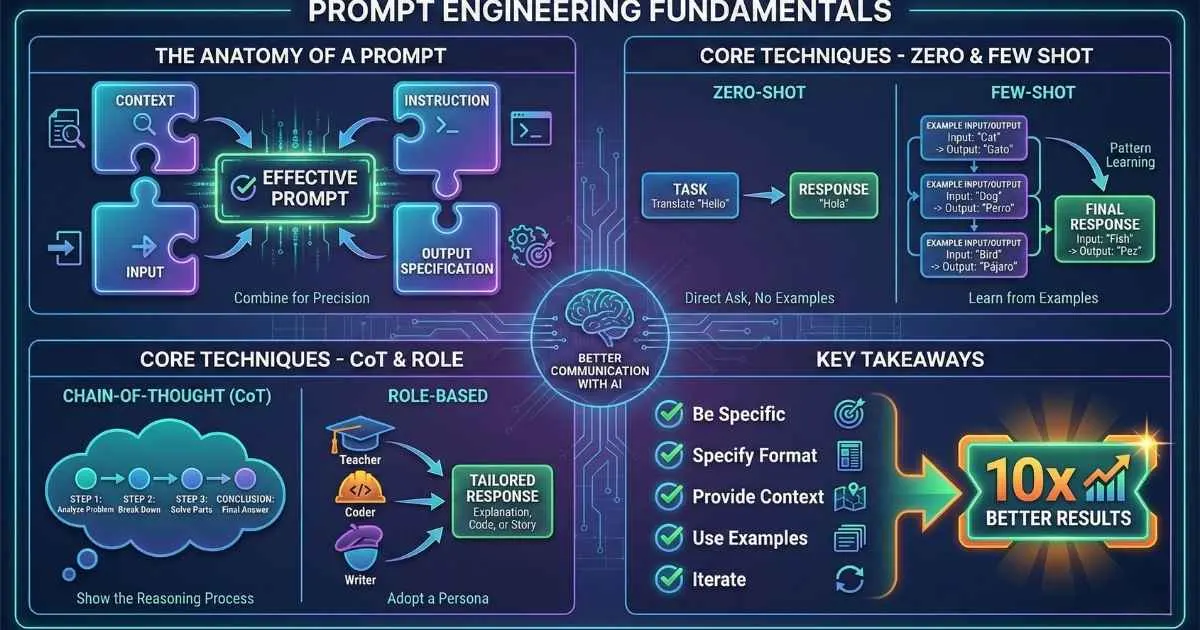
- The four components of every effective prompt
- Essential techniques: zero-shot, few-shot, and chain-of-thought
- How to use roles to unlock better responses
- Ready-to-use templates for common tasks
- The most common mistakes and how to avoid them
Let’s transform you from a casual AI user into an effective AI communicator.
What Is a Prompt, Really?
A prompt is any text you give to an AI model. Simple, right?
Not quite. A prompt isn’t just a question—it’s instructions, context, examples, and constraints all rolled into one. The prompt is literally the only way you can communicate with the AI. Everything it knows about what you want has to be in that text.
The Prompt-Response Relationship
Here’s the mental model that clicked for me: AI models are sophisticated pattern-completion engines. They predict “what should come next” based on your prompt. Your prompt sets the direction, tone, and constraints for this completion.
A vague prompt gets a generic response. A specific prompt gets a targeted response.
%%{init: {'theme': 'base', 'themeVariables': { 'primaryColor': '#4f46e5', 'primaryTextColor': '#ffffff', 'primaryBorderColor': '#3730a3', 'lineColor': '#6366f1', 'fontSize': '16px' }}}%%
flowchart LR
    A["Your Prompt"] --> B["AI Model"]
    B --> C["Response"]

    subgraph "What Shapes the Response"
        D["Context You Provide"]
        E["Instructions You Give"]
        F["Format You Request"]
        G["Examples You Show"]
    end

    D --> A
    E --> A
    F --> A
    G --> A
Same Question, Dramatically Different Answers
Watch how the same basic question transforms with better prompting:
| Prompt | What You Get |
|---|---|
| ”Explain machine learning” | Generic, textbook-style, assumes nothing about you |
| ”Explain machine learning to a 10-year-old” | Simple language, fun analogies, no jargon |
| ”Explain machine learning to a Python developer” | Technical depth, code examples, assumes programming knowledge |
| ”Explain machine learning in 3 bullet points for a CEO” | Concise, business-focused, actionable insights |
The AI didn’t suddenly get smarter between prompts. You just communicated better about what you needed.
The Prompt Engineering Mindset
Think of prompting as giving instructions to a brilliant but extremely literal assistant. They’ll do exactly what you ask—so be precise about what you want. Be explicit about things humans would infer automatically.
The AI doesn’t know:
- Your goals or intentions (unless you say them)
- Who your audience is
- What format you prefer
- What you already know
- What tone is appropriate
You have to tell it. That’s prompt engineering.
💡 Key insight: Quality of output = quality of input. The AI can only work with what you give it.
For more on how LLMs process and understand prompts, see the Tokens, Context Windows & Parameters guide.
The Anatomy of an Effective Prompt
After months of refining my prompting, I’ve found that great prompts typically contain four elements. Not every prompt needs all four, but understanding them helps you know what’s missing when results disappoint.
🧩 The Four Components of an Effective Prompt
Click each component to see an example. Not all prompts need all four—use what's relevant!
Component 1: Context — Setting the Stage
Context is background information the AI needs to give you a relevant response. It answers questions like:
- Who am I?
- Who is the AI supposed to be?
- What’s the situation?
- What constraints exist?
Examples of good context:
| Context Example | What It Tells the AI |
|---|---|
| ”You are a senior software engineer at a tech startup…” | Expertise level, work environment |
| ”I’m writing a blog post for beginner investors…” | Audience, topic area |
| ”This is for a formal presentation to executives…” | Tone, stakes |
| ”We’re brainstorming—nothing needs to be practical yet…” | Creative freedom |
Component 2: Instruction — What to Do
This is the core task. Use clear, specific action verbs: analyze, write, explain, compare, list, debug, summarize.
Watch how specificity transforms instructions:
| Weak Instruction | Strong Instruction |
|---|---|
| ”Help me with my email" | "Write a professional email declining a meeting invitation while maintaining a positive relationship" |
| "Summarize this" | "Summarize this article in 3 bullet points, focusing on actionable insights for product managers" |
| "Fix my code" | "Debug this Python function, explain what’s wrong, and provide a corrected version with explanatory comments” |
Component 3: Input — The Material
This is the actual content the AI should process—text, data, code, or a description. Make sure it’s clearly separated from your instructions.
Pro tip: Use clear delimiters like triple quotes, XML-style tags, or markdown code blocks to separate input from instructions.
Summarize the key points from this customer feedback:

"""
[Paste the feedback here]
"""
Component 4: Output Specification — Shape the Response
Tell the AI exactly how you want the response formatted:
| What to Specify | Example |
|---|---|
| Format | ”Use bullet points” / “Format as a table” / “Return as JSON” |
| Length | ”Keep it under 100 words” / “Give me 5 points” |
| Tone | ”Professional but friendly” / “Technical and precise” |
| Structure | ”Start with a TL;DR” / “Use H2 headers for each section” |
Putting It All Together
Here’s a complete prompt using all four components:
**Context**: You are a senior product manager experienced in B2B SaaS.

**Instruction**: Review this product feature description and identify
potential user objections, then suggest counter-arguments for each.

**Input**:
"""
Our new AI-powered scheduling feature automatically reschedules
conflicting meetings based on participant priority and meeting
importance scores.
"""

**Output Specification**:
- Format as a table: Objection | Counter-Argument | Evidence to Cite
- Include at least 5 potential objections
- Keep each row concise (2-3 sentences max)
- Focus on objections from enterprise customers
This prompt is explicit about context, clear about the task, provides the material to work with, and specifies exactly how to format the output. The AI doesn’t have to guess anything.
📈 How Prompt Quality Affects Results
Zero-Shot Prompting: The Starting Point
Zero-shot prompting is just asking the AI to do something without providing any examples. “Zero” examples.
This is how most people naturally use AI:
- “Translate this to Spanish: ‘Hello, how are you?’”
- “Write a haiku about coffee”
- “Summarize this article in 3 sentences”
When Zero-Shot Works Best
✅ Common tasks the AI has seen many times in training
✅ Well-defined, straightforward instructions
✅ Tasks with widely understood conventions
✅ When speed matters more than precision
✅ Exploration and brainstorming
Zero-Shot Examples
| Task | Zero-Shot Prompt |
|---|---|
| Translation | ”Translate to French: ‘The meeting is at 3pm‘“ |
| Classification | ”Is this review positive or negative? ‘Great product but shipping was slow‘“ |
| Summarization | ”Summarize this paragraph in one sentence: [text]“ |
| Generation | ”Write a professional out-of-office email message” |
When Zero-Shot Falls Short
Zero-shot prompting may not work well when:
- You need a very specific format
- The task is unusual or domain-specific
- Quality needs to be consistent across multiple requests
- The output requires a particular style or tone
That’s when you graduate to few-shot prompting.
%%{init: {'theme': 'base', 'themeVariables': { 'primaryColor': '#4f46e5', 'primaryTextColor': '#ffffff', 'primaryBorderColor': '#3730a3', 'lineColor': '#6366f1', 'fontSize': '16px' }}}%%
flowchart TB
    A["Your Task"] --> B{Common task?}
    B -->|Yes| C["Zero-Shot Often Enough"]
    B -->|No| D{Need specific format?}
    D -->|Yes| E["Use Few-Shot Examples"]
    D -->|No| F{Complex reasoning?}
    F -->|Yes| G["Use Chain-of-Thought"]
    F -->|No| C
Few-Shot Prompting: Teaching by Example
Few-shot prompting is one of the most powerful techniques you’ll learn. Instead of just describing what you want, you show the AI 2-5 examples of the desired input-output pairs.
I consider this the single most important prompting technique after learning the basics. Once you master it, you’ll wonder how you ever lived without it.
Why Examples Are So Powerful
Here’s a truth that took me a while to fully appreciate: examples communicate patterns that are impossible to describe in words.
Think about it. Try describing in words what makes a “good” email subject line. You’d say things like “be catchy” or “create urgency.” But those descriptions are vague. When you show three examples of subject lines you consider good, the AI instantly understands the exact style, length, vocabulary, and approach you want.
This works because of how LLMs are trained. They learned by seeing billions of input-output patterns. When you provide examples in your prompt, you’re essentially giving the AI a mini “training session” on exactly what you want.
Here’s the key insight: one good example often beats paragraphs of instructions.
The Few-Shot Structure
The basic structure is simple:
[Instruction explaining the task]

Example 1:
Input: [example input]
Output: [example output]

Example 2:
Input: [example input]
Output: [example output]

Example 3:
Input: [example input]
Output: [example output]

Now complete this:
Input: [your actual input]
Output:
The AI sees the pattern in your examples, then applies it to your new input.
Real Example 1: Email Subject Lines
Instead of describing what makes a good email subject line (which is abstract and hard to specify), just show examples:
Task: Write compelling marketing email subject lines.

Example 1:
Content: Flash sale - 50% off all items for 24 hours
Subject: ⏰ 24 Hours Only: Half Off Everything Inside

Example 2:
Content: New product launch - wireless earbuds with noise cancellation
Subject: 🎧 The Wait Is Over: Introducing Your New Favorite Earbuds

Example 3:
Content: Customer appreciation event with exclusive discounts
Subject: You're Invited: VIP Appreciation Sale Starts Now

Now generate a subject line:
Content: Holiday shipping deadline reminder - order by Dec 15 for delivery
Subject:
The AI now understands: use emojis, create urgency, make it personal, keep it punchy. You didn’t have to explain any of that—the examples showed it.
Likely output: ”🎁 Order by Dec 15 to Unwrap Your Gifts on Time!”
Real Example 2: Sentiment Classification
Few-shot is incredibly powerful for classification tasks. Here’s how to classify customer feedback:
Classify each customer review as POSITIVE, NEGATIVE, or MIXED.

Review: "The product quality is amazing but the shipping took forever."
Classification: MIXED

Review: "Absolutely love it! Best purchase I've made this year."
Classification: POSITIVE

Review: "Complete waste of money. Broke after two days."
Classification: NEGATIVE

Review: "It works as expected, nothing special but no complaints."
Classification: MIXED

Now classify this:
Review: "Great features but the battery life is disappointing."
Classification:
Without examples, the AI might not know where your threshold between POSITIVE and MIXED lies. With examples, it learns your specific criteria.
Real Example 3: Data Extraction
Extracting structured data from unstructured text is a perfect use case:
Extract the following information from each job posting:
Title, Company, Location, Salary (if mentioned), and Remote status.

Job Posting: "We're hiring a Senior Frontend Developer at TechCorp in San Francisco.
$150k-180k base, hybrid work environment."
Extracted:
- Title: Senior Frontend Developer
- Company: TechCorp
- Location: San Francisco
- Salary: $150k-180k
- Remote: Hybrid

Job Posting: "Join our team as a Data Scientist! Fully remote position at DataFlow Inc.
Competitive compensation."
Extracted:
- Title: Data Scientist
- Company: DataFlow Inc
- Location: Remote
- Salary: Not specified
- Remote: Yes

Now extract from this:
Job Posting: "Marketing Manager position at GrowthLabs, NYC office, $120k plus bonus."
Extracted:
The examples show the AI exactly what format you want and how to handle missing information (like salary).
How Many Examples Should You Use?
| Number | When to Use | Example |
|---|---|---|
| 1 (one-shot) | Very simple patterns, basic formatting guidance | Converting names to “Last, First” format |
| 2-3 | Most tasks—shows the pattern without overloading | Classification, style matching, data extraction |
| 4-5 | Complex patterns or when precision is critical | Multi-step transformations, nuanced tone |
| 5+ | Rarely needed; may hit context limits and cost more | Highly specialized domain tasks |
The Art of Choosing Good Examples
Not all examples are created equal. Here’s what makes examples effective:
✅ Good Examples:
- Cover the variety of inputs you’ll encounter
- Include at least one edge case (missing data, unusual format)
- Are consistent with each other in format and style
- Show the exact output format you want
- Represent different categories (for classification)
❌ Bad Examples:
- All too similar to each other
- Only show “easy” cases
- Inconsistent formatting between them
- Are sloppy or contain errors (AI will learn the errors!)
- Don’t represent the actual inputs you’ll use
Real-World Application: Building a Review Summarizer
Let me show you a complete few-shot prompt I actually use:
You summarize product reviews into structured briefs for a product team.

Example 1:
Reviews: "Great vacuum, super powerful. - Sarah" | "Love it but it's heavy
to carry upstairs. - Mike" | "Best vacuum I've owned! - Anonymous"
Summary:
👍 Strengths: Powerful suction, high satisfaction overall
👎 Concerns: Weight makes it hard to carry
📊 Sentiment: 3/3 positive
🎯 Key takeaway: Users love performance but struggle with portability

Example 2:
Reviews: "Camera quality is disappointing for the price. - John" |
"Fast shipping but phone runs hot. - Lisa" | "Battery life is excellent - Alex"
Summary:
👍 Strengths: Great battery life, fast delivery
👎 Concerns: Camera quality below expectations, overheating issues
📊 Sentiment: 1/3 positive, 2/3 negative
🎯 Key takeaway: Battery praised but camera and heat are concerns

Now summarize:
Reviews: "[paste your reviews here]"
Summary:
This single prompt replaced a 30-minute manual process for me. The examples teach the AI my exact format, icons, and analysis style.
⚠️ Critical Warning: Using sloppy or inconsistent examples will train the AI to give you sloppy, inconsistent outputs. Your examples set the bar. If your examples have typos, the output will have typos. If your examples are vague, the output will be vague.
Chain-of-Thought Prompting: Step-by-Step Reasoning
This technique dramatically improves AI performance on reasoning, math, and logic tasks. The idea is simple: instead of letting the AI jump straight to an answer, you ask it to “think out loud.”
I first discovered this when I kept getting wrong answers to word problems. Adding one phrase changed everything.
🧠 Chain-of-Thought: See the Difference
Question:
"A farmer has 17 sheep. All but 9 run away. How many sheep are left?"
Response (without CoT):
"8 sheep are left."
❌ Wrong! The model subtracted 9 from 17 instead of understanding "all but 9"
Adding "Let's think step by step" can improve reasoning accuracy by 2-3x
The Magic Phrase
Adding “Let’s think step by step” to the end of a prompt can improve math accuracy by 2-3x. It sounds almost too simple, but it works because it prompts the model to show intermediate reasoning rather than jumping to conclusions.
Why does this work? When an LLM immediately outputs an answer, it’s essentially making a prediction without “showing its work.” When you ask it to think step by step, each reasoning step becomes part of the context for the next step—allowing the model to catch and correct errors along the way.
When to Use Chain-of-Thought
✅ Math and numerical reasoning
✅ Logic puzzles and riddles
✅ Multi-step problem solving
✅ Debugging code logic
✅ Analyzing business decisions
✅ Tasks requiring analysis before conclusion
✅ When you need to verify the reasoning (not just the answer)
For more on AI-powered code review and debugging, see the AI-Powered IDEs Comparison guide.
When NOT to Use Chain-of-Thought
❌ Simple factual questions (“What’s the capital of France?”)
❌ Creative writing where you don’t need reasoning
❌ Quick translations or format conversions
❌ When you’re paying per token and speed matters
❌ Tasks where the “thinking” would just be busywork
Practical Example 1: Business Analysis
Without CoT:
Should we launch this product next quarter?
Revenue projection: $500K, Development cost: $200K,
Marketing budget needed: $150K, Current runway: $1M
The AI might just answer “Yes” or “No” without explaining why.
With CoT:
Should we launch this product next quarter?

Revenue projection: $500K
Development cost: $200K
Marketing budget needed: $150K
Current runway: $1M

Walk through this decision step by step, considering:
1. Financial viability
2. Cash flow impact
3. Risk factors
4. Alternative uses of the budget

Then give your recommendation with confidence level.
Sample reasoning output:
Let me analyze this step by step:
Financial Viability:
- Total cost: $200K + $150K = $350K
- Projected revenue: $500K
- Net return: $500K - $350K = $150K (42.8% ROI)
Cash Flow Impact:
- Current runway: $1M
- After investment: $1M - $350K = $650K remaining
- This leaves 65% of runway intact
Risk Factors:
- Revenue is “projected”—what’s the confidence level?
- $650K runway may be tight if revenue takes 6+ months
- Marketing spend may need to increase
Recommendation: Cautiously proceed, but de-risk by…
See how much more useful that is?
Practical Example 2: Debugging Code
Without CoT:
Why isn't this function working?

def get_average(numbers):
    total = 0
    for num in numbers:
        total += num
    return total / len(numbers)
With CoT:
Debug this function step by step. First trace through what happens
with an empty list, then with [1, 2, 3], then identify any bugs.

def get_average(numbers):
    total = 0
    for num in numbers:
        total += num
    return total / len(numbers)
Sample reasoning output:
Let me trace through this step by step:
Test 1: Empty list []
- total = 0
- for loop: doesn’t execute (no elements)
- return 0 / len([]) = 0 / 0
- ❌ BUG FOUND: ZeroDivisionError!
Test 2: [1, 2, 3]
- total = 0 → 1 → 3 → 6
- return 6 / 3 = 2.0 ✓
Fix: Add a check for empty list before dividing.
CoT Prompt Patterns
| Pattern | How to Use It | Best For |
|---|---|---|
| Basic CoT | ”Let’s think step by step.” | Quick improvement on any reasoning task |
| Explicit steps | ”First analyze X, then consider Y, finally conclude Z.” | When you need specific analysis structure |
| Structured reasoning | ”Show your reasoning in a <thinking> block, then give your answer.” | Separating reasoning from final answer |
| Self-verification | ”Work through this, then verify your answer at the end.” | Math problems, catching errors |
| Few-shot CoT | Provide examples that show the reasoning process | Complex domain-specific reasoning |
Advanced: Few-Shot Chain-of-Thought
You can combine few-shot examples WITH chain-of-thought by showing examples that include the reasoning:
Solve word problems by showing your reasoning.

Problem: If a train travels 60 miles in 1 hour, how far will it travel in 2.5 hours?
Thinking:
- The train's speed is 60 miles per hour
- In 2.5 hours, distance = speed × time
- Distance = 60 × 2.5 = 150 miles
Answer: 150 miles

Problem: A store has 3 boxes with 12 items each. After selling 15 items, how many remain?
Thinking:
- Total items = 3 × 12 = 36 items
- Items sold = 15
- Remaining = 36 - 15 = 21 items
Answer: 21 items

Problem: If you buy 4 items at $7.50 each and pay with a $50 bill, what's your change?
Thinking:
The Trade-offs
Chain-of-thought uses more tokens (the reasoning takes space) and is slower (more text to generate). Here’s when it’s worth the cost:
| Situation | Use CoT? | Why |
|---|---|---|
| Math word problem | ✅ Yes | Dramatically improves accuracy |
| ”What’s 2+2?” | ❌ No | Trivial, wastes tokens |
| Code review | ✅ Yes | Helps catch subtle bugs |
| Email writing | ❌ No | Not a reasoning task |
| Strategic decision | ✅ Yes | Shows thinking, builds trust |
| Translation | ❌ No | No reasoning needed |
%%{init: {'theme': 'base', 'themeVariables': { 'primaryColor': '#4f46e5', 'primaryTextColor': '#ffffff', 'primaryBorderColor': '#3730a3', 'lineColor': '#6366f1', 'fontSize': '16px' }}}%%
flowchart TB
    A["Chain-of-Thought Prompting"] --> B["Basic CoT"]
    A --> C["Zero-Shot CoT"]
    A --> D["Few-Shot CoT"]

    B --> B1["Just ask for step-by-step reasoning"]
    C --> C1["Add 'Let's think step by step'"]
    D --> D1["Show example reasoning chains"]
💡 Pro tip: If you’re unsure whether to use CoT, try both and compare. For anything involving numbers, logic, or multi-step analysis, it’s almost always worth it.
🆕 2025 Update: Many newer models have built-in thinking modes that automatically apply chain-of-thought:
- Claude 4+: Extended Thinking mode with dedicated reasoning tokens
- o-series models (o1, o3, o3-Pro): Built-in chain-of-thought reasoning by default
- GPT-5: Integrated reasoning that learns when to “think longer or shorter”
These models may not need explicit “think step by step” prompts—they reason automatically. However, the technique still helps with older models and when you want to see the reasoning.
Role-Based Prompting: Personas and Perspectives
Assigning a role or persona to the AI is like flipping a switch. The model “adopts” the characteristics, knowledge, and communication style of that role.
Why Roles Work
When you tell an AI to be a “senior software engineer at Google,” it activates patterns associated with:
- Technical vocabulary and depth
- Code quality focus
- Scalability concerns
- Professional communication style
You get all of that implicitly, without explaining each characteristic.
🎭 How Roles Transform Responses
Same question, different roles = dramatically different responses
Role Prompt Structure
You are a [role] with [specific experience/expertise].
Your approach is [style/methodology].
You are helping [audience] with [task type].

[Then your actual question or task]
Role Examples and Their Effects
| Role | Effect on Responses |
|---|---|
| ”Senior software engineer at Google” | Technical depth, code quality, scalability |
| ”Kindergarten teacher” | Simple language, patience, fun analogies |
| ”Skeptical journalist” | Questions assumptions, asks for evidence |
| ”Startup founder” | Bias toward action, MVP thinking, growth focus |
| ”Lawyer reviewing a contract” | Risk identification, formal language, caution |
| ”Stand-up comedian” | Humor, timing, unexpected connections |
Advanced Role Techniques
| Technique | Example |
|---|---|
| Dual roles | ”You are both a designer and a developer. Critique this from both perspectives.” |
| Adversarial role | ”You are a security hacker. How would you attack this authentication flow?” |
| Multiple personas | ”First respond as a marketing manager. Then respond as a CFO. Compare.” |
When Roles Help Most
✅ Domain-specific advice needed
✅ Need a particular communication style
✅ Want to explore different perspectives
✅ Creative writing with consistent voice
✅ Technical explanations for specific audiences
💡 Pro tip: Be specific about the role. “Expert” is vague. “Senior data scientist with 10 years in healthcare ML” is specific and primes better responses.
For more on AI agents and autonomous systems, see the AI Agents guide.
System Prompts: The Foundation Layer
When using the API (or advanced chat interfaces), you have access to a system prompt—a special instruction layer that defines the AI’s foundational behavior across the entire conversation.
System Prompt vs User Prompt
| Aspect | System Prompt | User Prompt |
|---|---|---|
| Purpose | Define AI’s role, personality, constraints | Specific task or question |
| Persistence | Stays constant across conversation | Changes with each message |
| Who sets it | Developer/admin | End user |
| Example | ”You are a helpful coding assistant who explains concepts clearly…" | "Debug this Python function” |
Why System Prompts Matter
- Consistency: Establishes stable behavior without repeating instructions
- Efficiency: Reduces token usage in user prompts
- Guardrails: Sets boundaries and safety constraints
- Persona lock-in: Maintains character across long conversations
System Prompt Best Practices
# Example System Prompt Structure

You are [ROLE] with [EXPERTISE].

## Your Approach
- [Behavioral guideline 1]
- [Behavioral guideline 2]
- [What to avoid]

## Output Style
- [Format preferences]
- [Tone guidelines]

## Constraints
- [Hard rules]
- [Safety boundaries]
⚠️ Important: Treat system prompts like production code—version them, test them, and iterate on them. A poorly designed system prompt leads to inconsistent behavior.
Emerging Techniques (2025)
The field continues to evolve. Here are techniques that have become mainstream in 2025:
Tree of Thoughts (ToT)
An advanced form of chain-of-thought that explores multiple reasoning paths before selecting the best one.
Analyze this business decision using Tree of Thoughts:

1. First, identify 3 different approaches we could take
2. For each approach, think through the consequences step by step
3. Evaluate the pros and cons of each path
4. Select the best approach and explain why

Decision: Should we expand to the European market this year?
When to use: Complex strategic decisions, scenarios with multiple valid options, when you want the AI to consider alternatives.
ReAct (Reasoning + Acting)
Combines reasoning with tool invocation—the AI thinks through a problem, then takes action (like calling an API or running code).
You have access to these tools: [search], [calculate], [lookup_database]

Task: Find the current stock price of Apple and calculate what
100 shares would be worth.

Think step by step, using tools when needed:
Thought 1:
Action 1:
Observation 1:
...
Final Answer:
When to use: Agentic workflows, multi-step tasks requiring external data, automated research pipelines.
Self-Consistency
Generate multiple responses to the same question, then select the most consistent answer.
Solve this problem 3 different ways, then determine
which answer is most likely correct:

Problem: [Complex math or logic problem]

Solution 1:
Solution 2:
Solution 3:

Most consistent answer:
When to use: High-stakes calculations, reducing hallucination risk, when you need high confidence.
Context Engineering
Moving beyond just the prompt to optimize the entire context window—including conversation history, retrieved documents, and tool outputs.
Key principles:
- Only include relevant information (not everything)
- Structure retrieved content clearly with headers/tags
- Summarize long conversation history to preserve token budget
- Use RAG (Retrieval-Augmented Generation) strategically
| Technique | Description |
|---|---|
| RAG | Retrieve relevant docs and inject into context |
| Conversation summarization | Compress history to fit more in context |
| Selective context | Include only what’s needed for current task |
| Structured injection | Use XML tags or headers to organize context |
Combining Techniques: Where the Magic Happens
Here’s what separates good prompt engineers from great ones: combining multiple techniques in a single prompt.
Each technique we’ve covered solves a specific problem:
- Zero-shot: Quick and simple
- Few-shot: Teaches format and style
- Chain-of-thought: Improves reasoning
- Role-based: Activates expertise
But real-world tasks often benefit from combining them.
Combination 1: Role + Few-Shot
“Be this expert” + “Here’s how to format the output”
You are a senior legal counsel specializing in startup contracts.

Review contracts and flag concerning clauses in this format:

Example:
Contract clause: "Employee agrees to assign all inventions, whether or
not related to company business, for a period of 2 years post-employment."
Analysis:
🚩 Risk Level: HIGH
📝 Issue: Overbroad IP assignment extends beyond employment
⚖️ Suggested revision: Limit to inventions created using company
resources or related to company business during employment only

Now review:
Contract clause: "[paste clause here]"
Analysis:
The role brings legal expertise; the few-shot example teaches your exact format.
Combination 2: Chain-of-Thought + Role
“Think step by step” + “As this expert”
You are a financial analyst with experience in SaaS startup valuations.

Analyze whether this acquisition makes sense. Think through each
factor step by step before making a recommendation.

Company A (Acquirer):
- Revenue: $50M ARR, growing 40% YoY
- Cash: $200M
- Market cap: $2B

Target Company:
- Revenue: $5M ARR, growing 100% YoY
- Asking price: $75M
- Key asset: AI technology that could integrate into Company A's platform

Consider: strategic fit, financial impact, integration risk, and alternatives.
Combination 3: Few-Shot + Chain-of-Thought
Show examples that include the reasoning:
Analyze competitive threats using this process:

Example:
Competitor: Notion adding AI features
Analysis:
1. What they're doing: Adding AI writing and summarization
2. Who this affects: Our power users who rely on AI features
3. Threat level: MEDIUM - our AI is more specialized
4. Our response options: Emphasize vertical integration, speed advantage
Recommendation: Accelerate our AI roadmap, focus on unique features

Now analyze:
Competitor: Slack releasing new workflow automation
Analysis:
Combination 4: All Four Combined
For critical tasks, combine everything:
You are a senior product manager at a B2B SaaS company.

Task: Analyze whether we should build Feature X. Think through
this step by step.

Feature X: In-app video messaging between users

Here's how I want the analysis formatted:

Example analysis:
Feature: Collaborative whiteboard
Step 1 - User Need: 8/10 (high user requests, solves real pain)
Step 2 - Competitive Landscape: 5/10 (Miro dominates, hard to differentiate)
Step 3 - Build Complexity: 7/10 (significant engineering, 3+ months)
Step 4 - Revenue Impact: 4/10 (nice-to-have, not buying driver)
Step 5 - Strategic Fit: 6/10 (aligns with collaboration vision)
Final Score: 30/50
Recommendation: DEFER - focus on core differentiators first

Now analyze Feature X (in-app video messaging):
Step 1 - User Need:
When to Combine Techniques
| Task Complexity | Recommended Combination |
|---|---|
| Simple, one-off | Zero-shot alone |
| Needs specific format | Zero-shot + output spec |
| Domain expertise needed | Role + zero-shot |
| Needs consistent format | Few-shot (2-3 examples) |
| Complex reasoning | Role + CoT |
| Critical business decision | Role + CoT + specific structure |
| Batch processing | Few-shot + clear format |
| Maximum precision | Role + Few-shot + CoT |
Before/After: A Complete Prompt Transformation
Let me walk you through how I’d transform a real prompt from beginner to professional. This shows the iteration process in action.
The Task
I need to get feedback on a product landing page for my new app.
Version 1: The Naive Prompt (Most People Start Here)
What do you think of this landing page?

[paste landing page text]
Problems:
- No context on who I am or what the product is
- No role for the AI
- Generic “what do you think” = generic response
- No format specified
- No criteria for feedback
Likely output: Vague, surface-level comments mixed with praise.
Version 2: Adding Context and Role
You are a conversion rate optimization expert.

Review this landing page for a B2B project management tool
targeting marketing teams.

[paste landing page text]

What could be improved?
Improvements: Role + context + basic instruction
Remaining issues: No structure, no priorities, no specific criteria
Version 3: Adding Structure and Criteria
You are a conversion rate optimization expert who has reviewed
1000+ SaaS landing pages.

Review this landing page for a B2B project management tool
targeting marketing teams at companies with 50-200 employees.

Landing page:
"""
[paste landing page text]
"""

Evaluate against these criteria:
1. Headline clarity (does it convey value in 5 seconds?)
2. Social proof (is it credible and relevant?)
3. Call-to-action (is it clear and compelling?)
4. Objection handling (are common concerns addressed?)
5. Mobile experience (would it work on mobile?)

Format your response as a table with: Criteria | Score (1-10) | Issue | Fix
Improvements: Specific criteria + format + audience details
Remaining issues: No example of the output format I want
Version 4: The Professional Prompt (Where We Want to Be)
You are a conversion rate optimization expert who has reviewed
1000+ SaaS landing pages, with particular expertise in B2B tools
for marketing teams.

Review this landing page and provide actionable feedback.

Product: Project management tool for marketing teams (50-200 employees)
Goal: Improve signup conversion rate
Current conversion: 2.1% (industry avg is 2.5%)

Landing page content:
"""
[paste landing page text]
"""

Evaluate each element and provide specific, actionable fixes:

Example format:
| Element | Score | Primary Issue | Specific Fix |
|---------|-------|---------------|--------------|
| Headline | 6/10 | Too vague, doesn't convey unique value | Try: "Ship campaigns 2x faster with visual workflows your team will actually use" |
| CTA Button | 4/10 | "Get Started" is generic | Try: "Start Free Trial - No Credit Card" |

Evaluate:
1. Headline & subheadline
2. Hero section overall
3. Feature presentation
4. Social proof/testimonials
5. Primary CTA
6. Pricing communication
7. Trust signals
8. Mobile experience

After the table, provide your top 3 priorities that would have
the biggest impact on conversions, with expected lift estimates.
The Transformation Summary
| Version | Techniques Used | Quality Level |
|---|---|---|
| V1 | None | Generic, unhelpful |
| V2 | Role, basic context | Better but unstructured |
| V3 | Role, context, structured criteria, format | Good, actionable |
| V4 | Role, context, few-shot format, specific criteria, output requirements | Professional, comprehensive |
The difference between V1 and V4 isn’t that the AI got smarter—it’s that you got better at asking.
Prompt Templates for Common Tasks
One of the best productivity hacks is building a library of prompt templates you can reuse. Here are some I use constantly.
📋 Ready-to-Use Prompt Templates
Task: Improve the following text

Text to improve:
"""
[YOUR TEXT]
"""

Goals: Improve clarity, fix grammar, enhance engagement
Tone: [FORMAL/CASUAL/PROFESSIONAL]
Length: Reduce by [X]%

Provide improved version, then explain key changes.
Copy and customize these templates for your specific needs
Template: Writing Enhancement
Task: Improve the following text

Text to improve:
"""
[YOUR TEXT HERE]
"""

Goals:
- [ ] Improve clarity
- [ ] Fix grammar/spelling
- [ ] Enhance engagement
- [ ] Adjust tone to: [FORMAL/CASUAL/PROFESSIONAL]
- [ ] Reduce length by approximately [X]%

Additional requirements: [ANY SPECIFIC REQUESTS]

Provide the improved version, then briefly explain the key changes made.
Template: Summarization
Summarize the following [CONTENT TYPE] for [AUDIENCE].

Content:
"""
[YOUR CONTENT HERE]
"""

Output requirements:
- Format: [BULLET POINTS / PARAGRAPH / EXECUTIVE SUMMARY]
- Length: [NUMBER] [SENTENCES/BULLET POINTS/WORDS]
- Focus on: [KEY ASPECTS TO EMPHASIZE]
- Include: [MUST-HAVE ELEMENTS]
- Exclude: [WHAT TO LEAVE OUT]
Template: Code Review
You are a senior software engineer conducting a code review.

Review the following [LANGUAGE] code for:
1. Bugs and potential errors
2. Performance issues
3. Security vulnerabilities
4. Code style and readability
5. Best practices adherence

Code:
```[LANGUAGE]
[YOUR CODE HERE]
For each issue found:
- Severity: [Critical/Major/Minor/Suggestion]
- Location: [Line number or function]
- Problem: [Brief description]
- Solution: [How to fix]
End with an overall assessment and top 3 priority fixes.
### Template: Brainstorming
Generate [NUMBER] ideas for [TOPIC/PROBLEM].
Context: [RELEVANT BACKGROUND]
Constraints:
- [CONSTRAINT 1]
- [CONSTRAINT 2]
For each idea, provide:
- Title: Brief name
- Description: 2-3 sentences
- Why it might work: Key advantage
- Potential challenge: What to watch for
Rank ideas by [feasibility/impact/novelty/cost-effectiveness].
### Template: Decision Support
Help me decide between the following options:
Option A: [DESCRIPTION] Option B: [DESCRIPTION]
Decision criteria (in order of importance):
- [CRITERION 1] - Weight: [HIGH/MEDIUM/LOW]
- [CRITERION 2] - Weight: [HIGH/MEDIUM/LOW]
- [CRITERION 3] - Weight: [HIGH/MEDIUM/LOW]
Context: [RELEVANT SITUATION DETAILS]
Analyze each option against the criteria, identify risks and tradeoffs, and provide a recommendation with reasoning.
---

## Common Prompting Mistakes (And How to Fix Them)

Let me save you some of the trial and error I went through. Here are the mistakes I see most often.

### Mistake 1: Being Too Vague

| ❌ Vague | ✅ Specific |
|---------|-----------|
| "Write about AI" | "Write a 500-word blog post explaining 3 ways AI is changing healthcare, for hospital administrators" |
| "Help me with my resume" | "Review my resume for a Senior PM role at a tech startup. Focus on quantifying achievements" |
| "Summarize this document" | "Summarize this report in 5 bullet points, focusing on action items for the marketing team" |

### Mistake 2: Not Providing Context

**The fix**: Before sending a prompt, ask yourself:
- Did I say who I am or what role the AI should play?
- Did I specify who the audience is?
- Did I explain why I need this?
- Did I mention relevant constraints (time, format, length)?

### Mistake 3: Asking for Too Much at Once

| ❌ Overloaded | ✅ Focused |
|--------------|----------|
| "Create a marketing strategy with audiences, messaging, channels, budget, timeline, metrics, and competitor analysis" | "Identify 3 target customer personas for our productivity app. For each: demographics, pain points, primary use case" |

**Better approach**: Break complex requests into multiple prompts.

### Mistake 4: Ignoring Output Format

AI defaults are often walls of text. Always specify:
- Bullets, numbered lists, or tables
- Length constraints
- Headers or sections
- How structured the output should be

### Mistake 5: Not Iterating

```mermaid
%%{init: {'theme': 'base', 'themeVariables': { 'primaryColor': '#4f46e5', 'primaryTextColor': '#ffffff', 'primaryBorderColor': '#3730a3', 'lineColor': '#6366f1', 'fontSize': '16px' }}}%%
flowchart LR
    A["First Prompt"] --> B["Response"]
    B --> C{"Good enough?"}
    C -->|Yes| D["Done!"]
    C -->|No| E["Refine Prompt"]
    E --> A
Multi-turn conversation is your friend. “Make it shorter.” “More casual tone.” “Add specific examples.” Iteration often beats trying to write the perfect prompt upfront.
Mistake 6: Expecting Mind-Reading
| What You Think | What You Should Say |
|---|---|
| ”The AI should know this is for beginners" | "Explain for someone with no technical background" |
| "Obviously I want it professional" | "Use formal, professional tone suitable for a business proposal" |
| "It’s clear I need examples" | "Include 2-3 real-world examples to illustrate each point” |
Quick Fix Checklist
When you get a poor response, check:
- Did I specify the goal clearly?
- Did I provide necessary context?
- Did I specify the format I want?
- Would an example help?
- Is my prompt too complex (should I split it)?
- Did I specify what to avoid?
Developing Your Prompting Intuition
🎯 Prompting Techniques: Accuracy vs Effort
Higher accuracy with reasonable effort = optimal technique for your task
Prompting is a skill that improves with practice. There’s no single “best” prompt—it depends on the task, the model, and your specific needs.
The Prompt Iteration Workflow
- Start simple: Begin with a basic prompt
- Analyze the response: What’s good? What’s missing?
- Identify the gap: Was it context? Format? Specificity? Tone?
- Add what’s missing: Make one change at a time
- Repeat until satisfied: Build intuition about what works
Building Your Prompt Library
Keep a document where you save prompts that worked well:
| What to Save |
|---|
| The task/use case |
| Your effective prompt |
| Why it worked |
| Common modifications needed |
| Which AI it works best on |
Over time, you’ll have a toolkit of proven prompts you can deploy instantly.
Model-Specific Notes
Each AI has subtle preferences:
| Model | What Tends to Work Well |
|---|---|
| ChatGPT (GPT-4o/GPT-5) | Detailed system prompts, Responses API for agentic flows, structured outputs |
| Claude (Opus/Sonnet 4.5) | XML tags for structure, extended thinking mode, explicit formatting, 200K+ context |
| Gemini 3 Pro | Multimodal prompts, Google integration, 1M token context window |
| Local LLMs (LLaMA 4) | Simpler prompts, more explicit guidance, MoE efficiency |
But the core techniques—few-shot, chain-of-thought, roles—work across all of them.
Claude 4+ Specific Tips:
- Use XML tags (
<example>,<document>) for structure—Claude was trained on this format - Claude 4 models communicate more concisely; explicitly ask for detailed responses if needed
- Extended Thinking mode can be activated for complex reasoning tasks
- Lead by example: Claude matches the style of your prompt
GPT-5 / o3 Specific Tips:
- Use the Responses API for agentic multi-step workflows
- These models have built-in reasoning—explicit CoT prompts are less necessary
- For production, pin to specific model snapshots (e.g.,
gpt-4.1-2025-04-14)
Resources for Continued Learning
- OpenAI’s Prompt Engineering Guide — Official best practices
- OpenAI’s GPT Best Practices — Production guidelines
- Anthropic’s Prompt Engineering Docs — Claude-specific techniques
- Anthropic’s Prompt Library — Ready-to-use examples
- Google’s Prompting Guide — Gemini-specific tips
- Communities: r/PromptEngineering on Reddit, AI discussions on X/Twitter
- Practice: The more you prompt, the better you get
Key Takeaways
Let’s wrap up with the essentials:
The Core Techniques
| Technique | What It Is | When to Use |
|---|---|---|
| Zero-Shot | Just ask, no examples | Common, simple tasks |
| Few-Shot | Show 2-5 examples | Specific formats, consistency |
| Chain-of-Thought | Ask for step-by-step reasoning | Math, logic, complex analysis |
| Role-Based | Assign a persona | Domain expertise, specific style |
The 80/20 Summary
These five improvements will get you 80% of the results:
- Be specific about what you want
- Specify the format you need (bullets, table, length)
- Provide relevant context (who you are, who the audience is)
- Use examples when format matters
- Iterate—refine based on what you get back
What You Can Do Right Now
- Take one task you do regularly and rewrite the prompt using these techniques
- Create your first 3-5 prompt templates for common needs
- Try few-shot prompting on something that needs consistent formatting
- Use chain-of-thought on a problem that requires reasoning
Prompt engineering isn’t magic. It’s just clear communication with a very capable but very literal assistant. Master the fundamentals, and you’ll be amazed at what becomes possible.
What’s Next?
Now that you have the fundamentals, you’re ready for advanced techniques:
- ✅ You are here: Prompt Engineering Fundamentals
- 📖 Next: Advanced Prompt Engineering - Techniques That Work — System prompts, Tree of Thoughts, ReAct, and prompt security
- 📖 Then: Understanding AI Safety, Ethics, and Limitations
Related Articles: