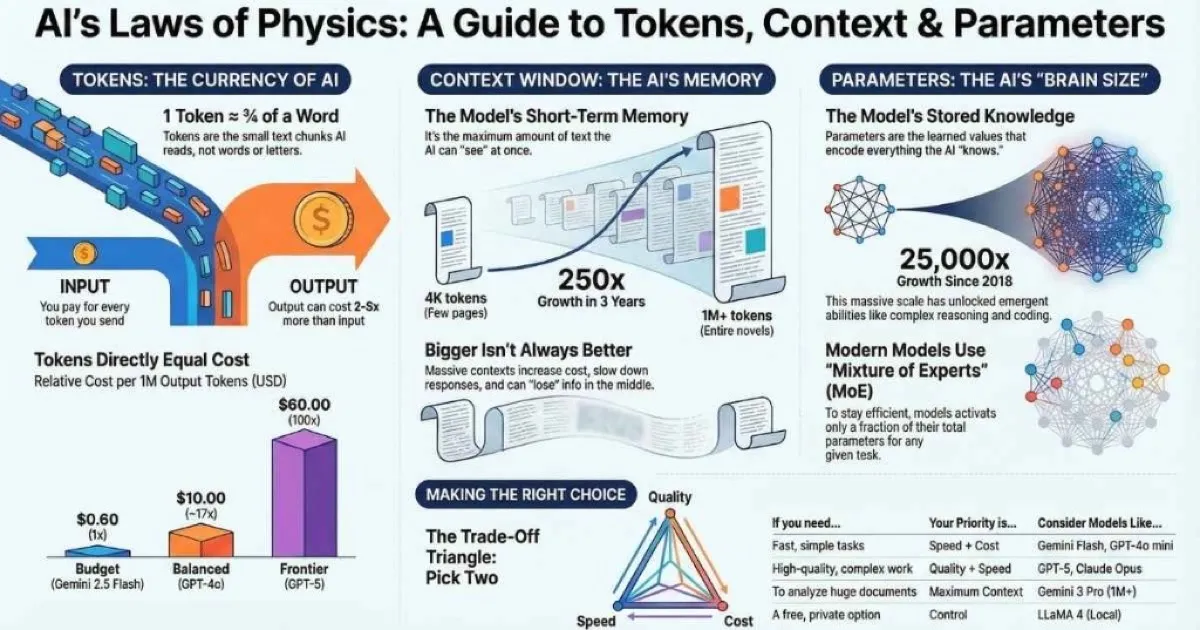
The Physics of LLMs
Just as traditional software is constrained by CPU cycles and RAM, Large Language Models are bound by their own fundamental constraints: tokens, context windows, and parameters. Understanding these three metrics is essential for estimating costs, optimizing performance, and selecting the right model for a specific task.
These are not just technical specs; they are the laws of physics for AI applications.
A “token” determines your bill. The “context window” determines the model’s memory. “Parameters” roughly determine its intelligence. Misunderstanding these concepts is the primary cause of ballooning AI costs and unexpected performance failures in production applications.
This guide provides a technical deep dive into the constraints that govern LLMs. For foundational knowledge about how LLMs work, see the How LLMs Are Trained guide.
1 Token
≈ 4 characters or ¾ word
1M+
Gemini context window
3T+
GPT-5 estimated params
100x
Price range across models
Who This Guide Is For
Before we dive in, let’s make sure this guide is right for you:
This guide is designed for:
- 👨💻 Developers building AI-powered applications who need to understand cost optimization
- 📊 Product managers evaluating AI solutions for their products
- 🎓 AI enthusiasts who want to go beyond surface-level understanding
- 🤔 Anyone tired of seeing these terms without fully grasping them
Prerequisites: Basic familiarity with AI/LLMs is helpful but not required. We start from first principles.
What You’ll Learn
By the end of this guide, you’ll understand:
- What tokens are and why they determine your AI costs
- How context windows work (and why bigger isn’t always better)
- What parameters actually mean for model capability
- How temperature and other settings affect your outputs
- How all three concepts interact (this is crucial!)
- Practical strategies for optimizing your AI usage and costs
- A framework for choosing the right model for any task
- Common mistakes to avoid and how to troubleshoot problems
Let’s demystify these concepts once and for all.
Tokens: The Building Blocks of AI
Here’s the first thing that surprised me: LLMs don’t read words. They don’t even read letters. They read tokens.
What Is a Token?
A token is the smallest unit of text that an LLM can process. Think of tokens as Lego bricks—the fundamental pieces that text is built from. A token is typically:
- A whole word (like “Hello”)
- Part of a word (like “Un” + “believ” + “able”)
- A single character (like ”!” or spaces)
The model’s tokenizer is what breaks your text into these pieces. Different models use different tokenizers, which is why the same text might produce slightly different token counts across ChatGPT, Claude, and Gemini.
How Text Becomes Tokens
Click examples to see how LLMs "read" text
"Hello"
💡 Notice: "strawberry" becomes [str][aw][berry] — that's why LLMs struggle with counting letters. They never see individual characters!
Sources: OpenAI Tokenizer • Hugging Face Tokenizers
The Rule of Thumb I Use Every Day
Here’s the practical estimation that’s served me well:
1 token ≈ 4 characters or about ¾ of a word
This gives you some quick math:
| Tokens | Approximate Words | Equivalent To |
|---|---|---|
| 100 | ~75 words | A short paragraph |
| 1,000 | ~750 words | 1.5 pages of text |
| 10,000 | ~7,500 words | A long article |
| 100,000 | ~75,000 words | A short novel |
| 1,000,000 | ~750,000 words | About 9 average novels |
Important exceptions:
- Non-English text often uses MORE tokens per word (Japanese and Chinese can use 2-3x more)
- Code uses more tokens due to syntax characters and formatting
- Rare or technical words get split into more tokens
Why This Matters: The Tokenization Problem
Remember that viral moment when people discovered LLMs couldn’t count the R’s in “strawberry”? This is why. The model doesn’t see:
s-t-r-a-w-b-e-r-r-yIt sees:
[str] [aw] [berry]The model never saw individual letters—it saw token chunks. That’s why character-level tasks like counting, spelling, and anagrams are surprisingly hard for LLMs. They’re not “reading” the way we do.
Tokenization Quirks to Know
Why LLMs struggle with certain tasks
| Task | Why LLMs Struggle | Workaround |
|---|---|---|
| Counting characters | Letters are merged into tokens | Ask LLM to use code/tool |
| Spelling backwards | Model doesn't see individual letters | Spell it out first |
| Math calculations | Numbers tokenized inconsistently | Use code interpreter |
| Specific word count | "Write 100 words" is approximate | Ask to count and revise |
| Unicode/Emoji | Often splits into multiple tokens | Be explicit about encoding |
🧪 Real Example: Ask GPT-4 "What is 123456 × 789012?" — The model sees [123][456] × [789][012]. It's not performing arithmetic—it's pattern matching on tokens. That's why code interpreters exist!
This isn’t a bug to be fixed; it’s fundamental to how these systems work. Understanding this helps you:
- Know when to use external tools (like a code interpreter for math)
- Predict when the model might struggle
- Structure prompts to work with tokenization instead of against it
For more on effective prompting techniques, see the Prompt Engineering Fundamentals guide.
Now that you understand what tokens are and how they determine your costs, let’s explore where those tokens go—the context window that defines what the model can “see” at any moment.
Why Tokens = Money
Here’s the part that directly affects your wallet: API pricing is almost always based on tokens.
When you use AI through an API (or indirectly through tools that use APIs), you’re charged for:
- Input tokens - Your prompt, system instructions, and any documents you send
- Output tokens - The response the model generates
And here’s the kicker: output tokens typically cost 2-5x more than input tokens. Why? Generating new text requires more computation than processing existing text.
API Pricing Comparison (Dec 2025)
Price per 1 million tokens (USD)
💡 Key Insight: Output tokens cost 2-5× more than input tokens. Reasoning models like o3-Pro can cost 100× more than budget options—but deliver dramatically better results for complex tasks.
Sources: OpenAI Pricing • Anthropic Pricing • Google AI Pricing
The Real-World Cost Calculation
Let me show you what this means in practice. Say you want to summarize a 10-page document and get a 2-paragraph summary:
The task:
- Input: ~3,000 tokens (your document + instructions)
- Output: ~200 tokens (the summary)
The cost at different models (per million tokens, December 2025):
| Model | Input/1M | Output/1M | For This Task |
|---|---|---|---|
| Gemini 2.5 Flash | $0.15 | $0.60 | ~$0.0006 |
| GPT-4o | $2.50 | $10.00 | ~$0.0095 |
| Claude Opus 4.5 | $5.00 | $25.00 | ~$0.02 |
| o3-Pro | $20.00 | $80.00 | ~$0.08 |
That’s a 130x difference between the cheapest and most expensive options!
Does that mean you should always use the cheapest model? Absolutely not. For a quick summary, Gemini Flash might be perfect. For complex legal analysis, Claude Opus or o3-Pro might be worth every penny. The key is matching the model to the task.
The Great Price Collapse: 2020-2025
Here’s something remarkable: AI API costs have dropped by over 99% in just 5 years. This is one of the fastest price declines in technology history.
The Great AI Price Collapse (2020-2025)
Cost per million tokens over time
99.4%
Total reduction
$60
2020 price
$0.36
2025 price
📉 Key Insight: AI API costs are following a trajectory similar to cloud computing and storage—expect today's premium prices to become tomorrow's budget options. Plan your architecture accordingly!
Sources: OpenAI Pricing • AI Price History
| Year | Model | Input Cost/1M | Output Cost/1M | Key Milestone |
|---|---|---|---|---|
| 2020 | GPT-3 (Davinci) | $60.00 | $60.00 | First commercial LLM API |
| 2022 | GPT-3 (Davinci) | $20.00 | $20.00 | 3× reduction |
| Mar 2023 | GPT-3.5 Turbo | $2.00 | $2.00 | 10× cheaper than Davinci |
| Mar 2023 | GPT-4 | $30.00 | $60.00 | Premium frontier model |
| Nov 2023 | GPT-4 Turbo | $10.00 | $30.00 | 3× cheaper GPT-4 |
| Mar 2024 | GPT-4o | $5.00 | $15.00 | Multimodal at half price |
| Jul 2024 | GPT-4o Mini | $0.15 | $0.60 | Budget-friendly option |
| Aug 2024 | GPT-4o | $2.50 | $10.00 | Another 50% cut |
| Dec 2025 | GPT-4o Mini | $0.15 | $0.60 | Still the budget king |
| Dec 2025 | GPT-5 Nano | $0.04 | $0.36 | Cheapest ever |
What does this mean practically?
- A task that cost $100 in 2020 now costs less than $1 with equivalent-quality models
- A million-word document analysis went from $80 to $0.10 (800× reduction)
- The same GPT-4 quality that cost $60/M output in 2023 costs $10/M today
This trend continues because:
- Hardware efficiency: Better GPUs, specialized AI chips
- Model optimization: Quantization, distillation, pruning
- Competition: Multi-provider market drives prices down
- Scale: More users = better economics
💡 Key Insight: If you’re building AI applications, factor in that today’s “expensive” models will likely be affordable commodity options within 12-18 months. The model that costs $10/M today might cost $1/M by next year.
Try the Calculator
Use this interactive calculator to estimate your API costs before making calls:
Token Cost Calculator
Estimate your API costs before making calls
≈ 750 words
≈ 375 words
GPT-4o Cost Breakdown
Input Cost
$0.002500
Output Cost
$0.005000
Total
$0.007500
Compare All Models
💡 Tip: For 1500 tokens, you could make 133 similar requests for $1 with GPT-4o.
My Token Optimization Strategies
After running up some surprising bills early on, I’ve developed these habits:
Reducing input tokens:
- ✅ “Summarize briefly:” instead of “Please provide a summary in a brief format”
- ✅ “Respond in JSON” instead of explaining the JSON format in detail
- ✅ Include only the context the model actually needs
Managing output tokens:
- ✅ Set explicit length limits: “In 2-3 sentences…”
- ✅ Use the
max_tokensAPI parameter to hard-cap responses - ✅ Request structured output (JSON) for predictable length
- ✅ Ask for “key points only” instead of full explanations
Smart model selection:
- ✅ Use cheap models (GPT-4o mini, Gemini Flash) for simple tasks
- ✅ Reserve expensive models (Opus, o3) for where they add real value
- ✅ Cache responses for repeated identical queries
🎯 Pro tip: Many APIs, including Anthropic’s, now offer prompt caching—if you use the same system prompt repeatedly, you pay reduced rates for the cached portion. This can cut costs by 50-90% for apps with consistent instructions.
You now understand tokens and how they affect your costs. But tokens need somewhere to live—that’s the context window. Let’s explore how this “working memory” works and why it’s just as important as the tokens themselves.
Context Windows: The Model’s Working Memory
This is the concept that finally clicked for me when I thought of it as how much the model can “see” at once.
What Is a Context Window?
The context window is the maximum amount of text an LLM can consider at one time. It’s like the model’s working memory or attention span. Everything needs to fit in this window:
- Your current prompt
- The entire conversation history
- System instructions
- Any documents you’ve included
- And the model’s response
When the window fills up, the oldest content gets pushed out. That’s why long conversations can “forget” what you discussed earlier—those messages literally aren’t visible to the model anymore.
%%{init: {'theme': 'base', 'themeVariables': { 'primaryColor': '#4f46e5', 'primaryTextColor': '#ffffff', 'primaryBorderColor': '#3730a3', 'lineColor': '#6366f1', 'fontSize': '16px' }}}%%
flowchart TB
    A["Context Window Capacity"] --> B["System Instructions"]
    A --> C["Conversation History"]
    A --> D["Your Current Prompt"]
    A --> E["Model's Response"]

    F["Total Exceeds Limit?"] --> G["Oldest Content Trimmed!"]
Context Windows: How Much Can LLMs "Remember"?
Measured in tokens they can process at once
4K → 1M
250× growth in 3 years
~750K
Words in 1M context
9+
Novels at once
Sources: OpenAI GPT-4 Docs • Anthropic Claude • Google Gemini
See It In Action
The best way to understand context windows is to experience them. Try this interactive simulator:
Context Window Simulator
See how conversations fill and overflow the context
You are a helpful assistant.
You are a helpful assistant.
Hello, can you help me?
Of course! I'd be happy to help. What do you need?
What You Can Actually Do With Different Context Sizes
This is where context windows become practical:
| Context Size | What Fits | Great For |
|---|---|---|
| 8K tokens | ~6,000 words | Quick Q&A, short emails, simple code snippets |
| 32K tokens | ~24,000 words | Long articles, multi-file code review, detailed conversations |
| 128K tokens | ~96,000 words | Book chapters, comprehensive research, entire codebases |
| 200K tokens | ~150,000 words | Legal contracts, academic papers, full project analysis |
| 1M+ tokens | ~750,000+ words | Entire books, video transcripts, massive data synthesis |
When I first realized Gemini could handle 1M+ tokens, I tested it by uploading an entire technical documentation set. It worked. I could ask questions that spanned hundreds of pages, and it found the connections I needed.
The Hidden Tradeoffs of Long Context
Here’s what the marketing materials don’t emphasize: bigger isn’t always better.
The downsides of massive context windows:
-
Cost — More tokens = more money. Processing 1M tokens isn’t cheap.
-
Latency — The model takes longer to process longer inputs. A 1M token input takes noticeably longer than a 10K input.
-
“Lost in the Middle” phenomenon — Research has shown that models can miss information buried in the middle of very long contexts. The beginnings and ends get more attention.
-
Quality can degrade — Some models perform worse at the extremes of their context window.
My Context Management Strategies
Instead of just dumping everything into the context, I’ve learned to be strategic:
Summarize conversation history: For ongoing conversations, periodically summarize older exchanges instead of keeping full transcripts. “We’ve discussed X, Y, Z; user prefers A approach.”
Use RAG (Retrieval Augmented Generation): Instead of stuffing everything into context, retrieve only the relevant chunks dynamically. This is how production AI apps work—they fetch what’s needed rather than including everything.
Chunk large documents: Break big documents into overlapping sections. Process them separately, then synthesize. You’ll often get better results than dumping 500 pages at once. For more on RAG and document chunking, see the RAG, Embeddings, and Vector Databases guide.
Keep system prompts efficient: Your system prompt counts toward context in EVERY message. A 2,000-token system prompt in a 100-message conversation costs 200,000 tokens just for the instructions!
So far we’ve covered the “what” (tokens) and the “where” (context window). Now let’s explore the “how”—the parameters that give the model its intelligence and determine what it can do with your tokens.
Parameters: The Model’s “Brain Size”
This is the number you see in headlines: “GPT-4 has 1.8 trillion parameters!” But what does that actually mean?
What Are Parameters?
Parameters are the adjustable numerical values the model learned during training. Think of them as the strength of connections in a neural network—the patterns and relationships the model discovered about language.
When you read about a “70 billion parameter model” (like LLaMA 3 70B), that means the model has 70 billion of these learned values. These numbers collectively encode everything the model “knows”—grammar rules, facts, reasoning patterns, coding conventions, writing styles.
The Evolution of Scale
The growth has been staggering:
| Model | Year | Parameters | Jump |
|---|---|---|---|
| GPT-1 | 2018 | 117 million | Baseline |
| GPT-2 | 2019 | 1.5 billion | 13× |
| GPT-3 | 2020 | 175 billion | 117× |
| GPT-4 | 2023 | ~1.8 trillion* | ~10× |
| GPT-5 | 2025 | ~2-5 trillion* | ~1.5-3× |
*Estimated—companies don’t always disclose exact counts
That’s roughly 25,000× growth in 7 years. And with scale has come emergent capabilities that no one explicitly programmed—creative writing, code generation, complex reasoning.
What More Parameters Give You
More parameters generally means:
- ✅ More “knowledge” capacity—can store more patterns
- ✅ Better at complex reasoning and nuanced tasks
- ✅ Handles rare topics more reliably
- ✅ More consistent quality across diverse prompts
- ✅ Better at following complex, multi-step instructions
What More Parameters Cost You
But there are tradeoffs:
- ❌ Slower inference (more calculations per generated token)
- ❌ Higher memory requirements (bigger GPUs needed)
- ❌ More expensive to run (costs passed to users)
- ❌ Higher latency (noticeable delays)
- ❌ Requires specialized hardware (can’t run on your laptop)
The Law of Diminishing Returns
Here’s something important: the relationship isn’t linear. Going from 7B to 70B parameters = massive capability improvement. Going from 70B to 700B = noticeable but smaller improvement.
You typically need ~10× more parameters for linear capability gains. This is why efficiency techniques have become so important.
Mixture of Experts: Having Your Cake and Eating It Too
Modern frontier models like GPT-4 and LLaMA 4 use a clever architecture called Mixture of Experts (MoE). Here’s how it works:
Instead of one giant network, the model has multiple specialized “expert” sub-networks. A “router” decides which experts to activate for each input. Only a fraction of parameters are used for any given token.
%%{init: {'theme': 'base', 'themeVariables': { 'primaryColor': '#4f46e5', 'primaryTextColor': '#ffffff', 'primaryBorderColor': '#3730a3', 'lineColor': '#6366f1', 'fontSize': '16px' }}}%%
flowchart TB
    A["Your Input"] --> B["Router"]
    B --> C["Expert 1 (Active)"]
    B --> D["Expert 2 (Active)"]
    B --> E["Expert 3 (Inactive)"]
    B --> F["Expert 4 (Inactive)"]
    C --> G["Output"]
    D --> G

    style C fill:#10b981,color:#fff
    style D fill:#10b981,color:#fff
    style E fill:#6b7280,color:#fff
    style F fill:#6b7280,color:#fff
Example: Mixtral 8x7B has 46.7 billion total parameters, but only ~12.9 billion are “active” for any single input. You get near-large-model quality with near-small-model speed.
This is why GPT-4’s parameter count doesn’t translate directly to 1.8 trillion active calculations per token—only specific expert networks fire for each input.
Model Size Classes to Know
| Class | Parameters | Examples | Best For |
|---|---|---|---|
| Small | 1B-7B | Phi-3 Mini, Gemma 2B, Mistral 7B | Mobile, edge devices, cost-sensitive apps |
| Medium | 8B-30B | LLaMA 3.1 8B, Mistral Nemo 12B | Local running, balanced performance |
| Large | 30B-100B | LLaMA 3.1 70B, Qwen 72B | General professional use |
| Frontier | 100B+ | GPT-4o/GPT-5, Claude Opus 4.5, Gemini 3 Pro | Maximum capability |
| MoE Giants | 400B+ total | Mixtral, LLaMA 4 Maverick, GPT-4/5 | Efficient frontier performance |
For more on running these models locally, see the Running LLMs Locally guide.
Now that you understand tokens, context windows, and parameters individually, let’s see how they work together. This is where many people get confused—and where the real optimization opportunities exist.
How These Concepts Work Together
Understanding how tokens, context windows, and parameters interact is crucial for optimizing your AI usage. Here’s the complete picture:
How It All Works Together
Click each step to see the flow
1. Your Prompt
You write a message or upload a document
Your text, code, or document that you send to the AI
| If You... | Tokens | Context | Params | Result |
|---|---|---|---|---|
| Send longer prompt | ↑ More | ↑ Fills faster | Same | Higher cost, may truncate |
| Use bigger model | Same | Same | ↑ More | Better quality, slower, pricier |
| Need conversation history | ↑ More | ↑ Fills up | Same | Old messages may get dropped |
| Lower temperature | Same | Same | Same | More deterministic outputs |
The Token → Context → Parameter Pipeline
When you send a prompt to an LLM, here’s what happens:
- Tokenization: Your text is broken into tokens (~4 characters each)
- Context Loading: Tokens fill the context window (up to its limit)
- Processing: Parameters (neural network weights) process the tokens
- Generation: New tokens are generated one at a time
- Detokenization: Generated tokens become readable text
Key Interactions You Need to Know
Understanding these relationships will help you make better decisions:
| Scenario | Tokens | Context | Parameters | Practical Impact |
|---|---|---|---|---|
| Send longer prompt | ↑ Higher | ↑ Fills faster | Same | Higher cost, may truncate old messages |
| Use a bigger model | Same | Same | ↑ More | Better quality, slower, more expensive |
| Extend conversation | ↑ Accumulating | ↑ Eventually full | Same | Old context gets “forgotten” |
| Include documents | ↑ Much higher | ↑ Fills quickly | Same | Significant cost increase |
| Switch to smaller model | Same | Same | ↓ Fewer | Faster, cheaper, possibly lower quality |
The Optimization Mindset
Here’s how I think about optimization now:
- Match model size to task complexity — Don’t use a frontier model for simple tasks
- Minimize unnecessary context — Don’t include everything “just in case”
- Control output length — Set
max_tokensto avoid runaway responses - Use appropriate temperature — Low for precision, high for creativity
Generation Settings: Tuning the Model’s Behavior
Same model, same prompt, different settings = completely different outputs. These settings control how the model generates, not what it knows.
Temperature: The Creativity Dial
This is the setting you’ll adjust most often. Temperature controls the randomness in word selection:
- Low (0.0-0.3): Focused, predictable, deterministic. The model almost always picks the most likely next word.
- Medium (0.4-0.7): Balanced creativity and coherence. Good for most writing tasks.
- High (0.8-1.0+): Creative, varied, sometimes surprising. Great for brainstorming, can occasionally produce nonsense.
Temperature: Creativity vs Consistency
Prompt: "Write a tagline for a coffee shop"
"Where every cup tells a story."
BalancedLow (0-0.3)
Code, facts, analysis
Medium (0.4-0.7)
General writing
High (0.8+)
Brainstorming, creative
When to Use Different Temperatures
| Temperature | Best For | Example Tasks |
|---|---|---|
| 0.0 - 0.2 | Precision, determinism | Code generation, factual Q&A, data extraction |
| 0.3 - 0.5 | Reliable with slight variation | Business writing, documentation, explanations |
| 0.5 - 0.7 | General creativity | Blog posts, email drafting, general writing |
| 0.7 - 0.9 | Creative variation | Creative writing, roleplay, storytelling |
| 0.9 - 1.2 | Maximum creativity | Brainstorming, ideation, poetry, wild ideas |
For code, I almost always use temperature 0 or 0.1. I want the most likely correct answer, not creative variations. For brainstorming, I crank it up to 0.9+ to get ideas I wouldn’t have thought of myself.
Top-P (Nucleus Sampling)
Top-P controls what pool of words the model can choose from:
- Top-P 0.9 = Only consider words in the top 90% of probability mass
- Top-P 0.5 = Only consider the most likely words, ignore unlikely ones
Lower Top-P = more focused. Higher Top-P = more diverse options.
I usually leave Top-P at 0.95 and adjust temperature instead. They do similar things, and temperature is more intuitive. If you adjust both at once, the effects compound.
Max Tokens
This is straightforward but crucial: the maximum number of tokens the model will generate. It’s NOT the same as context window—it’s just about the output.
Set this to:
- Control costs (cap response length)
- Force conciseness (“max 100 tokens” for brief answers)
- Prevent runaway responses
The model might stop earlier if it completes its thought, but it won’t exceed max_tokens.
My Standard Settings by Task
| Task | Temperature | Top-P | Notes |
|---|---|---|---|
| Code generation | 0.0-0.2 | 0.95 | Accuracy > creativity |
| Factual Q&A | 0.0-0.3 | 0.9 | Reduce hallucination risk |
| Documentation | 0.3-0.5 | 0.95 | Professional tone |
| Blog writing | 0.5-0.7 | 0.95 | Engaging but coherent |
| Creative fiction | 0.8-1.0 | 0.95 | Encourage variety |
| Brainstorming | 0.9-1.2 | 1.0 | Maximum diversity |
Common Mistakes and How to Avoid Them
After helping many developers with their AI implementations, I’ve seen the same mistakes repeatedly. Here’s how to avoid them:
Common Mistakes to Avoid
Learn from others' expensive lessons
The Problem:
"I'll just upload everything to Gemini's 1M context!"
Why It Fails:
- •Exponentially higher costs
- •"Lost in the middle" quality degradation
- •Slower response times
- •Often includes irrelevant information
✅ The Fix:
Start with the minimum necessary context. Add more only if the model asks for it or produces incomplete answers. Use RAG for large document sets.
Troubleshooting Guide
When things go wrong, here’s how to diagnose and fix the most common issues:
Troubleshooting Guide
Common issues and how to fix them
Response cuts off mid-sentence
Likely cause: max_tokens too low
✓ Increase max_tokens or ask model to be concise
Model "forgets" earlier context
Likely cause: Context window exceeded
✓ Summarize history, use RAG
Inconsistent output quality
Likely cause: Temperature too high/low
✓ Lower for factual, raise for creative
Unexpectedly high costs
Likely cause: Verbose system prompt
✓ Compress instructions, use caching
Slow responses
Likely cause: Very long context
✓ Trim unnecessary context
Hallucinated facts
Likely cause: No grounding / wrong temperature
✓ Add source docs, lower temperature
Putting It All Together: A Decision Framework
Now that you understand tokens, context windows, and parameters, let’s combine them into a practical framework for choosing the right model.
The Trade-Off Triangle
You can optimize for two of these three things—rarely all three:
%%{init: {'theme': 'base', 'themeVariables': { 'primaryColor': '#4f46e5', 'primaryTextColor': '#ffffff', 'primaryBorderColor': '#3730a3', 'lineColor': '#6366f1', 'fontSize': '16px' }}}%%
flowchart TB
    A["QUALITY"] <--> B["SPEED"]
    B <--> C["COST"]
    C <--> A

    D["Cheap + Fast: Small models<br/>(Gemini Flash, GPT-4o mini)"]
    E["Cheap + Quality: Batched, slower<br/>(Open-source, patient processing)"]
    F["Fast + Quality: Expensive<br/>(GPT-5, o3-Pro)"]
When to Use What
| Situation | Recommended Model | Why |
|---|---|---|
| Quick chat, simple tasks | GPT-4o mini, Gemini 2.5 Flash | Fast, cheap, good enough |
| General professional work | Claude Sonnet 4.5, GPT-4o | Best balance |
| Complex coding | Claude Opus 4.5 | Best-in-class for code |
| Very long documents | Gemini 3 Pro | 1M+ context window |
| Maximum reasoning | o3-Pro | Highest capability |
| Private/local use | LLaMA 4 | Free, private, customizable |
| Budget-conscious | DeepSeek V3 | Excellent quality/cost ratio |
Find Your Ideal Model
Answer 3 questions to get a personalized recommendation
1. Do you need to process long documents (>50K words)?
2. What is your primary task?
3. What's your budget priority?
My Personal Workflow
After months of experimentation, here’s how I actually work:
- Quick questions, drafts, brainstorming → Claude Sonnet 4.5 (best balance)
- Complex code reviews, debugging → Claude Opus 4.5 (worth the premium)
- Long document analysis → Gemini 3 Pro (1M context is game-changing)
- Research with citations → Perplexity (built-in search and sources)
- Batch processing, cost-sensitive → GPT-4o mini or Gemini 2.5 Flash
- Local/private needs → LLaMA 4 via Ollama
Practical Tips for Token Management
Let me share the specific techniques I use to get the most from AI without wasting money or hitting limits.
Counting Tokens Before Expensive Calls
Before sending large documents to expensive APIs, I estimate token counts:
Tools:
- OpenAI Tokenizer — Free online tool
tiktoken(Python) — Same tokenizer, local- Rough math: Character count ÷ 4 ≈ token count
Working with Tokens in Code
Here’s a practical Python example for counting tokens before making API calls:
import tiktoken

def count_tokens(text: str, model: str = "gpt-4") -> int:
    """Count tokens for a given text and model."""
    encoding = tiktoken.encoding_for_model(model)
    return len(encoding.encode(text))

# Example usage
prompt = "Explain quantum computing in simple terms."
token_count = count_tokens(prompt)
print(f"This prompt uses {token_count} tokens")

# Estimate cost before calling API (December 2025 pricing)
input_cost_per_1m = 2.50  # GPT-4o pricing: $2.50/M input, $10/M output
estimated_cost = (token_count / 1_000_000) * input_cost_per_1m
print(f"Estimated input cost: ${estimated_cost:.6f}")
Setting Optimal Parameters in API Calls
from openai import OpenAI

client = OpenAI()

# For code generation (low temperature, focused)
code_response = client.chat.completions.create(
    model="gpt-4o",
    messages=[{"role": "user", "content": "Write a Python function to reverse a string"}],
    temperature=0.1,  # Low for accuracy
    max_tokens=500    # Limit output
)

# For creative writing (high temperature, varied)
creative_response = client.chat.completions.create(
    model="gpt-4o",
    messages=[{"role": "user", "content": "Write a haiku about programming"}],
    temperature=0.9,  # High for creativity
    max_tokens=100
)
Making Prompts More Efficient
Here’s how to say the same thing with fewer tokens:
| Verbose (Expensive) | Efficient (Cheaper) | Savings |
|---|---|---|
| ”I would like you to please summarize the following document for me in a way that captures the main points and key takeaways" | "Summarize this document’s key points:“ | ~50% |
| “Can you explain to me in detail what machine learning is and how it works, including the main concepts and applications" | "Explain machine learning briefly:“ | ~40% |
| “Please review the following code and identify any bugs or issues you find, then tell me what they are and how to fix them" | "Review this code for bugs:“ | ~60% |
Caching Strategies
For production applications:
- Prompt caching — APIs like Claude offer reduced rates for repeated prompt prefixes
- Response caching — Store and reuse identical query responses
- Semantic caching — Cache similar (not just identical) queries
These can reduce costs by 50-90% for repetitive workloads.
Advanced Concepts: What’s Coming Next
If you want to go deeper, here’s what’s happening at the frontier of efficiency:
Quantization
Reducing parameter precision from 32-bit to 8-bit or 4-bit. A 70B model that would need 140GB of memory at full precision can run in ~35GB at 4-bit—with minimal quality loss. This is what enables running “big” models on consumer hardware.
Speculative Decoding
Use a small, fast model to draft multiple tokens ahead. Then use the large model to verify/correct. Result: 2-4× faster generation with identical quality.
FlashAttention
Optimized memory access patterns for the attention mechanism. Makes long-context processing much faster and cheaper. Most modern deployments use this.
The Efficiency Race
Here’s the exciting trend: efficiency is improving almost as fast as capability. The same quality that required GPT-4 in 2023 is available from much smaller, faster, cheaper models in 2025. This is great news for everyone—frontier capabilities keep getting more accessible.
| Technique | Benefit | Status |
|---|---|---|
| FlashAttention | 2-4× faster attention | Widely adopted |
| Speculative Decoding | 2-4× faster generation | Growing adoption |
| 4-bit Quantization | 4-6× memory reduction | Standard for local models |
| MoE Architecture | 3-5× efficiency | GPT-4, LLaMA 4, Mixtral |
| Prompt Caching | 50-90% cost reduction | Available (Anthropic, others) |
Glossary
Quick reference for all terms introduced in this guide:
| Term | Definition |
|---|---|
| Token | Basic unit of text (~4 characters, ¾ word) that LLMs process |
| Context Window | Maximum number of tokens an LLM can process at once |
| Parameters | Learned numerical values in a neural network (model’s “knowledge”) |
| Temperature | Setting that controls output randomness (0 = focused, 1+ = creative) |
| Top-P (Nucleus Sampling) | Controls the probability pool for word selection |
| Max Tokens | Hard limit on generated output length |
| BPE | Byte Pair Encoding — common tokenization algorithm |
| Tokenizer | System that breaks text into tokens |
| MoE | Mixture of Experts — architecture using specialized sub-networks |
| RAG | Retrieval Augmented Generation — dynamically fetching relevant context |
| Quantization | Reducing parameter precision for efficiency |
| Inference | The process of generating responses from a trained model |
| Prompt Caching | Storing and reusing common prompt prefixes to reduce costs |
Key Takeaways
Let’s wrap up with the essential points:
Tokens:
- The units LLMs read—roughly ¾ of a word or 4 characters
- Determine pricing: you pay per token for both input and output
- Output tokens cost 2-5× more than input tokens
- Tokenization explains why LLMs struggle with character-level tasks
Context Windows:
- The model’s working memory—how much it can “see” at once
- Ranges from 8K to 1M+ tokens across models
- Bigger enables more, but costs more and can be slower
- Manage strategically: summarize, chunk, use RAG
Parameters:
- The model’s “brain size”—learned knowledge encoded as numbers
- More parameters = more capability, but diminishing returns
- MoE architectures use only a fraction of total parameters per query
- The right size depends on your task, not just “bigger is better”
Generation Settings:
- Temperature controls creativity vs consistency (0 = focused, 1 = creative)
- Match settings to task: low for code/facts, high for brainstorming
- Use max_tokens to control costs and response length
Model Selection:
- Consider: context needs, task type, quality needs, budget
- No single “best” model—match the tool to the job
- Efficiency is improving fast: yesterday’s premium is today’s commodity
What’s Next?
You now speak the language of AI fluently. These concepts appear everywhere in AI tools, documentation, and discussions—and you understand what they mean.
Ready for the next level? In the upcoming articles, we’ll dive into:
- ✅ You are here: Tokens, Context Windows & Parameters
- 📖 Next: How to Talk to AI - Prompt Engineering Fundamentals
- 📖 Then: Advanced Prompt Engineering - Techniques That Work
- 📖 Then: Understanding AI Safety, Ethics & Limitations
With the vocabulary from this article, you’re ready to master the art of prompting—which is where you’ll unlock the true power of these systems.
Quick Reference Card
Keep this handy when working with LLMs:
| Concept | Simple Definition | Key Metric |
|---|---|---|
| Token | Text chunk (~¾ word) | Cost: $X per 1M |
| Context Window | Working memory | Length: 8K–1M+ |
| Parameters | Brain size/capability | Size: 7B–3T+ |
| Temperature | Creativity dial | Range: 0.0–2.0 |
Quick Estimates:
- 1 token ≈ 4 characters ≈ ¾ word
- 1,000 tokens ≈ 750 words ≈ 1.5 pages
- 100K tokens ≈ 75,000 words ≈ 1 novel
Model Quick Picks:
- Cheap + Fast: Gemini 2.5 Flash, GPT-4o mini
- Best Balance: Claude Sonnet 4.5, GPT-4o
- Best Coding: Claude Opus 4.5
- Longest Context: Gemini 3 Pro (1M+)
- Maximum Power: o3-Pro
- Free & Private: LLaMA 4 (local)
Now go experiment! Try the same prompt on different models and see the differences yourself. That hands-on experience, combined with this knowledge, will make you an AI power user.
Related Articles: